Would anyone like to know more about…?

Wow, how did I miss this whole thread?
Awesome.
I have had some issues this weak with latency that I never had before . I looked up settings and drivers and it all seems correct. Lower buffer for recording.
It seems the plugins are weighing down the CPU and RAM. It was barely enough to begin with.
When I bought the laptop used around 4 years ago it was sufficient. Once I got in to the plugins it is lagging


The laptop has been fine but it's time for a upgrade. The current machine is not capable of running Windows 11.
I would go with Mac but they price them more than I care to budget for.
 
Wow, how did I miss this whole thread?
Awesome.
I have had some issues this weak with latency that I never had before . I looked up settings and drivers and it all seems correct. Lower buffer for recording.
It seems the plugins are weighing down the CPU and RAM. It was barely enough to begin with.
When I bought the laptop used around 4 years ago it was sufficient. Once I got in to the plugins it is lagging


The laptop has been fine but it's time for a upgrade. The current machine is not capable of running Windows 11.
I would go with Mac but they price them more than I care to budget for.

If you're going to jump ship, I'd be sure to factor in any non-compatible software you might have to replace. Personally, I always use Mac, because it's the only platform that will run Logic Pro (which is precisely why Apple bought Emagic, who developed it as a cross-platform application). But also, there's a massive difference between the asking price for a computer and the actual cost of ownership. Please let me explain what I mean.

I bought my Mac Pro about the same time you bought your laptop. But – and here's the big difference – my Mac Pro was built in 2010, so it's now 14 years old, and still going strong. It has 2 x 3.46GHz 6-core Intel Xenon processors, 128GB RAM and I've upped the internal storage to more than 4TB using the internal drive bays. Not bad for an outlay of about £1,300! :cool:
 
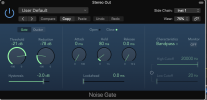
Noise Gate.png

OK, let's get back to the idea of 'side chaining'. First off, what does that even mean, and why should we want to do it? Normally, if you put a noise gate in a signal chain, when it opens and closes is dictated by the source. For instance, if we've got an electric guitar with a shed load of ditortion and overdrive, we might use a noise gate at the end of the chain to cut out all the noise in between notes. Of course, we need to be careful with our settings, or we'll get the tail end of notes cutting off suddenly, instead of decaying naturally. But, providing we are careful, it's a perfectly useful way of reducing noise.

When we 'side chain', we use a signal other than the source to trigger the gate.

Let's look at a couple of examples to help us understand why we might want to do that. Radio DJs often rely on something they call 'line ducking'. What they're actually doing is side chaining a gate, but using it to 'duck' – in other words, reduce the level – of the music when the DJ is talking. So the gate in in the signal chain of the music, but it's side-chained to the DJ's mic channel. The Threshold is set so that the gate is triggered when the DJ speaks, and the Reduction is set to just enough for the DJ to be hear clearly over the music.

As another example, imagine some one is playing long, sustained chords on a keyboard over an up-tempo track. The result is probably going to sound a bit dull, but we could create exiting rhythmic patterns by gating the keys and triggering the gate by side chaining it from, say, the hi-hat. You'll find that trick all over dance music, and now you know how it's done, you'll spot it everywhere.

Looking at my screen shot, you'll see my gate is side chained from 'Inst 1'. No prizes for guessing that's my drum track, because that's all there is on my little example recording. So why would I do that, rather than leave the source as the drums through the main signal chain. Well, if you experiment with this, you'll find you can't get tight, aggressive gating if the gate is triggered after reverb and room simulation has been applied. That because the extended reflections of the reverb keep the gate open. But if you use the dry, source drums as the side chain trigger, you can get the gate to slam shut really quickly. Gated reverb on snares was a staple sound of the 1980s, when digital reverb became part of mainstream music production.

This track contains a number of subtle variations on the same idea. In fact, it was hanging around with producer Tony Mansfield and engineer Pete Hammond that helped me to get my production chops together. This track was reorded on analogue, with no MIDI and no console automation:

 
If you're going to jump ship, I'd be sure to factor in any non-compatible software you might have to replace. Personally, I always use Mac, because it's the only platform that will run Logic Pro (which is precisely why Apple bought Emagic, who developed it as a cross-platform application). But also, there's a massive difference between the asking price for a computer and the actual cost of ownership. Please let me explain what I mean.

I bought my Mac Pro about the same time you bought your laptop. But – and here's the big difference – my Mac Pro was built in 2010, so it's now 14 years old, and still going strong. It has 2 x 3.46GHz 6-core Intel Xenon processors, 128GB RAM and I've upped the internal storage to more than 4TB using the internal drive bays. Not bad for an outlay of about £1,300! :cool:
Sounds like a great machine.
 
Sounds like a great machine.
I found this place on-line. In the USA, a used Mac is a lot cheaper than it is over here: Used Apple iMac and iMac Pro Desktops from OWC Those iMac are pretty capable and will run later OS than a mid 2010 Mac Pro.

Here's a similar machine to mine Configure your own Apple Mac Pro (2010-2012) at OWC I put in a Metal-compatible GPU a while back and upgraded the OS to Catalina 10.15.4. That requires a 3rd party patch, so officially, I suppose mine is a Hackintosh.
 
Last edited:
Let's more on to the bass. Here's a quick jam I put together to see what kind of sound I could get from a Precision bass copy I picked up for £90. I'm afraid much about the drum track, because it's something I must have picked up pre-mixed. It might have come from Yurt Rock. I find their drum tracks pretty useful when you want pro-quality results without buring off a lot of time on it.

 
I found this place on-line. In the USA, a used Mac is a lot cheaper than it is over here: Used Apple iMac and iMac Pro Desktops from OWC Those iMac are pretty capable and will run later OS than a mid 2010 Mac Pro.

Here's a similar machine to mine Configure your own Apple Mac Pro (2010-2012) at OWC I put in a Metal-compatible GPU a while back and upgraded the OS to Catalina 10.15.4. That requires a 3rd party patch, so officially, I suppose mine is a Hackintosh.
Wow , great resource. Yesterday , I did find a Windows box that will work on ebay. I would change over but everything I have was set up for Windows.
i7 processor , just 16 gb of ram but I could double it. 2 drives , one SSD .
 
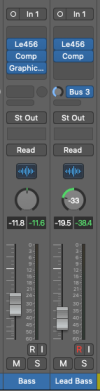
There are the only two channel strips that matter for the purpose of talking about mixing bass and drums. I think the lead part is some nonesense I made up while playing high up on the same bass, but through the wonderful JamOrigin bass to MIDI plugin. I also have the guitar version, and they turn any of my guitars and basses into MIDI instruments Jam Origin – Audio to MIDI I've even played slide guitar and the system still tracks it!

Channel strips.png

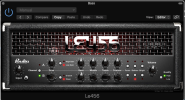
For an amp, I used this, just to get some 'sounds like it was probably pretty loud' kind of flavour. I think I've got every Le Pou/Poulin amp sim ever released and all of them were free. The guy who developed them, seems to have gone AWOL in recent ywears, but you can still find the sims if you Google, and they really are very good.

Le Pou Amp.png

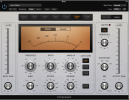
The compression is straight-out-of-the-box Logic compressor preset. I always use compression on bass tracks, because it's the best way to make sure the bass sits in the mix nicely. I've placed it after the amp sim, because I wanted to preserve the feel of the instrument interacting with the amp. If I smooth out the signal by compressing before the amp, that isn't going to happen so much.

Bass Comp.png

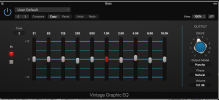
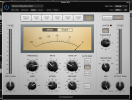
Next up is our old friend the graphic EQ. It's not doing a lot, apart from a slight cut at 250Hz and a small boost at 4kHz for a little more 'click'. Other than that, it's just imparting a bit of character.

Bass Graphic.png

On the output bus was one of my presets, which I use to imaprt a bit of vintage warm and help to get a decent level to the final mix.

Bus comp.png
 
There are the only two channel strips that matter for the purpose of talking about mixing bass and drums. I think the lead part is some nonesense I made up while playing high up on the same bass, but through the wonderful JamOrigin bass to MIDI plugin. I also have the guitar version, and they turn any of my guitars and basses into MIDI instruments Jam Origin – Audio to MIDI I've even played slide guitar and the system still tracks it!

View attachment 101562

For an amp, I used this, just to get some 'sounds like it was probably pretty loud' kind of flavour. I think I've got every Le Pou/Poulin amp sim ever released and all of them were free. The guy who developed them, seems to have gone AWOL in recent ywears, but you can still find the sims if you Google, and they really are very good.

View attachment 101563

The compression is straight-out-of-the-box Logic compressor preset. I always use compression on bass tracks, because it's the best way to make sure the bass sits in the mix nicely. I've placed it after the amp sim, because I wanted to preserve the feel of the instrument interacting with the amp. If I smooth out the signal by compressing before the amp, that isn't going to happen so much.

View attachment 101564

Next up is our old friend the graphic EQ. It's not doing a lot, apart from a slight cut at 250Hz and a small boost at 4kHz for a little more 'click'. Other than that, it's just imparting a bit of character.

View attachment 101565

On the output bus was one of my presets, which I use to imaprt a bit of vintage warm and help to get a decent level to the final mix.

View attachment 101566
Glorious. Lol
 
…any particular aspect of recording and mixing? As a retired technology writer who's happy to provide tutorial material as long as it helps others, I'm inviting you to tell me if there are any topics you'd like to know more about. For instance, there's a lot of confusion about how to go about applying EQ to each track in a mix. Or did you wonder how to get a really big vocal sound? Or the gated snare that was so popular in the 1980s?

I first worked in pro audio in 1979, and I got the gig because I already knew a fair bit about PAs and mics. Later on, I got to hang out with, and learn, from some of the best engineers in the business, so there's a lot I'm happy to share. After all, it's how I learned, so it's time to give some back.
Do you still do mixes?
 
Once you have your bass and drums sorted, how do you progress with the rest of the mix? Part of the answer is to pare away the lower frequency of many of the other parts, so they don't clutter the kick and bass. Another is to try to occupy a different place in the stereo field. Here's a quick jam I've done over a YouTube backing track. Even getting a single guitar to sit in the mix can be tricky if you don't know the ropes. I'll show you the signal chain later today.

 
Last edited:
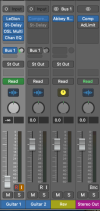
Here's the overview:

Channels.png

Note that the reverb sits on a separate bus and that my guitar channel is fed to Bus 1 via an Aux (auxilliary) send. This is because I might want to have multiple tracks sharing the same reverb, so it's faster and more processor efficient to share one instance of the plug-in with all the channels on the mixer. I'll discuss Aux mixes in more detail in later posts.
 
Sorry, Simon. So to back track a bit to the compressor with drums. For live sound reinforcement.
Our new digital board has a gate which is very good for reducing floor noise and feedback and drums bleed. But as for compressor, given that drums have a heavy transient peak and little else, other than reducing the high level (limiter) what else will the compressor do with the drums? Never sure how to set compressors though I am sure there are many videos showing this.
Oh, and I ask for a slow friend of mine. ;)
 
This is all way over my head, but it makes interesting reading
Peace
I used to understand 0%. But it soaks in after a while like I said. Much is over my head but I am up to about 30% now. I tend to skim over the stuff I do not have a grasp of and nibble on the stuff I can. That broadens my knowledge so I can put 2 and 2 together and later back to figure out 3 plus 3.
 
Sorry, Simon. So to back track a bit to the compressor with drums. For live sound reinforcement.
Our new digital board has a gate which is very good for reducing floor noise and feedback and drums bleed. But as for compressor, given that drums have a heavy transient peak and little else, other than reducing the high level (limiter) what else will the compressor do with the drums? Never sure how to set compressors though I am sure there are many videos showing this.
Oh, and I ask for a slow friend of mine. ;)

Good question. Exactly what the compressor does depends on the specific settings you use. In order to catch the initial transient you'll need a fast attack time, whereas if you want to increase the sustain of notes (or the length of time the drums ring out), you'll need a slower release. About the only way to learn this stuff is to experiment and hear for yourself what the difference is.

No compressor sounds a lot better on live drums than an inapproriately set compressor, who I'd want to be certain I was making things better before I used it.
 
Back
Top