Understanding and using live sound equipment

EQ for toms

There are a number of approaches to applying EQ to toms. Which one you go for should depend on which one best suits the musical style of the act, not the way you “usually do it”. It’s also worth remembering that EQ is (hopefully) not the only tool you have in the box, so if you want to create a tom sound that is basically “what’s there but bigger”, compressors and gates have a role. But that’s for another day.

For a natural sound, I start with the idea that I’m ideally not going to do anything with the EQ that’s going to mess up the sound the drummer is making! However, I will use some EQ cuts to clean up the tom sound in the overall drum mix.

These are not precise frequencies you should follow automatically, but a high tom in its natural state typically has little energy below 80Hz, or above 8kHz. You can roll off these frequencies and get less kick drum and stage rumble on the low end, and less cymbal spill at the high end. The middle tom can probably be rolled off below 60Hz and the low tom roll-off can start around 30Hz without taking anything away from the sound of the toms. None of the toms have a lot of high end, my suggestion of 8kHz is probably about right for all of them – well, as a starting point at least.

How do you know the exact frequencies to dial out? You have to be guided by your ears. If dialing out 60Hz seems to have little effect on the sound of the tom, but dealing out 100Hz seems to rob it of power, 60Hz it is. Remember, there is no need to make really extreme cuts, just because the EQ has a range of +/-15dB. But there are a couple of other things you might like to consider.

1. If you’ve already switched in the 100Hz HP filter, there will be progressively less signal below this frequency anyway. You don’t really want it in circuit if your ears tell you to start rolling off at a lower frequency. Fortunately, you can easily switch the EQ and the HP filter in/out on most desks, so you have an instant comparison.

2. What’s good for the toms isn’t necessarily good for the drum mix as a whole. For instance, it’s important to consider what taking the highest frequencies out of the tom mics does to the sound of the cymbals. This isn’t something you can do by asking the drumming to smash the heck out of one tom at a time: you have to hear the whole kit.

If you don’t like what the EQ on the toms is doing to the cymbal sound, one solution is to gate the tom mics but we’re moving further and further away from a naturalistic approach to mic technique. Not EQing the high end of the tom mics, so that they add less coloration may be a better way to go. Or it may be that you want a very realistic portrayal of the kit sound and you have high quality overheads. In which case, they might be the most important part of the mix, with the tom mics taking a much smaller role.

NB – Ask yourself not what you can do for the drummer but what the drummer can do for you! For instance, sometimes you’ll find there is an unwanted ring that seems to affect the two high toms, regardless of which one is being played. Often, this is a sympathetic resonance coming from one of the bottom heads, and striking either tom will set it off. When you encounter this problem, it makes more sense to tell the drummer that close miking has emphasized this resonance, before you go trying to dial it out at the mixing desk. If the drummer agrees this is an unwanted overtone, he/she can often banish it more effectively by retuning one of the heads than you ever could at the desk.

At the risk of confusing you, there is a very different approach to EQing toms, which gives a more contemporary ‘produced’ sound than the ‘purist’ approach we’ve discussed so far, which is better suited to jazz and musical styles based on acoustic instruments. This basically consists of three steps:

1. Boost low mids to give the toms more depth. The frequency required will vary with the tom, the way it’s tuned and the affect you are after, but is likely to be anywhere from 250Hz down to 100Hz, or even lower.
2. Cut the mids somewhere between 500Hz-2kHz somewhat, so that the natural resonance of the drum shells is a less important part of the sound.
3. Consider boosting around the 5kHz range to put more ‘snap’ into the sound.

If you are going this route, it’s best to remember that boosting EQ can also eat into your safe operating levels, so you may need to recheck/reduce your input gains to retain headroom. In any case, a little EQ in the right place is a lot better than applying extreme levels of boost. And if you are cutting some mid and have any control over Q, gentle curves will usually serve you better than sharp notches.
 
EQ for overheads

As we’ve talked about in earlier notes about choosing and placing overhead mics, the roles these play in the mix depends very much whether you are going for a naturalistic, purist approach, or a more rock/pop approach where the sound you are aiming for is closer to the way drums sound on record than the way they sound in a room.

(Being very practical about this, it’s also worth remembering that in smaller venues especially, acceptable listening levels for jazz and acoustic music are often low enough that the audience can hear a lot of the natural drum sound in the room. In those situations, the role of the sound engineers is to amplify and augment the sound as transparently as possible. At the other end of the scale, at a large rock gig, the actual sound of the drum kit on stage will have a negligible affect on what the audience hears. The name of the game is to get the sound that works for the act.)

What does this matter when it comes to overhead EQ? It totally matters? Here’s why. If you are going down the purist road, the overheads pretty ARE your drum mix. What’s needed in this situation is a good, flat and extended frequency response and a realistic stereo image. Any other mic you introduce after that is simply to give added definition to certain drums. Any EQ adjustment you make in this situation are probably going to be purely corrective: make sure any stage rumble is in check, notch out any unwanted ringing from room resonances… that’s about it.

In a pop/rock environment, the individual mics on the drums are the main ingredients in your mix and the overheads are there to allow you to amplify the cymbals. (In smaller venues, cymbals are pretty loud – even at rock levels – so you might not even need much overhead in your mix. This is especially true when cymbals aren’t a big feature in some styles of music.)

When you’re mixing in a more ‘produced’ environment like this, you can afford to dial out plenty of low frequencies from the overheads. Even with quite an aggressive slope from 300Hz downwards you won’t do any real damage to the cymbal sound, but you will clean up the overhead channels a lot.

One of the plus sides of using the overheads for cymbals only is that you can get away with cheaper mics. For ‘purist’ overheads, I’d generally suggest the best large-capsule condensers you can get your hands on. In a rock environment, there are a lot of reasonably prices condensers that will do the job. But this brings me onto one big issue for me.

Spend some time of the Web researching and you’ll soon some across advice like this: “To give the overheads a little more sizzle, try boosting the EQ at 10kHz.” What?! When I read that, it makes me feel like some Rambo-type, diving across the mixing desk in slo-mo going “Noooooo’ until my hand connects with the mix engineer and drags him off the console before disaster strikes. Here’s why:

1. Cymbals have plenty of high frequency content. What you need to reproduce that well is mics with a linear response up to 20Hz, or as close to that ideal as you can get.
2. Out in the real world where money is tight, you’ll may have to use fairly inexpensive condenser mics, which have a reasonable frequency response up to 20Hz on paper but at a specific payoff: they have a lot of boost in the upper mid (10kHz range). This is a good trick from the mic designer’s point-of-view because it shows a frequency plot that is not too far down at 20kHz, plus the very bright sound impresses some people, who think “this is the difference a condenser mic makes”.

So, the cymbals are a sound source with a lot of high frequency content, and you may be using mics that already emphasize the upper mid/high end of the frequency spectrum. What could possibly go wrong if you add some 10kHz EQ into the equation? Please go to the top of the class if you answered something like: “We’ll end up with a really grating, cheap and unrealistic cymbal sound.” That’s spot on. A little 10kHz boost might be a way to rescue a tired-sounding drum recording, but I wouldn’t suggest it as a good way to go in most live situations.

As a quick wrap-up: there is no single ‘right’ way to mic or EQ drums. Like every other instrument, the closer the drum kit sounds ‘in the room’ to the sound the act is after, the easier the sound engineer’s job will be. Choosing the right mics, and where to put them is very important. When you EQ (maybe ‘if’ you EQ), consider what you are aiming to achieve, and how this will help the total mix. Removing those parts of the frequency spectrum you don’t need on any mic can use really big cuts. Go easier on EQ boosts.

It’s probably about time we left the topic of drum miking and went for the more common requirement: how can I get a natural acoustic guitar sound, but amplified?
 
This took time first used my DW Collectors 12' 14' 16' 20' BD it was good for band practice not recording the 20" bass drum could not get a fat sound
next used my Ludwig set 14" 16" 18" 24" BD could not get rid of the ring out of the 14" tom from the snare drum changed to a 13" tom fixed
were getting drum recording sound we like now have not tried the other DW Collectors set 10" 12" 13" 14" 16" 22" BD
cymbals I have 5 sets to choose from GrandMasters Master Tuned are the best very expensive they were hand made in the 1990's

The "Mastertuned" Model


This is out flagship model, and the only cymbal in the world which is double hammered (once during construction and a 2nd time after completion!) and by the most skilled master cymbal craftsman in the world! Its alloy is also a very special custom version of our secret "Living alloy". The rich, sweet and colorful harmonics caused by this exclusive process has to heard to be believed. The control factor is astonishing! Vowel like chimes, clear rich tinging pings and big deep breath... these things darn near talk!

Even we here at the factory are left astounded by its spectacular response. The double hammering process produces a stunning eye-catching cymbal with a "unique appearance unlike any other cymbal" which glands out on any stage. These cymbals are breathtakingly beautiful and will attract "ooo's and aahhh's" even before you play them, and when finally you do, its "dazzled faces and dropped jaw time"!

Because these cymbals are doubled hammered a second time after completion and re-tuned (or as we call it "Master Tuned") by out expert craftsman every Master Tuned series cymbal is harmonically consistent in their "voice" which is the sweetest and richest sound you will ever heat. Rides and Crash-Rides along with mid to large size crashes seem to favor this wonderful process. The Hi-hat models have a remarkably unique "Breathing hi-hat" sound which has had phenomenal response!

But be forewarned 'The Master Tuned Model" 12 not for everyone. This is a highly specialized cymbal that requires some time to get used to before you can fully exploit its dynamic qualities (especially in the "Ride" and "Crash/Ride" positions). We recommend that drummers first play this cymbal off the set "alone" for extended periods to learn its unique attributes and various sweet spots before including it into their setup. But once you get the feel of this cymbal its "basically all over"!
 
Amplifying acoustic guitar

I’ve called this post ‘amplifying’ acoustic guitar, rather than ‘miking’ acoustic guitar, mainly due to the popularity of electro-acoustic guitars with built-in transducers and onboard preamps. The quality of these has improved greatly over the years, and in a lot of environments, they may be a better bet than using external mics. For one thing, transducers mounted in a guitar allow performers to move around, whereas external mics require a fair amount of discipline from the performer to ensure they stay on axis.

Electro-acoustics are also designed to combat that most tricky of problems when dealing with acoustic instruments in high volume environments – feedback. On one hand, electro-acoustic preamps often include a sweepable notch filter to cut the frequency most likely to cause a problem. And on the other hand, electro-acoustic guitars are sometimes built specifically to be more resistant to feedback than purely acoustic models. The very thick finish used of the tops of many Ovation guitars seems to be there for exactly that reason.

If you are using an electro-acoustic on stage, it’s a good idea to also use an acoustic guitar amp with a line out socket, or an active DI box. That way, you’ll have a buffered cable run that will help to preserve high frequency response, even when it’s a long way to the mixing console.

If you really want the true sound of an acoustic guitar, it is important to consider that you need to capture the way in performs in air, once the sound has left the body of the instrument. Most of us are familiar with the experience of a friend playing our own acoustic guitar, and realizing how much better it sounds. This is because as players, we are used to hearing the acoustic guitar from somewhere off the upper bout, whereas the true tone is forming somewhere in front of the top. For this reason, it is worth considering using mics on your acoustic guitar, or perhaps a combination of mics and the electro-acoustic output of the guitar’s internal system.

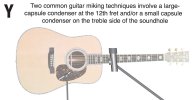
The big question is: “What mics and where?” In recording situations, it is common to use – at least as a starting point – a large capsule condenser mic maybe two feet (.5m) away over the twelfth fret. While this position can often be refined to suit the individual instrument and the room, it tends to give a clear, natural tone without too much boominess. Diagram Y shows this mic technique, along with an alternative, which I’ll deal with next.

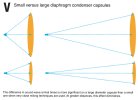
In live situations, a closer miking technique may be preferable, in order to get the maximum program level before the onset of feedback, amd the minimum amount of spill from other sources. One viable position for a flat-top guitar is a few inches from the top (maybe 150mm) and a little below the soundhole. This technique works best with a small capsule condenser mic, for reasons we’ve already seen back in Diagram V. Basically, the closer you get to a sound source, the more significant the difference in arrival times across the capsule become. Naturally enough, these differences become more significant the wider the capsule is. These differences in arrival time equate to phase differences in the waveform. While this is a lot more subtle than having one mic in a stereo pair 180 degrees out of phase with the other, it means that some frequencies will tend to be emphasized, while others are cancelled to some extent.

So, you’ve selected a nice, linear small-capsule condenser and stuck it somewhere near the soundhole of the guitar. You’re home and dry right? Er… probably not. In the real world, you’ll be lucky to find the optimum position first time. Although, with experimentation, you’ll probably be able to identify a ‘sweet spot’ in terms of the position of the mic relative to the soundhole, there are some difficult compromises to cope with when it comes to how far away the mic should be.

The idea that if the mic is too far away, it won’t pick up enough sound level is obvious enough, as is the fact that feedback and spill will become a problem. But what happens if we move the mic in too close. Well, the first problem is we’ll eventually hit the player’s hand and/or the body of the instrument. This is definitely too close! But before that, we’re likely to encounter some other unfortunate problems. ‘Wolf’ notes and overtones will become more noticeable, until some of these turn into uncontrollable feedback, often at a frequency somewhere around the guitar’s low G.

Some of these problems would occur even if the guitar had no strings, because the body of the guitar has started to turn into an acoustic modifier of the mic’s normal polar pattern. To put it another way, at some frequencies what was once a cardioid mic has now got quite a strong pick-up at some points off axis. Exactly which frequencies and which points off-axis will be determined by some unholy and largely incalculable combination of the size and geometry of the guitar’s body, the distance of the mic, the original directional characteristics of the mic before we got too close… In short, it’s a mess best avoided. To make things even worse from an engineer’s perspective, those pesky guitars ARE fitted with strings, and it’s quite easy to excite them into sympathetic resonances as the offending frequencies leave the nearest monitor speaker. Almost every players’ natural response when this happens is to back away from the mic. At this point, the engineer has completely lost control of the situation.

There is no intention on my part to put the frights on you. It would make me far happier to think that you’ve understood the problems ahead of time, so you don’t have to deal with them ‘on the night’, possibly in front of an audience.

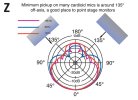
One thing that can make a considerable difference to the level you can achieve without howls is the position of any monitor speakers. It’s tempting to imagine that the least problematical place for a monitor speaker is 180 degrees off-axis (ie, pointing directly at the back of the mic). Actually, that isn’t true. I’ll explain why with reference to Diagram Z.

If you’ve followed this thread from the start, you’ll probably recall that the polar plots supplied with microphones are intended to give the user some idea of their directional characteristics at different frequencies. Diagram Z shows a plot we first looked at as part of Diagram R. As you can see, at the three frequencies plotted, there is a pronounced ‘lobe’ at 180 degrees off-axis. The mic is actually least responsive at about 135 degrees, which is generally the best place for stage monitors to be pointing.

It’s usually the ‘lobe’ area that increases in sensitivity when a physical object interrupts the natural on-axis response of a cardioid mic. Whether it’s a hand cupped over the mic, or the bell of a horn that has strayed too close, or the body of an acoustic guitar, they can act as a physical modifier and increase off-axis pickup.

There will come a point where, no matter how careful you are with your choice of mic, positioning of mic(s) and monitors etc, the sound level created by the production makes it impossible to use mics for the guitars. Don’t feel too defeated in accepting this reality. Any time you’ve seen electric instruments and strings on the same stage, it’s highly likely that every violin, viola, cello and double bass has been fitted with its own transducer. The alternative would simply be inaudible strings and a high risk of feedback.

Ultimately, there is no ‘right’ or ‘wrong’ way to get an amplified acoustic guitar sound coming through the rig. While we could argue that the electro-acoustic guitar doesn’t give the true sound of an acoustic, it’s also fair to say that it often gives a very fair version of the thinner, more compressed acoustic sound you find in contemporary music recording. Is it what Segovia would have wanted? No, but it sits well on top of a lot of modern music mixes.

You’ll probably want to go for mics, rather than transducers and preamps in recitals where natural guitar tones are more important than high volume levels, or freedom of movement for the performers. In those situations, you may consider combining mic techniques, with maybe small capsule condensers used for close miking, with large capsule condensers used for a more ambient role, not unlike drum overheads.

DiagVsmallLargeDiaph.jpgDiagYmikingGuitars.jpgDiagZpolarplotAndMonitors.jpg
 
This took time first used my DW Collectors 12' 14' 16' 20' BD it was good for band practice not recording the 20" bass drum could not get a fat sound
next used my Ludwig set 14" 16" 18" 24" BD could not get rid of the ring out of the 14" tom from the snare drum changed to a 13" tom fixed
were getting drum recording sound we like now have not tried the other DW Collectors set 10" 12" 13" 14" 16" 22" BD
cymbals I have 5 sets to choose from GrandMasters Master Tuned are the best very expensive they were hand made in the 1990's

The "Mastertuned" Model


This is out flagship model, and the only cymbal in the world which is double hammered (once during construction and a 2nd time after completion!) and by the most skilled master cymbal craftsman in the world! Its alloy is also a very special custom version of our secret "Living alloy". The rich, sweet and colorful harmonics caused by this exclusive process has to heard to be believed. The control factor is astonishing! Vowel like chimes, clear rich tinging pings and big deep breath... these things darn near talk!

Even we here at the factory are left astounded by its spectacular response. The double hammering process produces a stunning eye-catching cymbal with a "unique appearance unlike any other cymbal" which glands out on any stage. These cymbals are breathtakingly beautiful and will attract "ooo's and aahhh's" even before you play them, and when finally you do, its "dazzled faces and dropped jaw time"!

Because these cymbals are doubled hammered a second time after completion and re-tuned (or as we call it "Master Tuned") by out expert craftsman every Master Tuned series cymbal is harmonically consistent in their "voice" which is the sweetest and richest sound you will ever heat. Rides and Crash-Rides along with mid to large size crashes seem to favor this wonderful process. The Hi-hat models have a remarkably unique "Breathing hi-hat" sound which has had phenomenal response!

But be forewarned 'The Master Tuned Model" 12 not for everyone. This is a highly specialized cymbal that requires some time to get used to before you can fully exploit its dynamic qualities (especially in the "Ride" and "Crash/Ride" positions). We recommend that drummers first play this cymbal off the set "alone" for extended periods to learn its unique attributes and various sweet spots before including it into their setup. But once you get the feel of this cymbal its "basically all over"!

You clearly know a vast amount about drums and cymbals. You may be interested to know I started work at Paxman Musical Instruments in 1972, where I trained in brass musical instrument repair and manufacture. I ended up running the Bell Shop, where we made all the bells for Paxman French horns. The process has a fair bit in common with cymbal making, in that you select the appropriate alloy for the customer's order, then it is initially spun from a flat disk to a generic bell profile, by pushing the metal again a former on a lathe. (This is the part known as the 'flare', rather than the 'spout', which is made separately, in the first instance.)

After this, the metal is softened by heating it to red hot. Then, the 'throat' of the flare is hammered by hand to achieve more-or-less the profile of a specific bore (typically Medium, Large or XL). The exact shape is achieved by repeatedly beating the brass sheet against a solid metal former, then spinning once again on a lathe, before the metal is thinned and smoothed.

The greatest similarity with cymbal making (apart from many of the basic techniques) is the importance of the exact alloy mix. Student models from China usually have a very high zinc to copper ratio. This makes the brass cheaper and easier to work. It also has a dull, soggy tone compared to the bright and singing tones of a high copper, or nickel content.

While 'living alloy' might be a little poetic, I appreciate the difference the alloy makes, doubly so in cymbals, I believe. And yes, I know great cymbals cost a serious amount of money.
 
Rigging the rig – setting it all up

Whether your Sound Reinforcement rig is coming from a rental company, it’s a loan from a friend, or you’re loading your own rig into your truck, there is one very important step before you set up the system. Make sure it’s all there! This may seem blindingly obvious but the very first gig I mixed, the rig turned up minus the power amp. (This was for reggae star Desmond Decker, and I was 17-years-old, so you can't criticize me for lack of ambition. :rolleyes: )

Having discovered this mission-critical omission, I phoned the rental company. It was on voicemail, or as we called it back then, ansaphone. I phoned again, and again… No-one got back to me, so I tried desperately to formulate a Plan B. Eventually I found an alternative source for an amp. Just one problem there: it was a 40 Watt WEM that had probably seen service as a back stage intercom at an Isle of Wight festival (insert ‘Woodstock’ if this cultural reference is a mystery to you).

With about 30 minutes before the band was due to take the stage, a guy finally turned up from the rental company with some sorry-looking piece of crud that was apparently ‘the power amp’. Frankly, it wasn’t that much better than the WEM I’d already turned down. So Lesson 1: make sure everything is there. Lesson 2: whenever possible, have a say in the system spec and ask awkward questions if you have to. I’ve known even pro engineers for big acts discover too late that the ’80 channel desk’ they’ve hired is actually two smaller desks that they can ‘just chain together’.

Back to Lesson 1, most reputable rental companies will provide you with a printed manifest showing what is being supplied. Use it as a check-list and make sure everything that should be on-site has been delivered. If that means keeping a driver waiting, keep them waiting. Not only can a missing item ruin your gig, you may even end up paying for it. Once you’ve signed to say you’ve got something, it could be difficult to convince the company that it never arrived.

******
Handy tip: Don’t forget stands are an essential part of the rig. When renting a system for a venue you don’t know, it’s best not to assume that they will provide a table for the mixing console, suitable chairs etc. If in doubt, ask first. (A friend of mine once organized a conference but forgot to tell the venue she needed 80 chairs. You can guess the rest…)
******

Setting up
I’ve always preferred to start with the FOH speakers, followed by the monitors, and then work backwards along the signal chain, so that the mixer and amps (if the amps aren’t built into either the speakers or the mixer) and outboard come next, followed by the stagebox and the mics. This has two significant advantages if you cable as you go. 1.) The chances of you forgetting to connect the speakers are less, because you did that early on. 2) You are doing all the heavy lifting at the start, so by the time your arms ache, you’re only putting up mic stands and the like.

The other reason for starting with the speakers is that there is less flexibility about where they need to go. The optimum position for the main rig is mainly dictated by the acoustics of the room and the position of the audience, whereas the position of the monitors is mainly down to the various members of the act and the need to provide them with viable mixes without causing feedback.

Most of us understand, almost intuitively, that if we place the Front of House speakers somewhat further into the room than the performers, this reduces the chance of the sound feeding back into the mics and causing uncontrolled ‘howlround’. As I suggested in an earlier thread on acoustics, understanding how sound propagates and reflects in a room helps us to make better decisions about speaker placement.

Although the proportion varies from room-to-room, most of the sound we hear is not direct but reflected. This means that although we think we’re listening to the output of the speakers, for most part we’re listening to that sound bounced off the walls, ceiling and (if the venue is empty) floor.

If you’ve ever stood on a stage with the main rig on, but little or no foldback from stage monitors, you’ll probably have noticed two things a) the sound from the main rig is really muddy, because all the high frequencies are firing away from you, and b) there’s a much brighter sound coming back at you from the back wall of the venue, but delayed. What you’re hearing is literally ‘slapback’ echo.

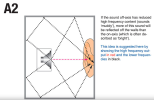
This tells us something very important, which is that speaker enclosures have a different frequency ‘on axis’ (straight in front) than they do from the side, or the back. In this respect, they are a bit like microphones, as shown earlier in the thread in Diagrams Q and R. So if a speaker enclosure that sounds almost hi-fi flat on-axis sound like a ‘woofer in a blanket’ from the side, what does this tell us about the role of reflected sound? The answer is implied in Diagram A2.

If the sound hitting the walls is not flat, it certainly won’t be any flatter when that sound reflects back to the audience! For this reason, we ideally want our speakers at least a yard (1m) away from walls, the ceiling and most acoustically reflective objects. (I’ll deal with the role of the stage/floor later.)

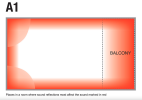
Diagram A1 shows where most of the ‘trouble spots’ are in a typical hall. Next time you’re at a sound check and have a few spare minutes, try standing in these positions and listen for yourself.

Without getting too technical here, these areas in a room are generally a mass of unwanted sound reflections. These build up and make some frequencies much louder than they should be. Just as these are not the best locations from which to enjoy a band, they are also bad places to locate speakers, or your mix position, if you can help it. Unfortunately, under the balcony is exactly where a lot of club owners would like to shove you and your space-hogging mixing console. So, if you are stuck in a really poor mix position, try to get out into the hall a few times to check what it sounds like to the audience.

Ah yes, the audience. Or ‘mobile sound absorbers’ as I called them in my earlier thread on Overcoming Venue Acoustics! (That thread deals in depth with the subject of speaker placement within a room. If that is your main information need, you could do worse that take a look here Understanding room and venue acousticsScreen Shot 2024-11-18 at 19.06.14.pngScreen Shot 2024-11-18 at 19.06.46.pngScreen Shot 2024-11-18 at 19.07.10.png

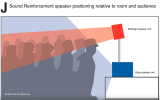
Below is a diagram I used in the earlier thread. I’ve mislaid the original artwork, so it appears here under its original designation as Diagram J. What it’s trying to tell you is that higher frequencies are easily absorbed by clothed bodies. This implies that you either need to get the mid/high range unit above the audience and pointing downwards, or persuade them to strip naked. Alas, I’m not providing an illustration for the second option…

Low frequencies have long wavelengths. That is to say the cycles of high and low pressure they create in air take place over much longer distances. These are not easily absorbed by bodies, or even walls. That’s why almost all you can hear outside a club is bass, with a little mid and no high frequencies. Unless you want your act to sound the way it does outside the club, you need to get the high frequency units pointing directly at as much of the audience as you possible can, with no physical barriers in between.

Next post, I’ll look at the issue of where best to place monitor speakers. This one topic can make a massive difference to how well the act can hear itself and also how much level you can achieve without feedback.
 
Directivity, dispersion and throw

This is just a mini-post today, because it occurred to me that any discussion of where we put speaker enclosures should also include an explanation of why speaker systems are designed a certain way, and what happens if we change some of the parameters. Before I got into pro audio, I’d read about ‘long throw’ and ‘short throw’ systems. Although I got the idea that the terms meant ‘long throw’ would reach the back of the hall better, I couldn’t for the life of me see how that could be the case. In fact, I was convinced it was total BS.

Now that I’m old and gray, I understand that no only is ‘long throw’ consistent with the laws of physics, it’s also tied in with other factors to do with how directional the sound projection is. As a primer, I’m going to borrow two diagrams from the earlier Controlling Venue Acoustics thread, so sorry if the Diagram idents seem a little illogical here.

In that same thread I identified three possible reasons why we might want to make Sound Reinforcement enclosures behave in a directional manner (a bit like stage microphones in reverse. I suggested we could:

• Maximize the sound level received by the audience
• Ensure that all audience areas receive similar coverage
• Minimize the sound levels directed at reflective surfaces (ie walls and ceiling)

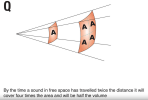
Hmmn, that sounds like a lot to deliver. Let’s see how we might do it. Diagram Q shows what happens when sound is projected in a perfectly omni-directional pattern. In this orderly universe, sound radiates in perfect spheres of high and low pressure, with spheres of atmospheric pressure between the high and low states.

(If you can get this image in your mind, it is a much more useful model of what’s happening in air than the squiggly lines we often use to represent sound waves. Think of the ripples on the surface of a pond when we drop in a pebble. Now think about what’s happening under the water: those ripples of high and low pressure are radiating away from the pebble and to the bottom of the pond. If we were to vibrate a perfect sphere under water, the pressure waves would radiate outwards in perfect spheres too, unless something interrupted them.)

There are two things worth noting about the behavior shown in Diagram Q. The first is that every time we double the distance we are from the sound source, the sound level reaching our ears halves. This is because with each doubling of distance, the area of the sound wave increases four-fold. (This is known as the ‘inverse square law’.) The second thing to note is that all of this is an absolute disaster in a Sound Reinforcement rig! For one thing, the people at the front are being deafened, while the people at the back can hear hardly anything. To make things worse, a lot of our sound is hitting random surfaces at the back and sides of the venue, causing audible delays and wrecking havoc with what was a perfectly acceptable frequency response at the sound source.

So what can we do to improve matters? One common solution over the years has been to mechanically modify the directional characteristics of the speaker by mounting it on a horn. This helps to solve both the problems we had with the omni-directional system. Because the sound is only radiating over a limited part of our original sphere, the ‘inverse square law’ no longer applies. (It also eases the transition between the small amount of very high pressure found at the driver and the much larger amount of lower pressure required in the room, but that’s a detail we don’t to dwell on here.)

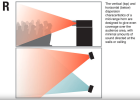
As a result, the sound remains louder over longer distances, meaning more even coverage of the audience area. In addition, if we position the horns carefully, we can minimize the level of reflected sound. This is good news in any venue that has not been designed as a concert hall. Diagram R shows the practical benefits of directivity in mid-range horns, which are a common feature of many Sound Reinforcement systems.

The directivity characteristics of a horn are called ‘dispersion’ and these are described in manufacturers' specs as maybe 40 degrees x 60 degrees, or 40 degrees x 90 degrees, with the first figure being the vertical and the second the horizontal. While it’s easier to get a broad audience area with an acceptable stereo image using a wider dispersion angle, the amount of reflected sound is also likely to increase. So the ‘best’ dispersion characteristic depends on the room, the exact application and the number of horn units you can afford to employ.

Some system use horn loaded low frequency drivers. On disadvantage of this approach is that low frequency horns have to be extremely large, which is why ‘folded horns’ were adopted as the most practical was of creating transportable cabinets. These are sometimes known as ‘bass bins’.

Over the years, amplifiers and speakers have become considerably more efficient, with Class D amps so compact for the power they output that they are often built into the speaker cabinets. Similarly, the much greater magnetic power of Neodymium has allowed for much more powerful speakers that can still be transported. Add to this the increasing transport costs for physically large systems, and the balance in medium-sized rigs has shifted somewhat towards the use of direct radiator, or bass reflex, woofer cabinets.

Whatever clever tricks speaker system designers use to help us overcome the limitations of venues, there is something we need to acknowledge. Although the omni-directional system is mainly unworkable for Sound Reinforcement, it does have one significant advantage: the frequency response should be equally linear in all directions. Just like directional microphones, directional speakers do not have anything like a flat frequency responses off-axis.

On one hand, that means we need to be aware that audience members to the side of the main FOH rig are not going to have the best listening experience unless we either introduce ‘fill’ speakers, or adjust the mix to take account of the sound at their listening position. But on the other, it gives us some opportunities to exploit those characteristics, particularly when it comes reducing the chance of unwanted feedback from on-stage monitors.

More next post.Screen Shot 2024-11-19 at 18.24.17.pngScreen Shot 2024-11-19 at 18.24.35.png
 
Monitor speakers - types and placement

I remember the first time I saw a picture of stage monitors in use. There was Mick Jagger bellowing into a mic and there were a number of WEM column speakers pointing directly at him. My immediate thought was: “Surely that’s going to cause feedback.” Well, that was a long time ago but I still find myself occasionally watching someone positioning stage monitor speakers and thinking: “Surely that’s going to cause feedback!”

If you place monitor speakers carelessly, they can make your job as mix engineer almost impossible, especially if you don’t fully understand which knobs on the desk are capable of sending more level to the monitors. (Not as dumb as it sounds – I’ve seen even quite competent engineers adjusting input gains during a set, seemingly oblivious to the fact that they are also adjusting the pre-fade mixes. That normally means the levels in the stage monitors are changing, which is not only disturbing for the artists on stage, it’s an open invitation to Mr Feedback and his backing band, The Howling Banshees. Seriously, don’t even think about it unless someone on stage has got so hyperactive that you need to reduce the incoming gain.)

The really bad news is not only that choosing the optimum position for stage monitors depends on a number of inter-related factors, but also that the job gets harder on small stages, where your choices are less and your compromises have to be correspondingly greater. So my first suggestion is this: keep it simple and don’t use more monitors than you need to. I know that on a big gig, it seems almost obligatory to give every member of the act two wedge monitors each (unless you’re using In Ear Monitors, or IEM) but that’s really multiplying your problems.

For one thing, you start to get into potential issues with ‘beaming’ or ‘comb filtering’ effects, where the output of one monitor combines with another acoustically, creating ‘hot spots’ at some frequencies, at points where the drivers from the two monitors hit the same patch of air. Best to leave the ‘double wedge’ set-ups to engineers with big stages and plenty of space to play with. (And let’s not forget, the act has to stand somewhere on this stage, along with the instruments and the backline amplification, so best not to cram it with Sound Reinforcement/PA gear.)

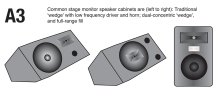
One of the reasons it is difficult for me to give you advice that covers every occasion is the great variety of stage monitor out there. At one of the spectrum are the out-and-out rock band wedges. These are typically loaded with one or two low frequency drivers, plus a compression driver on a horn. The output of these speakers is often quite aggressive, meaning the vocal range cuts through but the overall sound is not much like the main FOH mix.

A variant on this that has become more popular over the years in the co-axial monitor, where the horn is mounted in the middle of the low frequency cone driver. This arrangement has the advantage that all frequencies are coming from the same point, so it is a lot easier to predict the over-all dispersion characteristic. (To put it another way, it’s easier to figure out the area on-axis where there will be a full frequency response, therefore where you should be aiming the cabinet.)

At the other end of the spectrum is the type of monitor cabinet that is also used for under-balcony fills and stage fills (which are often used either side of the stage in in larger venues). Often these cabinets are also used for FOH in very small venues, or where an extended bass response is not a requirement.

These usually have a clean, hi-fi sound that makes them suitable for SR in a largely acoustic setting. Because acts that are predominantly acoustic tend to establish their own sound balance naturally, the more hi-fi type of monitor is appropriate. Its main function is to provide a pleasant and immediate sound to the performers, rather than the muffled sound that tends to come from FOH speakers when listened to off-axis, or the ‘slap-back’ echo that often comes from the back wall of a venue.

Diagram A3 shows you what each of the three types of monitor tends to look like. Very often if you work in live sound, you’ll have to work with ‘what you’re given’, and you’ll find it very useful if you can tell at a glance what you are actually dealing with.

When it comes to physically positioning monitors, the two factors that matter most are a) What the monitors should be pointing at, and b) Where they should be pointed from. The first issue is easily explained, in that the monitor needs to be pointing at the ears of the performer it is intended for. Often wedge monitors offer a different angle on each side, so that there is a sharp up-tilt for standing performers, and a shallower one for drummers, keyboard players and others who are sitting down.

If the monitors you are using don’t have the appropriate cabinet angle, it’s worth considering other ways to get them pointing where they need to be. (A couple of mic boxes under the back edge?) Generating high levels of sound on stage gives the engineer real problems, and monitors pointing in the wrong place will always make artists ask for more level.

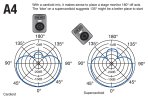
When considering where to place monitors on the floor (our point B above), you will need some knowledge of the mics you are using. Diagram A4 shows simplified plots for cardioid and supercardioid mics (also known as hypercardioid). Although these aren’t actual plots from the Shure SM58 and Shure Beta 58A, they are good examples of the kind of polar response I’m talking about.

Both cardioid and supercardioid mics are ‘directional’ and exhibit greatly reduced sensitivity 90 degrees off axis. This gives them strong feedback rejection characteristics. When microphone designers degrease the sensitivity of a mic at 90 degrees, they have to pay a little price demanded by the laws of physics.

You’ll notice a ‘lobe’ starts to appear at 180 degrees off axis (ie the back of the mic). On a typical cardioid mic, this isn’t especially pronounced, so a monitor firing from this direction is unlikely to cause a feedback problem. With a supercardioid mic, the lobe is bigger, so it makes sense to move the monitor towards the 135 degree position. This suggestion becomes doubly important if you are dealing with sax and brasswind, because the bells of those instruments at close range will exaggerate the lobe and take you very easily into feedback.

There is some good news in all this: by thinking carefully what you really need to put though the monitors, keeping the monitor volume in check and with some work to notch out problem frequencies, a lot of the points above become less critical. The physical positioning of the monitors is still important, but it’s just a starting point in keeping the whole system under control.

Next post, I’ll continue the process of ‘setting up the rig’.
DiagA3-monitor-types.jpgDiagA4-polar-patterns-and-monitor.jpg
 
Monitor speakers - types and placement

I remember the first time I saw a picture of stage monitors in use. There was Mick Jagger bellowing into a mic and there were a number of WEM column speakers pointing directly at him. My immediate thought was: “Surely that’s going to cause feedback.” Well, that was a long time ago but I still find myself occasionally watching someone positioning stage monitor speakers and thinking: “Surely that’s going to cause feedback!”

If you place monitor speakers carelessly, they can make your job as mix engineer almost impossible, especially if you don’t fully understand which knobs on the desk are capable of sending more level to the monitors. (Not as dumb as it sounds – I’ve seen even quite competent engineers adjusting input gains during a set, seemingly oblivious to the fact that they are also adjusting the pre-fade mixes. That normally means the levels in the stage monitors are changing, which is not only disturbing for the artists on stage, it’s an open invitation to Mr Feedback and his backing band, The Howling Banshees. Seriously, don’t even think about it unless someone on stage has got so hyperactive that you need to reduce the incoming gain.)

The really bad news is not only that choosing the optimum position for stage monitors depends on a number of inter-related factors, but also that the job gets harder on small stages, where your choices are less and your compromises have to be correspondingly greater. So my first suggestion is this: keep it simple and don’t use more monitors than you need to. I know that on a big gig, it seems almost obligatory to give every member of the act two wedge monitors each (unless you’re using In Ear Monitors, or IEM) but that’s really multiplying your problems.

For one thing, you start to get into potential issues with ‘beaming’ or ‘comb filtering’ effects, where the output of one monitor combines with another acoustically, creating ‘hot spots’ at some frequencies, at points where the drivers from the two monitors hit the same patch of air. Best to leave the ‘double wedge’ set-ups to engineers with big stages and plenty of space to play with. (And let’s not forget, the act has to stand somewhere on this stage, along with the instruments and the backline amplification, so best not to cram it with Sound Reinforcement/PA gear.)

One of the reasons it is difficult for me to give you advice that covers every occasion is the great variety of stage monitor out there. At one of the spectrum are the out-and-out rock band wedges. These are typically loaded with one or two low frequency drivers, plus a compression driver on a horn. The output of these speakers is often quite aggressive, meaning the vocal range cuts through but the overall sound is not much like the main FOH mix.

A variant on this that has become more popular over the years in the co-axial monitor, where the horn is mounted in the middle of the low frequency cone driver. This arrangement has the advantage that all frequencies are coming from the same point, so it is a lot easier to predict the over-all dispersion characteristic. (To put it another way, it’s easier to figure out the area on-axis where there will be a full frequency response, therefore where you should be aiming the cabinet.)

At the other end of the spectrum is the type of monitor cabinet that is also used for under-balcony fills and stage fills (which are often used either side of the stage in in larger venues). Often these cabinets are also used for FOH in very small venues, or where an extended bass response is not a requirement.

These usually have a clean, hi-fi sound that makes them suitable for SR in a largely acoustic setting. Because acts that are predominantly acoustic tend to establish their own sound balance naturally, the more hi-fi type of monitor is appropriate. Its main function is to provide a pleasant and immediate sound to the performers, rather than the muffled sound that tends to come from FOH speakers when listened to off-axis, or the ‘slap-back’ echo that often comes from the back wall of a venue.

Diagram A3 shows you what each of the three types of monitor tends to look like. Very often if you work in live sound, you’ll have to work with ‘what you’re given’, and you’ll find it very useful if you can tell at a glance what you are actually dealing with.

When it comes to physically positioning monitors, the two factors that matter most are a) What the monitors should be pointing at, and b) Where they should be pointed from. The first issue is easily explained, in that the monitor needs to be pointing at the ears of the performer it is intended for. Often wedge monitors offer a different angle on each side, so that there is a sharp up-tilt for standing performers, and a shallower one for drummers, keyboard players and others who are sitting down.

If the monitors you are using don’t have the appropriate cabinet angle, it’s worth considering other ways to get them pointing where they need to be. (A couple of mic boxes under the back edge?) Generating high levels of sound on stage gives the engineer real problems, and monitors pointing in the wrong place will always make artists ask for more level.

When considering where to place monitors on the floor (our point B above), you will need some knowledge of the mics you are using. Diagram A4 shows simplified plots for cardioid and supercardioid mics (also known as hypercardioid). Although these aren’t actual plots from the Shure SM58 and Shure Beta 58A, they are good examples of the kind of polar response I’m talking about.

Both cardioid and supercardioid mics are ‘directional’ and exhibit greatly reduced sensitivity 90 degrees off axis. This gives them strong feedback rejection characteristics. When microphone designers degrease the sensitivity of a mic at 90 degrees, they have to pay a little price demanded by the laws of physics.

You’ll notice a ‘lobe’ starts to appear at 180 degrees off axis (ie the back of the mic). On a typical cardioid mic, this isn’t especially pronounced, so a monitor firing from this direction is unlikely to cause a feedback problem. With a supercardioid mic, the lobe is bigger, so it makes sense to move the monitor towards the 135 degree position. This suggestion becomes doubly important if you are dealing with sax and brasswind, because the bells of those instruments at close range will exaggerate the lobe and take you very easily into feedback.

There is some good news in all this: by thinking carefully what you really need to put though the monitors, keeping the monitor volume in check and with some work to notch out problem frequencies, a lot of the points above become less critical. The physical positioning of the monitors is still important, but it’s just a starting point in keeping the whole system under control.

Next post, I’ll continue the process of ‘setting up the rig’.

As per the bottom pic as mentioned, there is a spot around 135 degrees where the sensitivity falls rignt off. I have been at many a show with house or hired PA where they put monitor directly behind mic at 180 degrees. There is an out of phase signal straight out the back that is stronger than the pattern diagrams would suggest.

Try it. Set a monitor right on rear axis till it verges on feedback. Then angle mic off axis until this stops. It will stop somewhere between 0 and 45 degrees off dead on.
I have done this multiple times and it proves that monitors directly behind are not the best place yet so many still do it. They should move mics to least amount of feedback before ringing system out.
Fortunately most of our shows we use our own system.
Cheers Simon such great info here!!
 
Mix positions and cable runs

Now that we have the main FOH speakers and the stage monitors in place, it’s time to consider where to place the rest of the gear. Unless you are using powered speakers throughout, you’ll have an amp rack. From an electrical point of view, the best place for that is as close to the speakers as possible. That way, you cable runs can be as short as possible and the signal loss through the cables will be kept to a minimum.

Unless you are using a networked system, where you can address devices remotely, there are two related downsides to this arrangement: a) You can’t easily access the level controls on the amps, b) The band, the band’s friends etc can possibly access the controls only too easily. The most economical solution to this problem is to either use amps with lockable controls, or to fit tamper-proof covers after you’ve set the controls to max. Thereafter all levels are set at the mixing desk where you – and only you – have control over them.

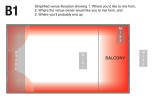
In terms of getting on with the job of mixing music, where you place the mixing console has a direct impact on how effectively you can do the job. Diagram B1 is a variation on one I’ve used before, with the red areas showing places in a venue that are likely to be particularly problematic sound-wise. This is because high levels of reflected sound will make some frequencies louder than others, giving a misleading impression of the sound balance in most of the room.

The area marked Mix 1 is an idea mixing position, as it will give the engineer a good impression of the sound balance as experienced by the majority of the audience. Perhaps just as importantly, it gives the engineer clear line-of-sight to the stage, especially in an auditorium with raked seating. If you’ve ever tried to mix a band you don’t know very well – and you can’t see which guitarist has taken the solo, or which mic is unexpectedly being blasted with enthusiastic harmonica playing – you’ll know how important visual input can be.

The area marked Mix 2 is where most bar or club owners would like you to put your mixing console – out with the parked cars where it’s not taking up any space. Seriously, they make money from paying punters and your gear is not paying to get in and it certainly won’t be buying any beer, even if you do.

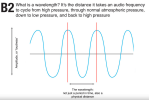
Position Mix 3 is probably where you’ll end up many times: a dark and dingy corner where the sound is bad and a standing audience means you can’t see the stage. Let’s just recap on why the sound is going to be so bad. A major problem comes from what are called ‘standing waves’. Every sound frequency has a corresponding ‘wavelength’, that is to say the physical distance in space it takes the wave to go through a cycle of high pressure, through average atmospheric pressure to low pressure and back up to high pressure again. Diagram B2 illustrates this point, although it’s important to remember that what’s really happening in real 3D is air molecules bunching together (high pressure) and spacing apart (low pressure). Sound isn’t made up of wiggly lines, it just looks that way on test equipment!

When two reflective surfaces face each other, any frequency with a wavelength that is a multiple of the distance between the two surfaces will be amplified as it bounces between the two. This is much the same concept as how harmonics are formed along a guitar string, or why some acoustic guitars suffer from ‘wolf notes’ due to unwanted resonances inside the body.

Stuck under a balcony in a corner you’re into double trouble because the corner itself will form one set of unwanted resonances, while the distance between the underside of the balcony and the venue floor will form another. Expect plenty of bass notes to leap out at you in a way they won’t almost anywhere else in the room.

NB – Theoretically, there will be a particularly nasty standing wave right in the centre of our B1 venue, as this is the point where any standing waves from the side walls will collide with those from the front and back walls. I’ve haven’t marked this as a ‘trouble spot’ because in many small venues, the room is nothing like as symmetrical as our example. In addition, the back of the stage is often lined with soft drapes, which helps to minimize this affect.

Once you have your mixing console in place, and set-up any outboard rack where you can access it with ease, it’s time to set about running the cables. I’ve always worked from the speakers backwards to the mixer and then onto the mics last. That way, there’s less chance of me forgetting to hook up the speaker cables before I power up the rig.

A WORD ABOUT SAFETY: Any cable is a potential trip hazard. Cables should never be run across the floor of public areas unless it is encased in conduit specifically designed to make it safe. Many venues have cable ‘rat runs’ below floor level, or a cable management system that allows the cables to be run above head height.

Similar considerations apply on stage. If you have surplus amounts of cable, keep them away from the area the act will be using as far as possible and use gaffer tape to tether cable runs, so no-one trips over them.

The next thread post will be about powering up the rig and running through a sound check, setting levels as we go.Screen Shot 2024-11-20 at 17.51.59.pngScreen Shot 2024-11-20 at 17.52.26.png
 
By the way, I'm aware that there's a certain amount of repetition within this thread, as well as some duplication of topics also covered in my thread on acoustics: Understanding room and venue acoustics This is deliberate: there is a lot of ground to cover, so it sometimes helps us to get our heads round a topic if I later come back to it from a slightly different angle. Also, the two topics are closely intertwined.
 
Order on the input channels
Just as an interim post, I’ve said this before but it’s worth considering what sources to plug into which channels on the mixing console. Let me set the scene by telling you a true story. Many years ago, I walked into a small venue and noticed two things: 1) The band seemed quite good and 2) the sound was really poor. The act had the misfortune to hire a small-time operator who I soon discovered had no idea what he was doing, and here’s the proof.

The sax player walked up to the mic and started to play an inaudible solo. (How very Zen! Is a solo still a solo if you can’t hear it?) Anyhow, the next thing that happened was the toms got horribly loud and feedback broke out. I think we can all figure that the guy behind the desk had no idea what mic was on what channel, so kept upping the wrong fader. We can all make mistakes but if you can’t tell a drum mic from a sax mic, you clearly didn’t think things through at set-up time.

Electrically and sonically, it doesn’t make a massive amount of difference what you plug into the ‘low number’ input channels (furthest from the output section) and the ‘high number’ input channels to the right. Traditionally, the lowest numbers are occupied by the drums. I normally follow a similar sequence to the way keys are assigned to drum using General MIDI. So, I’ll go: kick, snare, hi-hat, toms from low to high, then the overheads.

After that, I’ll try to match the instruments on stage to the channels they occupy. For instance, if it’s as simple as bass guitar on the left and guitar in the right, I’ll place them on maybe channels 9 and 10. This scheme falls down a bit with keyboard because you’ll often have them come into stereo channels, which are normally on the right of the desk, nearest the output section. Similarly, if the keyboard player doubles on sax, do you put the sax channel next to the stereo keyboard channel(s)? In the end, you have to do what works for you.

One thing I always do, is put all the vocal mics together, at the end of the channel sequence. For the most part, I keep to the ‘guy on the left gets the first channel in the sequence’ but if there are one or two singers who are definitely lead voices, I’ll put them to the right where I can identify them easily.

All this structure is important but it’s not really enough to take you to the right channel in the heat of the moment. Fortunately, nearly all desks have some sort of ‘scribble pad’ above or below the channel faders where you can write with a Chinagraph. (Or a digital equivalent thereof.) Easier still – and a lot cleaner at the end of the night – is to run a strip of 1-inch masking tape along the scribble pads. This is the stuff you find in DIY and auto stores; it’s cheap, easy to run right across the board, you can write on it with a felt tip or almost any type of pen, and it peels off again when you’re done.

TIP – You’ll possibly have to read your channel idents in bad lighting, so big letters and short descriptions are the way to go. ‘KICK’, ‘VOX’ and ‘KB-L’ are a lot easier to read than ‘kick drum’, ‘vocals’, and keyboards-left channel’. In that respect, digital displays win hands down.


••••• Wireless/Radio Mics •••••


Sometime soon, I must write at least a whole post on radio mics, but for now I’ll make do with a note on receivers and plugging them in. It’s best to put receivers to the side of the stage in clear line of the transmitters (or wireless mics, which is the same thing for the purposes of this discussion). Any obstruction between the transmitter and receiver is potentially trouble, all the more so if it’s made of metal, or is of high density. A heaving audience wrapped in aluminum foil is about as close to a disaster as you could get! So best to run the receivers back to the console at line level, via the stagebox (if you are using one).

•••••
 
Powering up
Before you turn on any of the units, best to ‘zero’ the mixing desk. That is to say:

• Make sure all the input and output faders are set to minimum level (‘down’)
• Set all the input gains to lowest level
• Turn down all the aux mixes (foldback and effects)

If you have access to the power amp(s), it a good idea to turn them to maybe half way at this point, unless you are familiar enough with the venue and the rig to know it’s going to run with the amps flat out.

(If you aren’t anywhere close to the amps) and you don’t have networked control over them either, you’ll probably have to power up with the amps on full. Providing you power up in the correct sequence, the only downside to having the amps up further than you need them is the master faders on the mixer will be set very low before you reach the position we engineering types know as ‘the onset of pain’. Because you are only using a proportion of the total travel of the master faders, fine tuning the volume will be consequently difficult. Basically, you’ve paid for maybe 100mm fader throw but you’re getting 50mm fader resolution.)

Assuming you’ve set the levels so you’re not going to treat the entire venue to uncontrolled feedback, you can start to power up. The place to start is the mixing desk and any outboard, working your way through the signal chain until you reach the power amps.

What happens if you do things the wrong way round? Well, once you power up the amps, they’ll be perfectly capable of passing audio, so when you turn on the mixing console, there will probably be an almighty ‘BANG’ through the speakers. Even if you don’t damage anything in the rig, it won’t do your reputation too much good.

What if you’ve got a powered mixer/amp with just one big red switch for power? Well, we’d hope the manufacturer has arranged ‘soft’ switching, so that the internal components power up in the best sequence. But just in case, keep those levels down and you’ll stay out of trouble.

Time to listen

Unless the rig is a permanent installation and you’ve used it in that particular venue before, I’d recommend you put some music through the system at this point. A CD you’re familiar with is probably all you need to get a feel for how the system sounds and to make any adjustments.

My advice to you at this point is to try to make the system sound as close as possible to a ‘big Hi-Fi’. Unless you have a compelling reason to do so, I would specifically NOT boost the system EQ excessively at either end of the frequency spectrum. (By ‘compelling’ I mean, unless the act and its followers are certifiably deaf.)

If you’re very lucky, you might have the benefit of a 31-band graphic EQ on each side of the rig. Whether this is in the form of two old-fashioned analogue rack units, or the equivalent facility somewhere in a digital processor, I would again caution you not to make radical changes from one slider to the next, unless you are sure there are problem frequencies that are going to ring and cause feedback.

Why? Because no matter how narrow the bands are, you have to ask yourself what’s happening to the frequencies in between the one you’re boosting like crazy and the one you’re pulling right down. Usually, the answer is a big bunch of phase anomalies, meaning the sound is getting unpredictable from one frequency to the next. So less really is more on this one, unless you have a specific problem to solve.

Talking of which, today there is a lot of clever digital gear that will analyze the sound in a room and either optimize the rig response to the room acoustic, or monitor it with a view to killing feedback before it gets out of hand. Telling you how to operate any of those systems is beyond the scope of what I’m trying to do here. More importantly, I genuinely believe that it is probably beyond the scope of anything you need unless you are starting to work large and complex venues. (At that point, you really shouldn’t need my help any more.)

So let’s assume that you have used the best sound analyzing equipment available to you – your own ears – and managed to get the system sounding ‘nice’. Right now, that’s all we need.
 
We’re probably getting close to the end of our journey here, because once I’ve suggested how you can set up a viable Front of House and Monitor mix, my job is probably done. While I’m happy to answer questions for as long as anyone cares to post them, those of you with greater information needs are probably better served elsewhere. By that I mean there are forums populated by people who mix live sound every day, as well as structured courses and books for people who really want to learn the craft skills of live sound. It’s not that I don’t want to help, it’s just that there are people better qualified than me to deliver that help.

OK, so where were we? You’ve powered the rig up, and you’ve put some recorded music though the system. This has enabled you to establish some sensible working levels on the master faders of the desk and the power amp(s) if they are separate items.

What you need to do next is a whole lot of things at once, often in rotation, and this tends to be where the first-timer can get a bit flustered and make the process seem more complicated than it needs to be.

One two, one two
Right it’s about time you got some levels set up on your mics. It’s useful to have an assistant to help you. If there isn’t one, rope anyone from the band into the role, but make it clear to them that all they need to do is say “one two, one two” into a few vocal mics. Unless you are a really fast worker, it’s best not to get the whole band on the stage at this point. I’ll explain why in a moment.

Your “one two” mic tester gives you the chance to do a few things. One is to set the vocal mic preamp gains to reasonable levels that are not so low they suffer hiss (on analogue circuits) , or so high they overload.

We’ve been though this in earlier posts but ideally, the input channel faders should be set to the unity gain (zero) position, but you can also use the peak overload LEDS on each channel and the PFL/Solo functions to establish the optimum input gain for the mics.

Typically, you’ll only have a handful of vocal mics to deal with, so setting those input levels should be a quick job. While you are at it, you can start to set up a monitor (foldback) mix for the stage. If you open up the pre-fade aux mix for each channel maybe half way, then start to increase the main level to the monitors, your assistant on stage can tell you if you are in the right ball park.

While your assistant might believe the main point of this exercise is to let the chicks in the venue know he’s “with the band”, the main value for you as engineer is two-fold. 1) You’ve got some starting points for the vocal mic gains, meaning you can now push the system volume levels and dial out any ringing frequencies on the system EQ, and 2) You’ve got a reasonable monitor level on stage for the singers. This is really important!

We’ve all been in the situation where you go to a sound-check and the guy on the desk is so occupied with what he/she is doing, they forget you can’t hear anything much on stage. This is a horrible thing to do to an artist! I believe it’s more important to get the monitor levels right at first than it is to sort the FoH.
 
I know I’ve been over this a few times, but for the benefit of you who are only reading this later section of the thread, or could maybe benefit from a refresher course, I’ll restate some basics.

When it comes to the main signal paths, from the mics and DI boxes through to the main stereo outputs, there is an interaction between the Gain control on each input channel, the Fader on each input channel and the master Faders that dictate the main L/R mix level though the rig.

Hopefully, by now you’ve grasped the idea that it’s the input Gain that sets the optimum operating level for each input channel, the input Faders that create the musical balance and the Master Faders that determine how loud the whole thing is. In theory, you can set the input gains by setting all the channel faders and the master faders to ‘unity gain’ – the position on the scale numbered ‘0’ where the level is neither cut or boosted. Then you can use the Main Output Meters to see when each gain is at optimum level. In practice, this strategy will only work if you have one channel only at a time in play, meaning the main output meters are only reading the level of that channel. This is a bit cumbersome, which is one reason why mixing console manufacturers came up with PFL (Pre Fade Listen) and it’s more up-market cousin Solo.

These functions allow one channel (or a number of selected channels) to be monitored in isolation, for the input gains to be metered without the other channels, for EQ to be set up while hearing that channel only…

Some of you are probably thinking: “Yes, yes, we know all that, please cut to the chase.” OK, I will…

…And that folks, is why I get so bored when I hear a Front of House engineer using the PFL functions to feed one channel at a time through the main rig while he/she EQs each drum to death at the highest possible volume level! No-one wants to hear that stuff. It’s like the guitarist who uses ‘setting up’ as an excuse to treat us to his coolest chops – but worse. I do not want to hear two minutes of nothing but snare drum strikes, altered only by the desk EQ, and why would anyone else want to hear it either?

One of the great things about the PFL/Solo circuits is you can generally route them where you want. I have a pair of Audio Technica ‘QuietPoint’ headphones with me at most times. When they are in active mode, they cancel enough background noise to make flying on a jet while listening to music a bearable experience. They also make Soloed channels on a mixing desk pretty audible even when there’s a full mix going through the main rig.

Not only is there no need to subject any audience and bar staff to your desk-tweaking, you shouldn’t put the band through it either. I’ve heard engineers solo the lead singer, then the backing singers and expect them to perform almost a cappella. That’s such a wrong thing to do to artists!

My preference is to start with the drummer alone. (Drummers rarely mind this excursion, tending to regard it as a ‘body advert’ for the opposite sex.) Setting the input gains is not a major task, especially as the input channels nearly always have little LEDs to tell you if they’re overloading. EQ is important, but it’s also contextual, meaning a) it should reflect the sound the band is shooting for and b) it’s how the whole drum set sounds that matters, not how one drum mic sounds in isolation. Hence, there is nothing to be gained bugging the crap out of everyone else PFLing drums into the main rig! More than that, point c) should be your need to use the EQ to clean unwanted frequencies from the drum mics, to maximize the headroom through the system. Once you understand the concept, it gets easier with execution. You can undergo this process without having to ‘impress’ the bar staff or test the maximum output of the rig.

(I’ve ‘banged the drum’ about Mics and EQ for drums much earlier in the thread.)

If you’ve done a tidy job of setting up the drums, the rest of the band has hopefully had a chance to hear how it sounds out front and has now got some confidence in you. This is important, because what they hear through the monitors on stage won’t be nearly as good as the FoH. If you’ve followed my suggestions earlier, at least they’ll take the stage with a reasonable foldback mix.
 
I've covered most of the ground I intended to, but I thought it fitting to add a note of caution. As some of you already know, I've developed tinnitus, and its getting louder, more frequent and more aggressive in terms of the harmonic content I 'hear' as time goes on. Not knowing if it will ever level out – and if it does, what that level will be – is pretty scary. So too is just how many forum members also suffer from tinnitus.

The sad truth is that too many of us failed to take sufficient care of our hearing, maybe thinking that ringing ears after a gig was perfectly OK, as long as the ringing died down after a day or so. Unfortunately, there comes a point when it doesn't die down. Not tomorrow. Not ever.

What prompted me to write this now is partly the last gig I attended (and sadly, it will have to be the last gig, because I'm not risking this tinnitus getting any louder, even though I have ear protectors). It was a two-nighter in London to celebrate the 40th Anniversary of my old band, The Monochrome Set.

The sound engineer was a talented young guy, who really knew his way round the digital Soundcraft desk at the venue, and went the extra mile to fix and issues the band were having. The first night, I congratulated him on the quality of the mix. The second night, I again congratulated him, but added: "It was very loud!" He disagreed and said his meters confirmed he was on the safe side. Well, I recorded both nights, so I know the SPL was about 6dB up the second night.

Most of the audience probably go to a live gig once a week or less. The band and the engineer have somewhat heavier schedule, maybe exposing themselves to that sort of sound level most nights of the week. Their hearing is a far greater risk as a result – and so is yours if you gig regularly.

I'm reprinting a chart that sounds how long it's safe to be exposed to various decibel levels, because 97dB is hardly unusual in many live venues, especially if you happen to be standing between the drummer and the bass payer. Yet how often is the music limited to a total duration of 30 minutes a night?

You may care to take a good look at the table below and ask yourself what you are doing to your own hearing.

noise.jpg
 
I should have reviewed my archive material before posting it here, because when I originally put it on-line, I did so as I wrote it. I was some way through writing about miking techniques when I learned a close friend had died. (Don't feel too bad, because this was 10 years ago.) After the funeral, I'd completely 'lost the thread', meaning I'd forgotten what else I was going to say about live miking techniques.

Equally, technology has changed a lot in the last decade, so the latest digital and wireless technologies are definitely worthy of discussion.
 
Here's the first of the 'missing pages'.:sneaky:

Miking pianos
As we’re talking about mic techniques, it’s fair to assume that by ‘pianos’, I’m talking about the ‘acoustic’ variety. I should say that, as far as I’m concerned, there is no such thing as an acoustic piano. I’m going to be talking about mics for grand piano and upright piano. (Fortunately, once you’ve got your head round miking a grand piano, a lot of what you’ve learned can be adapted to upright piano.)

Any piano that doesn’t fall into either of those categories is probably an electric piano. You can either DI electric pianos straight into the Front of House mixing desk, or it may be that the keyboard player prefers to use a small mixer on stage and send you a feed from that, especially if they have multiple keyboards, and are possibly triggering loops, using laptops and sound modules etc. Either way, electric pianos don’t give us a great deal to talk about when it comes to mics.

Uniquely among the instruments you are ever likely to mic up, pianos cover an and enormous frequency range and also have a considerable dynamic range. An 88 key piano ranges from A0 to C8, or on sound engineer’s terms 27.5Hz to 4.186kHz, and that’s before we consider the rich harmonic content of all those hammered strings. Ah yes, hammers! Let’s not forget that the piano is a percussion instrument.

Miking a grand piano is most simply done using a pair of cardioid condenser microphones configured as a 'stereo pair'. There are a number of ways you can configure a stereo pair. Because I'm guessing the number of readers who will ever want to mic up a grand piano is small, I'll point you straight at a discussion of the configurations here: The 5 Methods of Stereo Recording

(I was less than wowed with the opening spiel: “Well, I’ll tell you. It’s called stereo recording. And it’s the real secret professionals use to create that awesome sound that’s had you baffled up until now.” Personally, I'm not 'baffled', and I've never met a pro sound engineer who was reluctant to share info. However, it's not a bad little primer.)

This video allows you to compare the sound of 13 different mic techniques on a grand piano. Most of them will be somewhat problematic in a live situation if the act uses high volume levels, but the guy really knows his stuff:


Tip: Closer mics give a brighter, more percussive tone, while moving the mics further away mellows the sound (but potentially creates more bleed and feedback issues). From a 'purist' perspective, it's worth pointing out that no one at a piano recital is allowed to listen with their head inside the lid! Therefore 'stereo grand piano' is very much an invention of the recording studio.

Most people who want a good quality grand piano sound in a live band setting are likely to consider using either an electric grand, or one of the many high-quality sample libraries that are recorded in world-class studios using very fine instruments. They don't feedback, they don't take much time to set up and the keyboard player can carry it back to the hotel under his/her arm.

However, if you happen to find yourself working with Elton John, it's worth knowing he likes very high on-stage SPL through the monitors. As a result, you better get yourself one of these magnetic pickup systems unless you want the piano mics howling all night: https://helpinstill.com/

Next post, I'll take a look at miking the good-old bar-room upright piano.
 
This is the #2 biggest problem I see with live bands / PA systems =

1732391905370.png The horn (hi frequency) is 6X more efficient than the speaker (lo frequency).

Please forgive me for complaining but
The engineer who designed this created a huge imbalance between lo and hi frequency, as a result the frequency response of the system is KA-KA.

The high frequency is way too loud, and is blasting your ears out...typically...
The lo mid frequency is never loud enough and the amplifier is constantly peaking (clipping) trying to make the mids and lows loud enough to match the loudness of the hi's horn.

So if you want to start at "frequency response,"
What are the methods used by professional sound, to balance the loudness of the highs and mids lows?
 
This is the #2 biggest problem I see with live bands / PA systems =

View attachment 104028 The horn (hi frequency) is 6X more efficient than the speaker (lo frequency).

Please forgive me for complaining but
The engineer who designed this created a huge imbalance between lo and hi frequency, as a result the frequency response of the system is KA-KA.

The high frequency is way too loud, and is blasting your ears out...typically...
The lo mid frequency is never loud enough and the amplifier is constantly peaking (clipping) trying to make the mids and lows loud enough to match the loudness of the hi's horn.

So if you want to start at "frequency response,"
What are the methods used by professional sound, to balance the loudness of the highs and mids lows?
I can't say my experience matches yours. The world is full of passive, portable two-way speaker designs and most of them work reasonably well. The frequency plot below is for an Electro-Voice example. OK, the frequency plot shows a dip around 13kHz, but that's because the designer had tweaked the crossover circuit to get a resonable response all the way up to 20kHz (always a plus point, if only in-store…). What I'm not seeing is this massive disparity between the output levels of the 12" cone driver and the titanium comression driver handling the HF.

For some time, I had an inexpensive pair of Samson two-way passive speakers, and they sounded perfectly acceptable with pre-recorded music through them, and no EQ whatsoever.

Compression drivers are not without their problems, but musf that traditionally came from the design of the horn, rather than the driver itself. These days, with much more accurate modelling and analysis tools, those problems are mercifully rare. Yes, the mid-range is potentially problematic, but that is largely down to how well the crossover is designed.
Screen Shot 2024-11-24 at 16.25.04.png
 
Last edited:
Back
Top