Miking Vocals
One of the problems when it comes to miking vocals is similar to the one with drums – everyone's seen it done and most of us have had a go at it – so everyone and their uncle thinks they know all about it. Quite often, some of the things they think they 'know' are based on misconceptions, not facts.
Now, you can write a perfectly good primer on miking drums or pianos without once mentioning the musician, except perhaps for strategies for stopping them accidentally hitting the mics or stands. It would be careless of me to talk about miking vocals without flagging up some of the things singers do that engineers find very hard to fix. Here are a few that are best avoided.
Cupping the mic. Some singers seem to do this because they think it reduces feedback, others seem to think it makes them sound better. I hope I can convince you, and everyone else, that the opposite is the case in both instances.
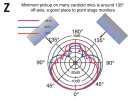
Going back to diagram Z, we have a polar plot for a typical cardioid mic at three different frequencies, along with suggested positions for on-stage monitor wedges. As soon as you cup a hand over the mic, those polar plots go out of the window and the mic becomes something closer to omni-directional. While cupping a hand over the top of the mic does this the worst, the Death Metal 'grab the top of the mic with both hands before making vomiting noises' technique does not fare much better.
(At the risk of going too off topic, I should also mention that sax, trumpet and other instrument bells do something very similar. This gets into a destructive cycle if the player starts to hog the mic in order to be louder, as the engineer is forced to reduce the monitor volume to minimize the risk of feedback, making the player hog the mic even more, meaning the engineer has to...)
Also, the frequency plot becomes a work of fiction once a hand is cupped over a mic. Why? Well, you wouldn't stick a bucket over your head and expect everything to sound the same, would you?
Suffice to say that if the monitor wedge is in the 180° position, the chances of cupping the mic causing feedback is increased. This is because all directional mics have a 'lobe' at 180°, which gets a lot bigger thanks to that hand, horn bell or other mechanical obstruction. It's worth noting that mics with a hypercardioid pickup pattern – while generally more directional than cardioid mics – have a bigger lobe at 180° off-axis. This makes it even more essential that wedge monitos are not pleaced directly behing the mic.
Getting too close/far away. Mic munching and clear diction do not go together! Apart from the fact that I defy anyone to produce clearly intelligible words with a metal grille pressed against their lips.
There is also 'proximity effect' to consider. Due to the laws of physics, the closer a singer, or other sound source, gets to a directional mic (not omni), the bigger the boost to the low frequencies. Some singers exploit this effect a little to make their voice sound more intimate and rounded, but once we get within an inch or so off the mic, things can get muddy and indistinct.
The proximity effect is less noticeable on female voices, so it is a paradox they are usually the most likely to get too far away from the mic. One very obvious problem, especially if the singer is not a loud one, is that the engineer has to significantly increase the input gain, and the likelihood of feedback with it.
But there is a point, somewhere about a foot away, where mics are particularly prone to plosive plops. (Nice turn of phrase, huh?) Take one shy, quiet, female singer, make the very reasonable assessment that a Shure SM57 will suit her voice, and prepare for a problematic time if she treats the mic as if the last singer had really bad breath.
The ideal distance from a vocal mic is somewhere around six inches, but some singers don't even stick to a constant distance. This brings us to what I call...
Cabaret singer technique. Some singers, usually of the sequinned jacket persuasion, have developed bad habits when it comes to handheld mics. They pull the mic away from their mouths, or move it closer, as some sort of manual level control. I once heard a comedian, who was presumably trying to disguise the fact he couldn't really sing, do this so compulsively at the start of every word that it sounded as if someone had set up a compressor with all the wrong settings as a 'what not to do' demonstration.
Next topic: what characteristics should we look for in a vocal mic?