Understanding and using live sound equipment

It occurred to me that those of you who already know they way round a computer-based DAW will probably grasp a lot of the concepts used in this digital desk very quickly once you see the similarities. This desk has a lot more hardware controls than will be attached to most DAWs, but that's because everything has to happen fast in a live situation. If everything goes to pieces on stage, no-one wants to look over to the mix position and see a guy frantically hitting a Space Bar and screaming at computer monitor!

Some of the latest live digital mix systems are largely software and touchscreen based, with the hardware used for I/O and possibly additional processing for plug-ins, which is a very DAW-like approach.

I decided to start with the Si Impact, for the simple reason it retains where possible a lot of the orthodoxies of analog mixers, while using digital technology to maximise what can be achieved from a compact control surface. Soundcraft is obviously not yet ready to throw the faders out with the channel strips!

For those of you interested in touch-screen systems, you may care to check out the Behringer XR18 X Air Mixer Behringer | Product | S32 and also the Waves eMotion LV1 – eMotion LV1 Live Mixer Combos | Mixers & Racks - Waves Audio

I should point out that it's not obligatory to use a touch-screen interface with either of these systems: there is always the option of adding a MIDI controller, just like with a DAW.
 
The marketing departments of modern mixer manufacturers love to give all the functions on their mix systems proprietary names – usually based on a bunch of fancy initials – so that you are in no doubt that this technology is specific to one manufacturer. While this has a big benefit for the marketing department (when you ask if a rival mixer has 'XYpowerZone switching' the answer's going to be “no”) it has a great disadvantage for you, the user: you're learning lots of terms about one desk, only to discover they mean nothing when you look at a competitive product.

I'm going to skip all that proprietary naming and stick to general descriptions most audio pros would instantly understand. Once armed with an overview of key functions and capabilities of digital desks, you'll find it a lot easier to compare mix systems from different manufacturers
 
this is all such good, real world, useful info!
We do things slightly differently due to NOT having a dedicated sound person. I do that now from FOH with a tablet and the digital board.
One thing we never try to do is bludgeon the audience with volume. Most gigs we play do not require or want that. Just how it is.
I rarely use 5 watts on any amps especially on a stage where we use the drummer's shield of shame.

Because of that, the drums often can bleed into other mics and completely take over (esp before the shield and digital board with a gate). So I like to set everything on stage to the drum's acoustic volume keeping a basic beat, not going ape! Then I add vox out front to match. Then the other instruments come up to kick level in the subs appropriate for the room via FOH. Drums are added only as required and vox are tweaked to the right level.
Rather than starting with drums as this tends to get loud very fast. NO issues hearing our drummer with 4 vox mics across the front!!

Just a note on how I have developed a method that works for us.

Thanks for this incredible info Simon!!
Cheers
 
this is all such good, real world, useful info!
We do things slightly differently due to NOT having a dedicated sound person. I do that now from FOH with a tablet and the digital board.
One thing we never try to do is bludgeon the audience with volume. Most gigs we play do not require or want that. Just how it is.
I rarely use 5 watts on any amps especially on a stage where we use the drummer's shield of shame.

Because of that, the drums often can bleed into other mics and completely take over (esp before the shield and digital board with a gate). So I like to set everything on stage to the drum's acoustic volume keeping a basic beat, not going ape! Then I add vox out front to match. Then the other instruments come up to kick level in the subs appropriate for the room via FOH. Drums are added only as required and vox are tweaked to the right level.
Rather than starting with drums as this tends to get loud very fast. NO issues hearing our drummer with 4 vox mics across the front!!

Just a note on how I have developed a method that works for us.

Thanks for this incredible info Simon!!
Cheers
Thank you for explaining what works for your band. I spent a few years playing in bands that played 'social clubs', where the audience could be aged from 8-80 years-old, and vocals were almost the only element that went through the PA. In my opinion, getting a good sound at lower volume levels is harder than putting everything through the main rig. From a mixing POV, maybe not, but from the perspective of the band really understanding how to achieve a good internal sound balance, definitely.
 
Assign of The Times
A key concept is of course, assignability, and the Si uses a ton of it. Let's look at where it uses it, and how on Earth we keep tabs on what's going on when not every control parameter is in front of our eyes at the same time.

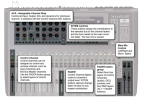
It's assignability that allows so few physical controls to address so many functions. To start to explain how, I'm going to use this rather crowded graphic (below) from the User Manual. Let's start with that little 'Fader button group', just to the left of the main output faders.

Assignable.png
 
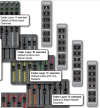
That little 'fader button group' switches between layers A, B, C & D. In other words, it's the first stage in saying what the faders do. By default (meaning you can change this if you want to): Layer A is mono inputs; Layer B is more mono inputs, followed by stereo inputs; Layer C is Mix and VCA Masters (what I still think of as Bus or Group outputs); while Layer D is Matrix Master Channels.

I covered Matrix mixes earlier in the thread. As a brief recap, they are basically mixes created from your Bus sends. This means you can, for instance, create different monitor mixes from relatively few controls, because you are only dealing with what are effectively Groups of input faders (vocals, drums etc).

We can already see from the above that it is possible to control vastly more channels than we have physical faders – and there are 24 on the Impact, when we exclude the main output faders. But the Si Series has a lot more tricks up its sleeve, even within this small Fader Layer section.

There are two further buttons labelled 'GEQ Hi' and 'GEQ Lo'. As the names imply, these turn the faders into a giant set of sliders for a Graphic Equalizer, covering two parts of the audio spectrum. More on that further down the line.

There are two further Layers that are not shown on the buttons until active. These are for DMX control. DMX is a lighting control protocol the Si can output. While I'm massively impressed it would be possible to control the lighting rig from the sound desk, I've never got hands-on with par cans, spotlights, or waggly disco lights. So, I'm going to gloss over all that for now, and possibly forever, because it's not an area I know a lot about.

Although we've only begun to scratch the audio control potential of the Si mix system, you may be starting to worry how you'd ever keep track of what any given controller is actually controlling. I'll tell you about Soundcraft's solution for that in my next post.

Fader Layers.png
 
Not Fade Away
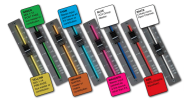
Soundcraft's digital desks employ an illuminated, color-coded system to alert the user any time a fader is controlling anything other than input channel level. To put it another way, 'normal' channel operation doesn't light up the fader, but switching it it any other function will. A look at the color-coding system below will show you some functions that can be accessed using the 'fader button group' Layer switches we looked at above. For instance, selecting 'GEQ Hi' or 'GEQ Lo' Layers will turn the fader red.

But how do we switch an input fader to yellow (a pre-fade mix you'd use for monitor mixes), or green (a post-fade mix you'd use for external effects)? Glad you asked. I'll get to that bit next.

(BTW - Soundcraft's system is called FaderGlow. Can we expect Rickenbackers in these colors soon?)

Colour Coded.png
 
Going off at a tangent for a minute, when I posted some of this material 'elsewhere', some loud-mouth who thought he knew it all because his Peavey PA filled every bar he played stated emphatically: "You should never use Phantom Power because it can trash dynamic mics. Use batteries instead."

I was a bit taken aback by this brash assertion, because I knew it wasn't true. So I reached out to leading mic manufacturers, including Shure and E-V, to ask the following:

1. Have you had dynamic mics returned for repair that have been damaged by connection to a 48V Phantom Power source?
2. As a manufacturer, what are you findings regarding the possibility of 48V PP causing damage to a dynamic microphone?
3. If there is a possibility of damage, it there a design feature within the mic that can protect it?

This is from Tom Colman who is a Senior Applications Engineer for Shure.

Answers:

1 & 2:
No. All Shure (professional) dynamic mics reject or simply ignore phantom power and are not damaged by it.

3. Yes, the way it's wired means it ignores the phantom power.

Confirmation from Sound On Sound magazine:
Q. Is it safe to apply phantom power to dynamic mics?

This is a good description from Wikipedia:
Phantom powering consists of a phantom circuit where direct current is applied equally through the two signal lines of a balanced audio connector (in modern equipment, both pins 2 and 3 of an XLR connector). The supply voltage is referenced to the ground pin of the connector (pin 1 of an XLR), which normally is connected to the cable shield or a ground wire in the cable or both. When phantom powering was introduced, one of its advantages was that the same type of balanced, shielded microphone cable that studios were already using for dynamic microphones could be used for condenser microphones. This is in contrast to microphones with vacuum-tube circuitry, most of which require special, multi-conductor cables.

With phantom power, the supply voltage is effectively invisible to balanced microphones that do not use it, which includes most dynamic microphones. A balanced signal consists only of the differences in voltage between two signal lines; phantom powering places the same DC voltage on both signal lines of a balanced connection. This is in marked contrast to another, slightly earlier method of powering known as "parallel powering" or "T-powering" (from the German term Tonaderspeisung), in which DC was overlaid directly onto the signal in differential mode. Connecting a conventional microphone to an input that had parallel powering enabled could very well damage the microphone.
Phantom power - Wikipedia
 
I meant to add that E-V told me the same thing as Shure, so I didn't quote them directly here. Phantom Power does not damage dynamic mics. End of.
 
Back to The Present
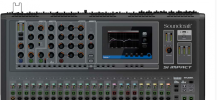
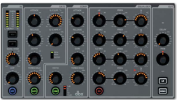
The section top left, with all the pretty dials on is a channel strip. It's as fully-featured as a top-flight recording studio console. Just imagine how long each channel strip would have to be if they all had this many physical controls, plus another 14 knobs just for the aux mixes. This is a vastly more intelligent way to manage things.

But how does the channel strip 'know' which channel it's currently supposed to be? Easy enough. If you look just above the first fader, you'll see an orange light on. That's the Select button. Push the Select button and you get the fader strip for that button.

See those 'skirts' of orange lights round each knob on the fader strip? They are there to indicate the position of the knob for that channel (it is actually a rotary encoder, the physical position of which doesn't matter – it just goes round and round).
Pretty Dials Si.png
 
When you adjust a control, it 'focuses', in Soundcraft speak. What that means is the LCD on the right changes to show its level precisely. (For a while, I thought all the LCD did was display that Lexicon processor. Then the penny dropped...) . Let's take a look at what the channel strip actually offers. It's pretty mind-blowing.
Pretty Dials 2.png
 
On the left hand side, you've got your input, with 8-segment level meter, +48V phantom power, phase reverse, and adjustable HPF (High Pass Filter), which is basically an advanced bass rolloff, to clear out any unwanted low end rumble for a cleaner mix.

Next up, there's a fully featured Gate, with attack, release, depth and threshold, plus super-useful side-chain LPF and HPF. In combination, these can be used to ensure that – for instance – if the snare us used to gate a reverb, it's only the snare that will trigger it, rather than half the drums around it. The two filters allow you to tune out anything else. A display shows: open, hold and closed.

The compressor is a genuine dbx. Soundcraft is part of the Harman group, so it turns to other companies in the group, such as dbx, Lexicon and BSS when it wants a particular circuit that manufacturer specializes in. Controls are: ratio, attack, release, gain and threshold, with a meter to show the compressor in action. That's a lot of dynamic control for a channel strip.
 
The equalizer section is worthy of a post in its own right, because it's as versatile as you'll find on any console, regardless of price. Believe it or not, all four bands are fully parametric, meaning you can define: cut/boost; frequency and Q (or 'contour'). In addition, the HF can be Bell or Shelving, both of which can be useful, depending on context.

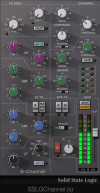
To give you an idea of just how advanced the Soundcraft Si channel strip is, here's a screen-shot of the famed SSL G Series channel strip, a software version of arguably the most successful studio mix console of all time. Although the controls are slightly different, the big deal is the Si matches it pretty much feature-for-feature.

Channel Strip.png
 
Rather than me writing endless posts, I think it's time to ask what you want to know about.

Back in the 1980s, when I was the full-time editor of Sound Engineer & Producer magazine, our publisher was always talking about "information need". It was just a fancy way of saying: "the things the readers actually find useful, and find easier to find out from you that somewhere else." Without knowing your information needs, there's a danger that I'll just go rambling on, while you drift off and play some music instead. :)

So, please let me know anything about live sound you'd find useful, and I'll do my best to help.
 
Back
Top