Understanding and using live sound equipment

simoncroft

Well-Known Member
Country flag
This thread is all about live sound rigs – what used to be known as simply “the PA” when I started gigging back in the early 1970s. I’m starting this in response to the cries of frustrations I hear from acts about their live sound. Some of this frustration comes from the complexities of the equipment itself, but often a major factor is a person referred to fondly as “the monkey behind the desk”, or worse. Hopefully, this thread will help whether you find yourself in a self-opsituation, or negotiating with our simian friend in whose hands your fate rests.

(Before anyone accuses me of being a complete hypocrite, I should admit I’ve been on both sides of this situation: as a live sound engineer for others and as a musician onstage saying: “Well I could turn down some more, but given I can’t hear a note I’m playing, I’m not sure how much further to go…”I’ve also been in the lucky position of being allowed to interview some truly great sound engineers, most of whom imparted their knowledge with considerable generosity. Let’s hope some of that wisdom has rubbed off.)

This is a thread, not a seminar, so its shape and content is dictated by you, along with other forum members who chose to contribute. Although I’m working to a framework that progresses in a logical manner, I am happy to modify if you’d rather I get to a particular topic ‘sooner rather than later’.

Apologies if this opening gambit is too simplistic for you – it’sonly the first 1,500 words of what will turn out to be a very, very long thread, so it will get chewier as we go along!

******* A note on terminology *******
I’ll usually refer to live sound rigs as ‘Sound Reinforcement’. This is because such systems are commonly used toa ugment ‘backline’ instrument amplifiers, drum kits and acoustic instruments, as well as vocals. The systems we used to call PA (or Public Address) back in the day were used primarily for vocalamplification. These days, the term PA is mainly reserved for the speaker systems found in railway stations, airports and other public places. However, I understand that the term 'PA' is widely used when talking about live sound.
 
System overview 1 – the evolution of speakers and crossovers
Because modern Sound Reinforcement systems are sophisticated – often using DSP (Digital SignalProcessing) accessed via bush-buttons and screens – it can be difficult to grasp what’s happening ‘under the hood’ if you don’t already know the basics.

A better place to start to understand live sound system is to turn the clock back to the mid 1960s, when systems were not much more complicated than guitar amps. (That’s not so surprising; they were often made by companies that mainly produced guitar amps.)

Once we have the most basic system under our belts, we can accelerate the time line, to see how each limitation was met with new solutions. At first these were analogue (pardon my British spelling) ,with many of the later digital developments designed to mimic these devices in new systems that were cheaper, more compact and faster to use. But let’s not get ahead of ourselves.

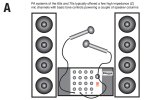
The first live sound systems I usedwith bands looked something like Diagram A. Although it was verysimple, it was good enough for vocal amplification in small venues.

Believe it or not, this was the sort of system The Beatles used to play Shea Stadium in 1965. Obviously,no-one could actually hear them, which is the main reason they retreated to the recording studio and never toured again.

Being valve-based in the first instance and developed by companies more used to working with electric guitars, the mixer/amps in these basic systems had high impedancei nputs on unbalanced jacks. We’ll go into the significance of balanced lines later on. For now it’s enough to note that unbalanced mics are not much less prone to interference than a 55 Strat.

Just like guitar amps of the day, the archetypal mixer/amp had passive tone controls, meaning they could cut a certain amount of treble, middle or bass' but not boost it. Many had no reverb or delay, or even the connectors necessary to introdueexternal effects into the mix as a whole.

But pop music was mutating into rock music by the 60s progressed, and as bands got louder, they wanted to put drum kits and instruments through the Sound Reinforcement system. This exposed the biggest limitation of the early systems. It wasn’t the mixer/amp, but the speakers.

DiagA-PA-system.jpg
 
(This wasn’t the end of the old-style PA, but as technology moved on in the 70s and 80s, these systems were increasingly aimed at functions bands.)

For vocal amplification, many manufacturers were using two column speaker cabinets, each loadedwith four 12in speakers. Although there was not much in the way of high frequency extension, the results were quite acceptable to audiences who went home to phonograms with lift up lids and containing amplifiers often connected to not much more than a small ellipticalspeaker.

Attempting to put a highly percussive source like a bass (kick) drum through the same system would be crazy! The massive transient peak signal caused by a beater hitting a drum head would probably drive the speakers to their end stops and the cone excursion required to reproduce the low frequencies would turn any vocals going through the system into a nasty, unintelligible mess.

Trying to put an entire kit (aka 'drum set') through thes ystem would likely destroy the speakers in minutes if the system were turned up to anything like a usable volume.

What was needed was a speaker system more like the ones used in movie theaters. Here, the frequency range of the program was split into typically two bands, with the low frequencies handled by 15in speakers mounted on a large wooden horn acting as an acoustic amplifier and the high frequencies handled by a compression driver mounted on a metal horn. Here are some classic designs from Ampex. https://www.itishifi.com/archives//2012/05/early-ampex-corporation-theater-sound.html?rq=ampex theater (Grrrr! No matter how many times I cut and paste this link it fails. If you enter 'ampex theater' into the search engine that comes up, you'll end up in the right place.)

Unfortunately for the rock ‘n’ roll business, the motion picture industry also used something called the Academy Curve, which was a controlled loss of high frequencies designed to mask the fact the old optical soundtrack that ran alongside the pictures on celluloid was noisier than an scratchy 78 record. In order to realize Sound Reinforcement that could act like a gigantic Hi-Fi, rock ‘n’ roll rigs would typically need to split the frequency spectrum into three or more bands.

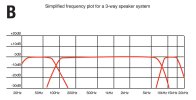
Diagram B is a typical frequency plot that shows the bandwidth of the program divided into three ranges,which would be fed to low, mid and high frequency speakers. The device that makes this division possible is a ‘crossover’.

DiagB-crossover-points.jpg
 
Last edited:
In Hi-Fi systems, crossovers are nearly always passive, comprising a bunch of unpowered capacitors and coils that sit on a circuit board inside the speaker cabinet. In many ways, they are an evolution of the tone control in a guitar, which uses a capacitor to progressively bleed high frequencies to ground as the tone pot is rolled forwards. (That makes it a ‘low pass filter’, which is exactly what you need to feed a woofer with nothing but low frequencies. By combining capacitors and coils, you can make a 'bandpass filter' to feed the mid-range section and so on...)

Unfortunately, there is a downside to passive crossovers: they absorb a fair amount of power. While this isn’t a big deal in a Hi-Fi, about the last thing you want in a Sound Reinforcement rig is a component that converts power intended to drive the speakers into heat!

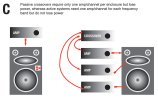
Active crossover units sit in the signal chain between the output of the mixing desk and the power amplifiers. Diagram C shows a three-way active system compared to a passive system. The active system would be considered as ‘tri-amped’.

In medium-sized systems suitable for music in clubs, a combination of design approaches is often used. The large sub-woofer speaker enclosure is also used to house the amp for the sub, plus a second amp that feeds the companion mid/high unit that sits on a pole above it. Usually, there is an intelligent DSP-based controller in the sub that acts as an electronic crossover, as well as providing EQ presets suitable for a variety of musical styles. Because the power levels required to drive the mid and high frequency units is a lot lower than the sub-bass, a passive crossover is used inside the mid/high cabinet.

In recent years, speaker system design has become much smarter. Thanks in part to the revolution that was started with the ‘line array’ concept we are now seeing almost impossibly small speakers delivering high quality sound to very carefully defined areas within the venue. And new materials technologies are making the speaker drivers lighter and more powerful.

Before we climb those heady heights though, we should continue our exploration of the Sound Reinforcement rig as it has evolved. Next post(s) from me will be about The Evolution of the Mixing Console.

DiagC-passive-versus-active.jpg
 
The Evolution of the Mixing Console (part 1)

System overview 2 – The Evolution of the Mixing Console (part 1)


This post is primarily intended to explain why mixing consoles (aka ‘mixers’, ‘desks’, or ‘boards’) took on what can seem like a bewildering array of additional features compared to the simple volume and tone controls found on a 1960s mixer/amp. In a later post, I’ll be running through the mixing console from a more operational perspective – ie how to use it in a concert situation. For now, I’m simply trying to give an overview of the functions a desk performs, so that you can look at one and feel confident that you understand it.

Before we get stuck in, there is a point you might want to consider. For the most part, the input channel strips on even the biggest mixing console are identical, so if you understand how Channel 1 works, you’ll also understand Channel 128, and any channel in between. Well, that’s cut our learning curve down to size!

Let’s go back to that mixer/amp I drew in Diagram A (earlier post) and see what simple improvements we can make, so that it’s more suited to the modern world. The first thing we can see (with a liberal dose of 20/20 hindsight) is that as the mixing system gets bigger, it becomes less suited to vertical operation. (Apart from anything else, as the channel strips get longer, there would come a point where we couldn’t see the band we’re supposed to be mixing!)

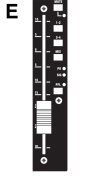
Once we’ve placed our controls at a near-horizontal angle, we could consider replacing the rotary volume controls with linear faders. (Diagram E.) That way, not only would we be able to see at a glance where they are set, we’ll be able to judge their position by touch alone – very useful when you’re also trying to watch the stage in a darkened venue.

DiagE_input_fader.jpg

Our 60s mixer amp had a volume control on each channel, but now we’re entering the hi-tech world of modern sound mixing, we need to up our game a bit. It’s time to consider the difference between ‘gain’ and ‘volume’.

Fortunately, we guitarists are already used to thinking of ‘gain’ as being how much drive we put into the preamp stage and ‘volume’ as being how loud the sound is coming out of the speakers. That’s exactly how it is on a mixing console, but with one major difference. The last thing in the world we want is distortion! No, no, our aim here is to get the maximum level before distortion sets in.

With a guitar amp, we’re normally only using one guitar at a time. With a mixing console, we have multiple inputs. One channel could have a really quiet acoustic guitar on it, and another a very loud snare drum. We need an input gain control on every channel of the mixer, so that we can set each input to its optimum operating level.

Now we’re adding these input gains, our ‘evolved’ mixer is starting to look more like a commercial product. For that reason – and to save me from having to draw a shed load of diagrams ¬– I’m going to use the GB2 series of live sound consoles from Soundcraft as my reference point.

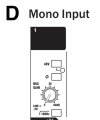
Diagram D shows the input stage of one of the mic channels from a GB2.
DiagD_input_stage.jpg

As you can see, right at the top of the channel strip, there’s an input gain pot, offering as much as 60dB of boost. (We’ll leave the function of the other controls in this section for now.) But how do we know how far to turn that control? On a guitar amp, we do it by ear, but on a mixing console we use the meters.

Unity gain

We’ll cover this in more detail when we look at how to actually operate a mixing console, it seems appropriate at this point to explain how the meters on a console are used as an aid when setting input gain. If you take another look at Diagram E, you’ll notice that there is a graph along the side of the fader, on which one of the values is ‘0’. That zero point is known as ‘unity gain’.

If the fader is higher than this point, the signal leaving the fader is higher in level than it was when it entered it (it’s 'boosted'). Intuitively enough, when the fader is below the zero point, it leaves the fader at a lower level. (You could say it has been cut, or ‘attenuated’.) Unity gain is an important concept when operating a mixing console, as the following example will show.

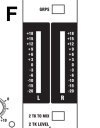
But before that, we’ll need to add some meters to our mixer. Diagram F shows the ones on the output section of the GB2. In real life, they’re color-coded illuminated bar-graphs that show the levels above unity gain in orange and the onset of overload in red. We’ll also need an output fader at this point. (No diagram, because it will look pretty similar to the input faders.)

DiagF_output_meters.jpg

OK, let’s assume that we have a mic connected to Channel 1. We have advanced the Channel 1 fader to the point of unity gain (ie zero) and set the output fader the same. As we turn up the gain control on the input of Channel 1, we can now use the output meters to measure the signal going through the console. As long as the signal is causing just the occasional peak into the red section of the meters – but no more – our input gain is set.

(In real life, we have to deal with a number of complexities, including the fact that just one drummer can occupy multiple channels of the desk, all of which will need the input gains set individually. Then there is the fact that the same drummer will create colossal peak levels during the encore that we didn’t allow for in the sound check… These are issues we’ll deal with another day, after we’re done with evolving our mixing console.)

Balanced, low-impedance inputs

Our archetypal 60s mixer/amp had high impedance mic inputs on unbalanced 1/4in jack sockets. That worked well enough back in the day but we can’t use them on our ‘evolved’ console, because we’ll get more radio breakthrough than Nigel Tufnel’s guitar in Spinal Tap. Partly it’s because we’re using more channels, partly because we’re using much more amplification, but mainly it’s because the sources of electrical, magnetic and RF (Radio Frequency) interference have increased so much. So, those jack sockets have to go in favor of 3-pin XLRs and low impedance, balanced wiring.

And while we’re doing the inputs, we might as well put the outputs on balanced XLRs as well. (This assumes we’re using separate power amplifiers. There are some very good modern mixer/amplifiers, especially now that the highly efficient Class D amp designs allow for high output on-board power, with very little weight or heat compared to older designs.)

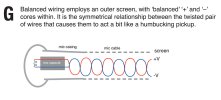
Engineering types get into considerable detail over what truly constitutes ‘balanced’ wiring. Good for them, I say. For the rest of us, who mostly want to know the benefits, I’ve drawn Diagram G. What this shows is that the signal to and from the mic capsule is kept entirely separate from the outer screen, which is there to complete the electrical shielding but does not carry the audio signal.
DiagG-balanced-connections.jpg

Because the audio + and – wires (sometimes known as ‘phase’ and ‘anti-phase’) are configured in a ‘twisted pair’ along the length of the cable, they are inherently resistant to outside interference from lighting rigs, the local taxi companies and the rest. It is very similar in concept and benefits to the classic Gibson humbucker.

Another benefit to the 3-pin wiring scheme is that it makes it possible to deliver ‘phantom power’ to studio-quality condenser mics. In larger venues particularly, there is a further benefit in the use of low impedance mics, because this allows for much longer cable runs without significant loss of high frequencies. (There comes a point where digital is the best solution but that subject is – ahem – somewhat down the line yet.)

At this point, we all deserve to take a rest! We’ve upgraded our old 1960s-style mixer/amp to the point where we have the basis for a high-spec mixing console. But we’ve got a fair way to go yet. Functionally, we’ll want EQ on every channel, effects sends, monitor mixes and much more in terms of the console’s I/O (Input/Output) capabilities. See you next time.
 
Great detailed overview so far. For this total greenhorn, I am fairly able to follow the logic and terminology.
Thank you for the encouraging reply. Please, if there is anything you, or anyone else on here, doesn't understand about what I post, just ask me for clarification. When I worked in pro audio sales in the 1980s, people would often say to me: "I know it's a stupid question but…" I would always start my answer with: "It's not a stupid question. None of us are born knowing about pro audio, and asking questions is mostly how I know what I know today."
 
Simon, as I think I remember telling you in the Private message, you and I are of similar mindsets and approaches to life.
Great to have a nice guy like you here with us. Here is my " stupid question" of the day.

As I am new, a "greenhorn" to all things PA, EQ, Sound Board, DI, Pre amp, etc. I will start with where I was up until last week/ weekend, and eventually where I may wind up if I spend/invest in a bit more equipment and education to build up experience and knowledge.

I have learned a lot on the principles of amp design, especially valve amps, through some long time members here and some who have moved on ( a Londoner who really knew electronics/ engineering) given that knowledge and their patience and generosity, they taught me the principles of electronics, circuit design, and the various parts that make up an amp. Step 1.

Step 2. They helped me diagnose and fix a few amps/ which then helped me in fixing car electronics and computer problems, along with fixing our home furnace and AC units.

Step 3. Brings us to where we are here. I have assisted a fellow drummer on a number of his gigs in the early 2000's. One in particular stood out to me. It was in a huge hall that I think I heard was once a parking garage. As you might guess, I had trouble hearing certain parts of his drumming in the mix. ( I was in the audience in the vicinity of the Sound guys, not a part of the sound team. ) BUT, while the band was playing, I flat out could not hear his cymbals. I couldn't hear ride and especially crashes. My summation was a theory. The sound guys did the best they could, but the room was somehow not projecting the frequency range necessary to hear the cymbals.

YOU may better explain the possible reasons. Poor Speakers, Concrete surfaces, Audience, or whatever that killed my ability to hear.

Step 4. I had to whip up a batch of equipment in a rushed fashion to provide amplification and projection for Mic'ing up Lecturer's speeches for 3 days. You saw the picture of the Ball room Hall it was held in.

1731168491316.png


The bottom line was that my Ashdown Mag 300 Bass Amp head served as the PA amp for the Peavey Mic that I plugged into the 1/4 inch input jack ( normally used for the bass guitar) then I was able to take the 2 speaker cables from the 1/4 inch output jacks to the passive Peavey SP2 PA speakers, and that was sufficient to get the job done.

Step 5 will be to learn the differences and to figure out what I need to do the job properly for things such as future speeches, conferences, band gigs, DJ'ing for weddings and the realm of all things PA and possibly Recording live and studio performances ( which to me would be step 6.)
 
Glad to be of help. While I'll try not to make this look like the sort of reply I'd give to a letter from a lawyer, I'll follow your numbering scheme. That way, you'll know what I'm talking about with me having to quote it verbatim.

Step 3. It's hard from me to know why the cymbals weren't audible without being in the room, but I can list out some possible reasons: 1) there were no overhead mics, so the cymbals weren't amplified; 2) the mics didn't have an extended frequency respose, so failed to capture the upper harmonics that help cymbals cut through a mix; 3) the mics weren't placed very well, meaning they were picking up more snare, toms, backline and monitor wedges than they were cymbals; 4) someone forgot to connect the mics to the mixer; 5) the sound guy tended to boost the frequencies he wanted to hear, rather than cutting the ones that aren't needed, so when everything came in, the output stages of the mixing desk had all the headroom taken out of them, leaving the cymbals completely out-gunned by the rest of the drums and the bass player; the high frequency section of the speakers was either not very good or non existent… I'll be returning to all of these themes in more detail over the weeks, but it's quite possible the real answer is "several of the above".

Step 4. Ha ha! We have the same bass amp. While I really like it for bass guitar, I'd hesitate to use it for a vocal PA, but if it made the lecturers audible and intelligible, it certainly did its job. Apart from the fact you don't have multiple input channels, so you're really limited to one mic, there are a couple of potential problems I'd flag up. Firstly, because it's designed for bass guitars, the Mag 300 has high impedence inputs ('Hi Z' on your side of the Atlantic). Most modern mics are low impedence (Lo Z). They will work when mis-matched, but the result tends to be a little quiet and somewhat tinny. Secondly, most of the vocal frequency range is 4kHz-8kHz, but the 'sibilence' range above that greaty helps us to understand the difference between consonants, such as 'P', 'T', 'B' and 'G', for instance. It was due to a lack of high frequencies, that I came to imagine that my sister-in-law was going to a 'High Tea' session, and not 'Tai Chi', which was the reality. This left me asking increasingly weird questions, like: "Will you be expected to bring cakes?"

It may just be that you were using a low impedance mic with the Mag 300, but the lack of high end in the speaker, coupled with the lack of low end from the mic, magically produced just the right frequency response!

As for Step 5 and Step 6, well, let's just take one step at a time…
 
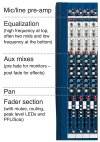
The post earlier in this thread that explains a little about input gain. Later posts will deal with other sections of the mixing console. You may find it useful to refer to the Overview of Input Channel Sections below. Once you understand how one mic/line channel works, you understand pretty much all of them as most analog(ue) desks follow the same layout conventions. (Digital desks are designed so that people who cut their teeth on analog(ue) can work out what's going on, so this knowledge is transferable. ;))

Credit: Console image courtesy Soundcraft
Sections-of-Desk.jpg
 
Simon, I like you so much not only for well thought out responses and not having to hit the nail on the head and have every detail spelled out precisely and yet still be helpful in understanding things.

I like the way you answered Step 3. Like my life, there has been many ways to skin a cat, plus many reasons for a thing happening or not. So, your reply is fully understood and reasonable at explaining things. Also, as the event was so long ago, I cannot answer what all my friend had mic wise or the sound crew did either. I also remember it being a 2-3 bands cycling one after the other kind of thing. But if I ever have to mic up a drum kit, or singer/bass/guitar players, I have a better understanding what gear is needed in order to produce a good result for the players and audience. Thanks.

As for Step 4. I had to abide by the old expression, " dance with the girl ya brung" where it came to amp and micing the conference.
I do not own any PA amps, Powered Mixers/Powered Mixable Speakers etc, so I made due for the short notice scenario. My other amps, a 50 Watt Marshall head from 1972 and my 2 Fender Combo amps as well. Solid State Princeton Chorus and a Red Knob The Twin, were definitely OUT as options.

I totally understand your Tai Chi/ High Tea Cakes story. Still laughing, but it was a great illustration of the effect of different specs and how to match things to improve the capabilities and outcome of the equipment to the application to what audiences hear. Our forum's own hatbastarddon may have mentiioned HiZ to me before the gig as I was shooting questions his way about how I needed to gear up. Both Don and smittyp made some suggestions as far as adequate mixers for such a task too. Smitty suggested a Mackie Mix8, and Don suggested an Allen and Heath ZEDi-8 unit. From my memory on looking these up, I think they both have preamps I know the ZEDi-8 one does.

I just pulled out the Mic from the little zip up bag I stored it in. It is a Peavey PV i Unidirectional Mic. I am presuming it is LowZ. Kathy said it worked fine for what we needed.
As we talk more and I do more homework/studying, I will get to know the terms, gear old and new, and many of the beginner questions to get started. Having proper PA speakers and a working Mic is a good start.
 
Also, Simon, in case you don't know it, our members on here range from pups in their 20's and 30's, to some ladies and gents 40 on up into some who may crack 70+. So many talents and areas of expertise. Then there are regular guys like me who are playing catch up on our guitar/ bass/ drums skills, and adding other useful ones like this thread is about too.

At almost 61, I have spent a lifetime of soaking up as much knowledge from life experiences of others as humanly possible for a humble grandson of a coal miner grandpop on one side, and a butcher for grandfather on the other. My own stepdad's stepdad, was in the US Navy awhile., while his one uncle built boats and the other was kind of like a farmer if I remember right. All born in the late 1890's to around 1910 or so. Fascinating to learn LIVING history.

I feel the same about my recent trip to the UK and all I got to see and hear about from London, to Brighton, to Wales, Dublin, Scotland etc.
From the minute I set foot on the Tube out of Heathrow to all the places in between, I enjoyed sharing stories with between myself and the European locals.
Such an experience. I wish I had known of you before leaving to go there. but you may not have joined us until after I had departed.

Thanks again for sharing.
 
In larger venues particularly, there is a further benefit in the use of low impedance mics, because this allows for much longer cable runs without significant loss of high frequencies.

As I was googling about HiZ/LowZ, I ran across an article that explained this. That part about long cables stood out.

OF course at today's prices. cables of any length are quite cost prohibitive to a bloke like me. I drive cars and trucks that cost me less than a pair of good 50 foot speaker cables might. **** Think $1 USD to $200 USD for some of my old beaters.
 
Last edited:
Thank you Simon.
I switched from passive to digital 6 years ago on my PA system I use 7 channels for drums 2 for guitar 2 for bass 3 vocal three piece band
Live use a Ludwig classic maple drum set 14" tom 16" tom 18" tom 7"x14" Noble and Cooley solid shell snare drum 24" bass drum
use Audix microphones 5 passive 2 overhead condenser for recording it took me two day's to EQ my drums with the Allen and Heath digital console
part of it was tuning the drums for the room used parametric EQ 31 band EQ compressor gate and effects and microphone levels
Now I'm using a Tascam Model 24 board for recording and the Allen and Heath for PA the Tascam took 15 min to set up
on computer using a Antelope audio interface with their modeling condenser microphone sounds fantastic
I write music on keyboards and drums not guitar much. The most complex part so far is getting a great snare drum sound that cuts through the mix
I have 5 high end snare drums my cheapest one works best for recording a Drum Workshop Collectors maple 5" x 14"
I know Phil Collins used a Noble and Cooley 5" x 14" solid shell maple snare drum for his famous recordings
 
System overview – The evolution of the mixing console (equalization)

Hello again guys. Glad you're enjoying this thread so far. Here comes an initial look at EQ

The typical mixer/amp made from the 1960s onwards that we looked at in the start of this series often came with a couple of tone controls on each channel: ‘treble’ and ‘bass’. It was good enough in its day, partly because expectations regarding live sound were lower, but also because you can successfully mix a bunch of vocal mics with little modification to their basic sound. Once you start adding instruments – and drums in particular – you really need more powerful tools in the box.

Sadly, the Equalization section (‘equalisation’ with an ‘S’ for us Brits, and often just ‘EQ’) probably has the greatest power of any section on a mixing console to ruin the sound of a live act! That might seem like a dramatic thing to say but too many people look at the EQ, instantly grasp the basics of what it does, but never truly learn how to use it.

“Hmmn,” we tend to think. “That’s like the tone controls on my guitar amp…” The problem with that line of thinking is that we guitarists are used to tone controls that generally sound better when we turn them up. For reasons I’ll try to explain, the EQ on a mixing desk often sounds better when we use it to turn down some elements of the sound.

In order to explain why, it’s useful to introduce a concept that could have been part of our earlier look at ‘unity gain’. The new concept is ‘headroom’. Technically, ‘headroom’ is the difference between the nominal operating level and the onset of distortion. To put it another way, the more headroom we have in our audio circuits, the more we can push our luck with the gain before it all starts to sound bad. Sadly, only very expensive consoles offer vast amounts of headroom, so those of us driving the equivalent of a mid-range Ford need to be extra careful about how hard we rev the engine!

OK, enough with the rubbish analogies, the simple truth is that the more you boost the EQ on any channel, the less headroom that channel has. And if you insist on doing that on say, an entire drum kit, there will be even less headroom left in the mixing desk when you combine those channels. (This is a theme I’ll return to when we get onto operating a mixing console.)

In order to compete in the ‘specmanship’ stakes, console manufacturers usually include channel EQ with gain of +/- 15dB on each band (sometimes +/-20dB). Not only is that more than enough to use up the headroom in a mixer circuit, it’s more than you probably need to apply in a live sound situation. Seriously, if an incoming signal does not sound at all musical, it is better to go back to source and fix whatever is wrong with the instrument, mic or mic position than it is to try EQing your way out of the problem.

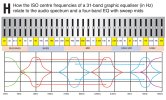
Diagram H is scary stuff at first glance, because I’ve used one diagram to illustrate several related points. There’s a lot of information in there, so let me break it all down into some manageable blocks for you, starting at the top and working downwards.

Hopefully, you’ll recognize the gray block with the sliders on it as my attempt to draw a graphic equalizer. Even if you didn’t recognize my drawing, you’ll have seen similar devices everywhere from bass rigs to hi-fi systems. This is no ordinary graphic though: this one has the full 31 bands typically used to compensate, or ‘tune’ the output of a Sound Reinforcement rig to the acoustics of a venue.

Because there are 31 bands, they are close enough together to allow problem frequencies to be tuned out without unduly compromising the overall sound balance. In fact, this format of equalizer is so universally recognized, the frequency centers from 20Hz-20kHz are set out in an ISO (International Standards Organization) specification. I’ve set those frequencies out in numbers below the graphic of the equalizer, with the octaves highlighted in yellow.

Below this, there is another block showing where these frequencies sit in terms of ‘sub-bass’, ‘bass’ etc. In an advanced 5-way rig, these general labels would correspond directly to the speakers that these frequencies would be coming from (with some deliberate overlap at the crossover points).

You might wonder, if this is such a useful format, why doesn’t every channel of a mixing console have a 31-band graphic? Well, one reason is that 31 bands take up an entire 19-inch rack case, so our channel strips would be unworkably big. As it turns out, for individual channel EQ, we don’t need access to all 31 bands. What we need is to be able to tune one or two bands to the frequencies we find useful on that particular channel.

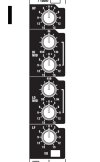
Diagram I shows the EQ section of a mic/line channel on a Soundcraft GB2 analogue console. Soundcraft pioneered this type of EQ format, and it is well worth becoming familiar with, because you’ll find it appears over-and-over on analogue consoles of many brands. The short-form description for this type of EQ is: ‘four-band, with two sweep mids’. Let’s see how it works.

The LF control at the bottom offers 15dB cut/boost of the Low Frequencies, while the HF control at the top does the same for the High Frequencies. Together they are the closest thing on a modern mixing console to those treble-and-bass controls on our original mixer/amp.

The Lo Mid and Hi Mid controls can both be operated across a range of frequencies. These are set for each of the two ranges using the associated ‘sweep’ control. These are marked 80-1.9k and 550-13k respectively. Because the control ranges overlap, it is possible to address two different but closely spaced frequency centers within part of the frequency spectrum. This can be useful when trying to tune out unwanted ringing or resonances.

Going back to Diagram H, the lower part is an idealized plot of how the four-band EQ works across the 20-20kHz spectrum. Because these plots, or graphs, can be a bit intimidating to anyone who isn’t familiar with them, I’ve color-coded mine to make it easier to refer to each band in the text.

In my scheme, the frequency curves for the LF control are green and the corresponding ones for the HF control are purple. The top half of the graph shows how the frequency curves would be changed if the LF and HF controls were turned up the full 15dB. Obviously enough, the bottom half shows how the frequency curves would be changes if the controls were turned down to -15dB.

The two curves have something important in common. They both start very gradually from the mid range, and only reach full cut/boost as they reach the ends of the 20Hz and 20kHz frequency spectrum. This is done with a ‘shelving’ circuit. You’ll find shelving circuits used a lot of LF and HF bands because the result they produce is musical and therefore useful as an enhancement tool.

The red lines represent the action of the Lo Mid. The first thing you’ll probably notice is that the curves appear twice on the graph. This represents the lowest and highest points in the sweep control’s range. The horizontal lines with arrows indicate that this control is continuously variable between the two points.

The Hi Mid section is represented by the blue lines. These show exactly the same thing as the Lo Mid, but operating over a different range of frequencies. Again, note how the graph indicates the overlap between the two, as well as the range over which each one can be swept.

The curve described by the mid range circuits looks like a bell. It is actually known as a ‘bell curve’. It is very useful in mid range circuits, as the cut or boost has a definite ‘center’ but the result remains musical. Bell curves generally interact well, in the sense that if two or more are applied at closely spaced centers, the result is still pleasing to the ear. Referring back to the 31-band graphic equalizer’s centers – where there are three separate sliders for every octave of frequency spectrum – helps to reinforce how important it is that equalizer circuits interact in a pleasing manner. Remember that between the centers there are frequencies that still have to sound like music!

(Continues below)
DiagH-31-band-EQs.jpgDiagI_4bandEQ.jpg
 
EQ (continued)

NB – There are three 'parameters' in EQ, and our example EQ addresses only two of them. Fully 'parametric' EQs also allow the width of the curve, or 'Q' to be adjusted. While a very tight 'Q' is useful for notching out unwanted frequencies, fully parametric EQs are an expensive inclusion on every input strip, so tend to be found mostly on top-level studio recording consoles. However, digital technology is bringing these facilities into mid-range mix systems too.


Before we leave the EQ section and move onto the Aux mixes, there are two other controls we should talk about. Neither is part of the EQ circuit, strictly speaking, but they both have a radical effect on how it works in practice. Just below the LF control is the EQ Cut. This gives an instant answer to the all-important question: “Is this EQ I’ve set up actually an improvement on the original sound?”

There is a second button, part of which you can just see above the top of the EQ section. This is a 100Hz bass cut. It actually sits in the circuit ahead of the EQ and is part of the mic/line input section but we’ll talk about it here, because it has an important affect on the sound of each channel.

Like the bass roll-off function on some microphones, the bass cut switch on a mixer channel imposes a progressive reduction in low frequencies, rather than a ‘brick wall’ cutoff at 100Hz. But you might wonder why we would even want such a function, given that the circuits of the mixing console have a bandwidth that theoretically goes all the way down to 20Hz.

On most of the channels – unless they are specifically carrying bass instruments – there is no meaningful content below 100Hz, just a certain amount of ‘stage rumble’ and unwanted LF spill that will muddy the mix and cause the subwoofers to work extra hard reproducing sound we don’t even want. Given that many subwoofers have very little output down at 20Hz, it is important that we use the capabilities of the rig in the last octave wisely.

These are issues we’ll return to in later posts, when we look at operating a mixing console. At that point, we’ll consider the practical aspects when adjusting EQ to suit different types of input, whether vocals or instruments.

The next topic will the Auxiliary mixes, and how they are used to set effects and stage monitor levels.
 
Thank you Simon.
I switched from passive to digital 6 years ago on my PA system I use 7 channels for drums 2 for guitar 2 for bass 3 vocal three piece band
Live use a Ludwig classic maple drum set 14" tom 16" tom 18" tom 7"x14" Noble and Cooley solid shell snare drum 24" bass drum
use Audix microphones 5 passive 2 overhead condenser for recording it took me two day's to EQ my drums with the Allen and Heath digital console
part of it was tuning the drums for the room used parametric EQ 31 band EQ compressor gate and effects and microphone levels
Now I'm using a Tascam Model 24 board for recording and the Allen and Heath for PA the Tascam took 15 min to set up
on computer using a Antelope audio interface with their modeling condenser microphone sounds fantastic
I write music on keyboards and drums not guitar much. The most complex part so far is getting a great snare drum sound that cuts through the mix
I have 5 high end snare drums my cheapest one works best for recording a Drum Workshop Collectors maple 5" x 14"
I know Phil Collins used a Noble and Cooley 5" x 14" solid shell maple snare drum for his famous recordings

That's some nice gear you've got there. I tend to find a very short but dense reverb really helps a snare to stand out.(y)(y)(y)
 
System overview: The evolution of the mixing console (aux mixes)

So far in this thread, our mixer has evolved a more sophisticated series of input channels than the basic mixer/amp we started with, but it still has only one output (well, two if we assume the unit is stereo). In reality, most modern mixers have multiple outputs, some of which feed the on-stage monitor mixes, while others are for external effects.

The levels to these additional outputs are fed by the Auxiliary, or Aux, mixes.
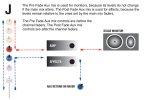
There are basically two types of Aux mix: ‘Pre Fade’ and ‘Post Fade’. The pre fade auxes are used for monitoring, and the post fade auxes are used for effects. This is shown in Diagram J.

As you can see, the pre fade aux mixes sit in the signal chain before the main channel fader. This means that the monitor mixes are not affected by any changes to the main mix. (If they were, it would be very distracting for the musicians on stage.) Conversely, the post fade aux mixes are in the signal chain after the channel faders. This means that these mixes stay in proportion to the main mix. (For instance, when you bring down the level of a vocal channel, the reverb level reduces with it. If it didn’t, there would be more and more reverb on the vocal as the level of the channel fader was reduced.)

If you refer back to the picture showing the input strips of a Soundcraft GB2 that I posted earlier in this thread, you’ll see that this particular console is equipped with six aux mixes. Two of these are pre fade, two are post fade, and the two in the middle can be switched pre or post. This means the same Front of House desk can support either four monitor mixes and two effects mixes, or two monitor mixes and four effects mixes.

However, it’s fair to point out that multiple monitor mixes, tailored for different members of the band, are a luxury. Most members of this forum probably count themselves lucky if even one decent monitor mix is provided.

We all know how frustrating it can be as a performer when you are on stage and can’t hear yourself – or the rest of the band – very well. Obviously, the first person we blame is “the monkey behind the desk”, or whatever pet name we have for the sound engineer. Let’s turn the tables for a minute and ask ourselves: “How does the sound engineer have the slightest idea what the sound is like on-stage?” The glib answer is: “By pushing a button on the mixing console.” The less reassuring answer is: “With extreme difficulty.” At this point, we need to introduce some acronyms: PFL and AFL.

PFL stands for Pre Fade Listen, while AFL stands for After Fade Listen. Exactly what they do, and the difference between them, can wait until another time. For now, it’s enough to know that these switches give the engineer a way to monitor either an input channel (PFL), or a group of channels (AFL) in isolation. That’s where the ‘push of a button’ part comes in.

But the audience doesn’t want to hear a mix ‘under construction’, it wants to hear the main Front of House mix as it is supposed to sound – ie, as if someone behind the desk knows what they are doing. That makes sticking the monitor mixes though the main rig a strict no-no at any time after the sound check.

When the band is actually performing a set, the only way the engineer can check a monitor mix is through headphones, or through a small speaker kept for that purpose somewhere near the mix position (often at the engineer’s feet). Either way, those headphones or small monitor speaker are now competing with an entire band in mid flow, so will be difficult to hear with any certainty. That’s where the “extreme difficulty” part of the job comes in.

Even during the ‘window of opportunity’ presented by the sound check, it’s worth considering that monitor mixes will sound different from the Front of House position compared to the way they sound of stage. For instance, the engineer may be able to hear the guitarist only too well, because his stack is up loud and pointed straight at the mix position. But the bass player may have difficulty hearing the guitarist, due to the directional nature of the guitar cabs. This is a topic I covered in some detail in an earlier thread Understanding room and venue acoustics

This means that the mix engineer’s idea of a good monitor mix is not at all the bass player’s idea of a good monitor mix. The best way for the bass player to resolve this situation is to ask the engineer: “Can I have more guitar in the monitors, please?” A polite, but specific, request is more likely to produce a usable response than yelling: “Hey monkey, how come I can’t hear anything up here?”

Often, the sound through the stage monitors is unlike the sound through the main rig. This can be a frequent source of complaint from musicians: the sound we’re hearing is nothing like the sound out front. This disparity can be down to the fact that the main rig has been ‘tuned’ using graphic equalizers, whereas the monitors are not equipped with the same equalization for cost reasons.

Another significant factor is down to the design of many traditional ‘wedge’ stage monitors. Often, these have increased mid-range emphasis to make the vocal range more prominent. They're not intended to sound the same as the main FoH rig!

At the risk of boggling your mind with more detail, there is a constant risk the engineer has to take into account. Stage monitor speakers are just as capable of causing feedback (howl-round) as the speakers in the main rig. If that happens, it can be a lot harder to pinpoint than when one of the mic channels causes feedback through the main system.

Fortunately, most mixing consoles have at least a ‘peak’ LED – and sometimes a complete bargraph meter – for each mic channel. This is useful when setting the initial input gains, but will also indicate if a channel is causing feedback.

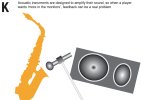
Diagram K illustrates the kind of monitor situation that can cause trouble. Acoustic instruments are designed to amplify sound in their own right. For reasons I’ll happily detail in a later post, this can make them really prone to feedback. The mix engineer’s nightmare begins when the player announces in a plaintive voice: “I can’t really hear myself, can you turn me up in the monitor please?” No prizes for guessing what happens when the volume from the monitor speaker increases…

Of course, not all stage monitoring involves the traditional ‘wedge’ speakers. IEM (In Ear Monitoring) has become very popular, not least because the close-fitting earpieces help to isolate the performers from high levels of sound on stage, rather than simply adding to it. That’s another interesting topic that can wait for another day.

Without sounding too cynical, the reality from most sound engineer’s point of view is fairly simple. The audience hears the Front of House sound, not the monitor mix(es). The venue owner is mainly guided by the reaction of the audience, as measured by sales of a) tickets, b) beer, or c) both. Pleasing those parties is how the engineer keeps his job. That leaves a small bunch of contracted labor on stage who require a mix all of their own… Although any professional sound engineer (by which I mean both caring and competent) will do their best to provide an act with a usable monitor mix, most of that thinking has to be done before the audience arrives.

NB – In concert touring rigs, the roles of Front of House Engineer and Monitor Engineer are separate, as are the consoles they operate. A Monitor console has a different format to a Front of House console, because the aux mixes are the whole point to the design, whereas there is usually no need for faders on a monitor console, for the simple reason there is no ‘main mix’.

Compared to monitor mixing, sending a post fade aux mix to an effects unit such as a reverb or delay is easy. Because it’s an integral part of the main mix, all you really need to do is turn up the effects sends for each channel until it sounds good. (Guidelines for what is likely to work will come in a later thread.) Providing the overall level of the aux mix is not so high it overloads the outboard unit’s input, all should be fine. Fortunately, there’s a master level for each aux mix that makes it easy to manage that.

The effects still have to be returned to the mix however, which brings us to the next topic: routing, grouping and aux returns.DiagJ-pre-and-post-fade-uses.jpgDiagK-feedback-from-monitor.jpg
 
Get on the bus Gus

System overview: The evolution of the mixing console (routing, grouping and aux returns)


In the last post, I explained how a Post Fade Aux Mix could be used to create an affect mix for a reverb or delay. Some mixing consoles offer internal digital effects – and often have an aux mix labeled FX to indicate that it sends to the internal processor – but it other instances, the mix will go to an external processor located in the outboard rack.

The question you might want answering at this point is: “Where do external effects come back into the signal chain on the desk?” I’ll answer that question, as part of the bigger subject of today’s post, which is essentially how signals are routed around the system and how groups of channels can be controlled to make the process of mixing easier to manage.

Effects returns
A lot of mixing consoles have dedicated ‘Effects Return’ or ‘Aux Input’ channels that introduce the signal from external units into the mix. On smaller desks, these often have little or no facilities beyond a line input, although some may offer an input level and possibly an EQ section.

An important thing to understand about ‘effects return’ inputs is that they are not linked in any way to the signal path from an aux mix unless you chose them to be. For instance, if you take the output of Aux 4 to a reverb unit and connect the output of the reverb to Aux Input 1, they form what is called an ‘effects loop’ on a guitar amp. But if you didn’t need a return input for the reverb, you could equally use that Aux Input for any line level device you want. This is worth remembering when the main input channels on a mixer are all in use and you need somewhere to connect, say, an MP3 player that will only be used to provide music between the acts.

Similarly, if you’d like a full set of EQs and a set of faders for the levels, there is nothing to stop you using the regular input channels for effects returns, if you have some to spare. If you have any stereo input channels, even better, but an adjacent pair of mono channels is almost as good. (You just need to pan them hard Left and Right… ah yes, we’ll cover the Pan control as part of our discussion on routing below.)

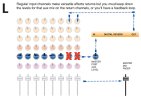
The one thing you definitely DON’T want to do if you are using input channels for aux returns is open up the aux levels for that mix on those channels! Diagram L hopefully makes this clear. It’s a simplified view of a mixing console, and I’ve grayed out the controls that are not directly concerned with the signal path to and from the digital reverb.

The aux mix colored blue and labeled ‘post’ goes via the master level control for that mix to the input of the outboard unit, a reverb in this case. It’s being returned to the mix via the last two input channels. If we turned up the aux levels on those last two channels, the result would be a feedback loop, which is to be avoided at all costs. (Let’s put it this way, people might forget to thank you at the end of the concert.)

To be absolutely clear about this, if we had multiple aux mixes (which is often the case) we only have to worry about sending a specific aux mix back on itself. So if our effect is on Aux 2, it’s opening up the Aux 2 mix on the return channels that would cause a feedback loop.

(At this point, you may be starting to understand why smaller mixing desks tend to have dedicated effects return input that are hard wired to the stereo output – they can be used to add effects to the mix, with no possibility of sending the signal somewhere it isn’t wanted. Unfortunately, to get the maximum flexibility from any mix system, you also have to take responsibility for incorrectly routing signals. Many years ago, I attended a lecture by the producer/engineer Alan Parsons, where he played an example of a Pink Floyd take he’d ruined by sending the reverb that was only supposed to be in the monitor mix also to multitrack. As a result, it was printed across all the tracks and couldn’t be removed.)

Why are there buses in my mixing console?
So far, we’ve assumed (or maybe just glossed over) that the faders from all our input channels go straight to a main mix, or more likely, main the left and right Mix Buses. You’ll find the term ‘buses’, or ‘busses’ used a lot in any discussion of mixing console architecture. That’s because they are fundamental to the way signals are routed and combined in the mixer.

In everyday life, a ‘bus’ is something we can all jump on and ride if we all want to go on the same route. We might not all get on at the same place, but we’re on a particular bus because we all need to go on the same route. The ‘buses’ in mix systems are exactly the same. In fact, if you open up a traditional analogue mixing console, you can actually see the ‘bus bars’ linking each channel like routes on a transport map.

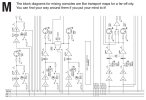
Diagram M shows detail from the block diagram of the output section of a Soundcraft GB mixing console. After you’ve looked at it for a bit, you might think: “That’s just like a train map for a foreign city.” You’d be exactly right, and if you are interested enough, I’m sure we can get to the stage where you can read that map with complete confidence. For now, let’s use the diagram to illustrate one fundamental concept. See those parallel horizontal lines at the bottom? They’re the buses.

The lowest bus is labeled ‘Aux 1-6’. If we took the actual console apart, that would be six separate conductive ‘bus bars’ stretching across the channels. The diagram only shows one because it is generally understood that this is simply ‘shorthand’ for the six separate routes a signal could take.

Move up a couple of lines and you’ll see ‘Mix L-R’. You’ve probably immediately grasped that these are the buses that go to the main stereo output of the mixing console. On the simplest of mixers, every input channel is permanently routed to the Left & Right buses via the Pan controls, which enable the relative L/R levels to be set. Matching the position of the pan controls to the physical position of musicians on stage gives a more realistic stereo field to the mix.

So far, simple enough, but if we move down a line, what is ‘GRP 1-4’ all about?

The purpose of subgroups
When we have more input channels to control than we have fingers on our hands, it’s time to consider whether we could manage the process more efficiently. Of course we can, and one approach is to ‘assign’ channels that have something in common to a ‘subgroup’ fader that will act as a master volume for them. So for instance, once we are happy with the drum mix, we could assign all the drums to their own subgroup. Then we could do the same with all the vocals.

This makes the job of mixing a lot easier, especially if we need to make quick decisions (such as the drummer seems to have got really loud since he had a beer break…)

I’ll happily explain how channels are routed to subgroups (and subgroups to the main mix bus) in the next post, but I'm close to the word limit now. (For readers who are following this but already know what subgroups are, I’ll also get into VCAs, virtual hierarchical assignments on digital consoles and all of that, but some way down the line.)


DiagL-Effects-send-Return.jpg


DiagM_bus_bars.jpg

 
Back
Top