Who is the resident computer nerd ?

Let me get back to you on that. I'm using XP pro. I'm trying to digest everything you said. I'm not a computer guy so I only understand parts of your post. :rolf2:
Take your time, read up on it using DuckDuckGo — Privacy, simplified. not the megalith evil empire. YouTube (MEE) surely has examples of what you need to get started. Feel free to run by article / vid finds you are unsure of. Some internet content has no business trying to teach others as I'm sure we have all seen.

Most people have more ability than they give themselves credit for. I did see some sad examples of those who also had no business in front of a PC.
 
I'm using DuckDuckGo since it came out, but favorite browser doesn't let me load it. I'm using Chrome at the moment, I used to use Firefox, but it's too glitchy. I have Avast virus protection and I really like the Avast browser, but that's the one that won't let me use DDG.
 
I'm using DuckDuckGo since it came out, but favorite browser doesn't let me load it. I'm using Chrome at the moment, I used to use Firefox, but it's too glitchy. I have Avast virus protection and I really like the Avast browser, but that's the one that won't let me use DDG.
Well, after a little search it seems Avast secure browser is as good or better than DDG as long as you are a paid subscriber, which I am, so maybe I'm worrying about nothing. I'll look further into it tomorrow.

I'm out for tonight. :cheers:
 
I'm using DuckDuckGo since it came out, but favorite browser doesn't let me load it. I'm using Chrome at the moment, I used to use Firefox, but it's too glitchy. I have Avast virus protection and I really like the Avast browser, but that's the one that won't let me use DDG.
Good! Avast is probably the best free scanner out there. I use it on an old notebook PC I need to use for my flatbed scanner. Long story, was the best workaround. I use the premium version of BitDefender on the desktop. Maybe $30 a year. Good software is worth that. Like Acronis.

You are misreading the default browser messages Google Chrome fires at you. You should be able to set whatever browser as default. They may complain as it were. Edge is the worst at nagging. I recently found a hidden setting of sorts that shuts it all down. I have never encountered any browser that prevents an installation of legitimate software.

Simply uninstall Google Chrome, then load what you want. It is a sh!t browser privacy-wise. Firefox is set as my default, not even a little buggy. The Brave browser would be an ideal replacement for the g-word app. I use that for forum browsing.

The DDG mobile browser is excellent. The PC, not so much imwo. I'm a tweaker, a rabid settings tweaker. The PC version has fewer settings than the iOS version. Inexcusably, it does not allow for automatic data dumping upon exit like the iOS version does (and all other browsers I use can). Having to click the stupid flame icon is irritating. I do quite like the Duck YouTube player.
 
Well, after a little search it seems Avast secure browser is as good or better than DDG as long as you are a paid subscriber, which I am, so maybe I'm worrying about nothing. I'll look further into it tomorrow.

I'm out for tonight. :cheers:
Fair enough - ditch google.

Some of Avast's utilities look appealing. Would not mind trying them out. Bitdefender has some optional do-dads, but am not interested in those. Buying the most expensive full featured security app is not worth it for me. Too much fluff.
Sleep02S.gif
 
Last edited:
Windows 11 has some garbage security I assume. I need to replace it.
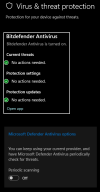
The Windows Defender app they provide in 11 is on par with many free third party apps. For those who never bother with security it is adequate.

When you load another security app Defender is disabled automatically, waiting to leap in should the default become compromised. I'd just leave it as is. I notice this when BitDefender updates the core product stopping and restarting services.


1722835218391.png

Hit me up with 11 questions if you want. Did you get home or pro? Pro does things that would amaze me if I took the time to learn.

Full disk AES 256 bit encryption is cool - think that started with 8 or 8.1. Only have used that for flash drives. I lost one at work once. Had a lot of goodies on it I would not want the general population to have. Unless they are NSA they did not get a thing.

Far from an expert, I have learned some neat tricks. The Start Menu with the "Recommended" section was maddening.

ExplorerPatcher fixes that and other settings you didn't know you wanted changed. I mentioned this earlier in the thread.

1722835397557.png
 
Last edited:
Good! Avast is probably the best free scanner out there. I use it on an old notebook PC I need to use for my flatbed scanner. Long story, was the best workaround. I use the premium version of BitDefender on the desktop. Maybe $30 a year. Good software is worth that. Like Acronis.

You are misreading the default browser messages Google Chrome fires at you. You should be able to set whatever browser as default. They may complain as it were. Edge is the worst at nagging. I recently found a hidden setting of sorts that shuts it all down. I have never encountered any browser that prevents an installation of legitimate software.

Simply uninstall Google Chrome, then load what you want. It is a :poo: browser privacy-wise. Firefox is set as my default, not even a little buggy. The Brave browser would be an ideal replacement for the g-word app. I use that for forum browsing.
The DDG mobile browser is excellent. The PC, not so much imwo. I'm a tweaker, a rabid settings tweaker. The PC version has fewer settings than the iOS version. Inexcusably, it does not allow for automatic data dumping upon exit like the iOS version does (and all other browsers I use can). Having to click the stupid flame icon is irritating. I do quite like the Duck YouTube player.
Free Advast is better than the free Malwarebytes?
 
Free Advast is better than the free Malwarebytes?
Free Malwarebytes is not a real time always running scanner. A full time scanner is still best. Give Avast a try, pretty sure I recommended this to you way back..


It is overly naggy in pushing the premium options, super annoying! Fortunately it has a "silent" mode that turns most nags off. Many AV apps also have the silent feature. Is ideal for users who may freak out if they see a message from the app they do not understand.

Looking at some of the pay for stuff, some seems of little worth.


A page for the UK loads with those links. My VPN is confusing the widget that loads your country page.

Easy enough to change to USA.
 
Last edited:
  • Like
Reactions: Ant
The Windows Defender app they provide in 11 is on par with many free third party apps. For those who never bother with security it is adequate.

When you load another security app Defender is disabled automatically, waiting to leap in should the default become compromised. I'd just leave it as is. I notice this when BitDefender updates the core product stopping and restarting services.


View attachment 102388

Hit me up with 11 questions if you want. Did you get home or pro? Pro does things that would amaze me if I took the time to learn.

Full disk AES 256 bit encryption is cool - think that started with 8 or 8.1. Only have used that for flash drives. I lost one at work once. Had a lot of goodies on it I would not want the general population to have. Unless they are NSA they did not get a thing.

Far from an expert, I have learned some neat tricks. The Start Menu with the "Recommended" section was maddening.

ExplorerPatcher fixes that and other settings you didn't know you wanted changed. I mentioned this earlier in the thread.

View attachment 102389
I don’t recall. I bought it recently and didn’t use for almost a month. I didn’t want to install all the music stuff but I got some on it. That’s why I started this.

But I was lost trying to find the start menu.
I don’t like the default set up.
I had no idea what the security is and it might be from the company that refurbished it.
 
Last edited:
I finally bought and started using an external a year or so ago, it sits velcro'd to the top of my pc desk top always plugged in for a simple drag n drop. Why I waited so long I have no clue.
I have 2, one is a western digital my book. I had one of those died and trying to fix it I made sure it would never work.
I think that if I cracked it open and took the drive out I could have read the data. Whatever, the other one is a black something.
They are not connected since some viruses might “encrypt” my data, well they can’t have access to it so…
I do regular backups.
Also I reformat my C: drive into a C: and a D:. I then move my documents to D:. That way I can reformat the operating system drive without erasing my data. This came from when I was corporate and all data was saved on a server.
It’s been a longgggggg time since I have had issues where I need to reformat my hard drive, even the old “system restore” to get rid of a virus, can’t remember last time I used that
 
I have 2, one is a western digital my book. I had one of those died and trying to fix it I made sure it would never work.
I think that if I cracked it open and took the drive out I could have read the data. Whatever, the other one is a black something.
They are not connected since some viruses might “encrypt” my data, well they can’t have access to it so…
I do regular backups.
Also I reformat my C: drive into a C: and a D:. I then move my documents to D:. That way I can reformat the operating system drive without erasing my data. This came from when I was corporate and all data was saved on a server.
It’s been a longgggggg time since I have had issues where I need to reformat my hard drive, even the old “system restore” to get rid of a virus, can’t remember last time I used that
WD My Book - a hardware backup product? I'm not a fan of proprietary hardware backup solutions. When they go bad or are discontinued your backups can become unusable. Stick with what has worked in years past and will continue to work into the future.

Yet another backup method I have used for years: How to Use SyncToy for Data Backups

It allows for simple drag and drop-like backups that are automated per your specifications. It is an older utility that has some limitations. Highly customizable and reliable. Perfect for external drives. The link is a very good tutorial. Best if you have a clear understanding of the folder / file structure in Windows.

There are some prerequisite Microsoft apps needed such as .NET Framework: Overview of .NET Framework - .NET Framework

You could simply load the package beforehand: Microsoft .NET Framework 4.8.1 for Windows 10 version 21H2, Windows 10 version 22H2, Windows 11 version 21H2, Windows Server 2022 (Desktop, Azure Editions), Azure Stack 21H2 and Azure Stack 22H2 (KB5011048) - Microsoft Support

Even if you decide not to try SyncToy, the .NET package is worth having on a Windows PC.
 
Last edited:
I used to be a resident computer nerd at Tom's hardware...
I posted solutions that received 1000s of likes...

Then the moderators started stealing / putting their names on my posts.
The moderators stole all my "likes..." thousands of them. They gave my "likes" to themselves.
A couple of the solutions I posted received over 25,000 likes, each. All of which were hijacked.
The moderators elevated themselves to the top forum rank, using my posts.
The moderators changed the forum rules, to block me from rising to the top rank of the forum.

I "was" the admiral of Tom's hardware... #1 tech....but intentionally blocked from becoming such.

The moderators buried my original posts in the forum archives....so that nobody would know who really wrote the software solutions.

The moderators threatened to expel me from the forum, for complaining about the plagiarism.
The moderators broke their own forum rules to elevate themselves, with my posts.

Yes this really happened. The only thing you see on Tom's hardware, is what the moderators want you to see.
 
Last edited:
Back
Top