POD XT and X3

To run to the PA, the best way is to take a Direct Out (the XLR connectors) to the mixing board.

There are two Direct Outs in case you want to run in stereo. Usually, people don’t use the stereo function. In this case, just take the left XLR to the mix.

The monitor outs are normally set to mirror the Direct Outs and can be run to a local amp or powered speaker for monitoring. Unless, that has been changed in a profile, you should be all set. I’ve never had to change those.

I used the X3 at the rehearsals tonight, no amp just the Variax some cables and the POD. I plugged into the PA using the XLR. All was great, I was able to tweek vol with the pedal.

However, some of my settings that sound great at home, lower volume, into a half stack didn’t push thru at stage volume

Instead i ended up using just a few patches that covered most songs we did, had a Gilmour Clean, and a Fuzz channel, then a couple of other settings that worked, it’s hard to get the settings right at home, maybe need more loud time to fully appreciate the POD X3
 
I'm not sure what you mean by "push through". I'm assuming it means the sound wasn't what you were expecting.

I would point out that if you are building patches using a guitar amplifier model and cabinet, it will not sound the same when you listen to that same patch using a direct out to the PA.

The reason is that the guitar amp and cabinet add their own color to the sound. So, while you build your tones, you're hearing the combination of the patch you're building plus the amp/cabinet. However, when you run direct to the PA, you will not have the amp/cabinet as part of the sound. Likely, you'll end up with a disappointing sound since much of what you were listening to (the amp and cabinet) when you built the tone is missing.

Ideally, you should build tones using a flat-response/full-range (FR/FR) amp and speaker or an FR/FR powered speaker. You essentially want the amp/speaker setup you use at home to build your tones to be sonically similar to a PA system. That way, you can get a more accurate sense of what your patches will sound like when played through a PA. PA systems should be very transparent, whereas guitar amps and speakers intentionally introduce their own flavor to the sound.

You can also use some flat response headphones to get a patch roughed in.
 
Last edited:
I'm not sure what you mean by "push through". I'm assuming it means the sound wasn't what you were expecting.

I would point out that if you are building patches using a guitar amplifier model and cabinet, it will not sound the same when you listen to that same patch using a direct out to the PA.

The reason is that the guitar amp and cabinet add their own color to the sound. So, while you build your tones, you're hearing the combination of the patch you're building plus the amp/cabinet. However, when you run direct to the PA, you will not have the amp/cabinet as part of the sound. Likely, you'll end up with a disappointing sound since much of what you were listening to (the amp and cabinet) when you built the tone is missing.

Ideally, you should build tones using a flat-respons/full-range (FR/FR) amp and speaker or an FR/FR powered speaker. You can also use some flat response headphones.

The only amp I have that could get close is a Kuston acoustic 60w amp, this has a XLR in for a mic or mixer with a basic tone bass middle tweek

I will set that up and put everything at 12 noon then go from there

Just to clarify tho, the channels I did use rocked and it was a better sound already than what I have had before with just a modelling amp
 
I will try the 4 cable method tonight. See how that works on my Traynor valve amp.

Unsure what’s output setting to have it on tho, maybe use combo or power stack we see
 
hey @Hackmaster
Check out all that FRESH CLEAN VIRGIN REAL ESTATE FOR PICKUPS!!!!!!!!!!!!!!!!!!!!!!

c9a8321c-e6a8-4a7d-9cfe-ed4bbb33340f-jpeg.25315
 
I don’t get the warning tag on the package.

How would you choke on a cable?

Hey Smitty

I want to set amps only on the pod, no effects, I want to have a fresh clean pallet to work from but I can’t work out how to dial in amps only without effects, nothing online either

Do you have Any advise on this
 
Hey Smitty

I want to set amps only on the pod, no effects, I want to have a fresh clean pallet to work from but I can’t work out how to dial in amps only without effects, nothing online either

Do you have Any advise on this

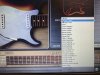
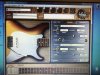
The easiest way is to just turn the effects off in the Gearbox page. If you look at your post #26, you can see some pedals turned on. Turn them off and only enable the amplifier. This will let you select both an amp and cabinet model.

To my knowledge, you can’t straight up completely remove an effects chain from the patch. But, you can turn off all effects, yielding the same result.

If you’re interested, I still have raw “User” patches from my X3 Live that I could email to you. These are good to get started on a patch.
 
The easiest way is to just turn the effects off in the Gearbox page. If you look at your post #26, you can see some pedals turned on. Turn them off and only enable the amplifier. This will let you select both an amp and cabinet model.

To my knowledge, you can’t straight up completely remove an effects chain from the patch. But, you can turn off all effects, yielding the same result.

If you’re interested, I still have raw “User” patches from my X3 Live that I could email to you. These are good to get started on a patch.

That would be awesome thanks
 
Okay...I just sent again.

As I recall, when I got my X3 Live, the first 18 or 19 banks were pre-loaded with some tone from Line 6. They ranged from clean to metal, with a variety of different effects and amp/cabinet models.

There were also acoustic guitar, bass, and even vocal patches. Yes, you can even sing through the X3 Live. That's what the XLR input is for. There are some vocal effects, like a de-esser, and some other things

Anyway, the rest of the tones in all channels were simply populated with a base patch called, "User". That is what I just sent you.

Although you can modify any patch to create a tone, but this gives a good place to get started.
 
Okay...I just sent again.

As I recall, when I got my X3 Live, the first 18 or 19 banks were pre-loaded with some tone from Line 6. They ranged from clean to metal, with a variety of different effects and amp/cabinet models.

There were also acoustic guitar, bass, and even vocal patches. Yes, you can even sing through the X3 Live. That's what the XLR input is for. There are some vocal effects, like a de-esser, and some other things

Anyway, the rest of the tones in all channels were simply populated with a base patch called, "User". That is what I just sent you.

Although you can modify any patch to create a tone, but this gives a good place to get started.

Thanks
 
Back
Top