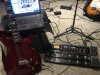
POD XT and X3

Just plugging it thru guitar input gives me so much flexibility, however the Variax can also get power from the Variax port (when I get a cable) and I can adjust both guitar and sounds from Gearbox

Ahh...now I see.

Whenever I bring up Gearbox I see the controls for the Variax, but since I don't have one, they don't really mean anything to me.

Interesting, though....
 
So, Leeds...

I just remembered a minor physical design issue with the X3 Live that I ran into several years ago. But, don't worry. It's not a huge deal and I'll show what to do about it.

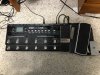
Here's a shot of my whole X3 Live rig. I use a second expression pedal and a little switch box that I made to allow me to switch guitars quickly.

FullSetup_sm.jpg

The design issue I mentioned will only be a potential problem if you play outside in the bright sunlight and if the sun is at the correct angle.

The reason is that the built-in expression pedal works in conjunction with an optical system inside the unit. The pedal operates a light interrupter that gradually blocks light from an LED inside the unit from being "seen" by an opto-detector. This is very effective and eliminates the potential for dirty pots.

The problem is that if the sun (or other bright lights) get into the unit, the light will play havoc with the opto-detector and you'll essentially lose control via the foot pedal. Unfortunately, the hole where the interrupter enters the unit is not especially well-shielded from external light.

This actually happened to me several years ago during a sound-check at an outdoor event. Needless to say, it was a very nervous several minutes while I tried to figure out what was going on!

The fix is to block outside light, and this can be done with black gaffers tape.

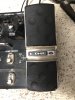
First, tape over the pedal, covering the holes in the pedal, as in the pic below. This blocks light from entering the unit through the holes in the expression pedal if you take your foot off the pedal.

Covered Pedal_sm.jpg


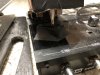
Lastly, use some gaffers tape to make a little "light dam" to block light that may enter from the front, as shown below:

Light Dam_sm.jpg

The tape you see on my X3 Live in these pics is the same tape I put on it years ago when this first happened to me. It's been effective ever since.

Just a little hint that may come in handy!
 
Last edited:
So, Leeds...

I just remembered a minor physical design issue with the X3 Live that I ran into several years ago. But, don't worry. It's not a huge deal and I'll show what to do about it.

Here's a shot of my whole X3 Live rig. I use a second expression pedal and a little switch box that I made to allow me to switch guitars quickly.

View attachment 25271

The design issue I mentioned will only be a potential problem if you play outside in the bright sunlight and if the sun is at the correct angle.

The reason is that the built-in expression pedal works in conjunction with an optical system inside the unit. The pedal essentially operates a light interrupter that gradually blocks light from an LED inside the unit from being "seen" by an opto-detector. This is very effective and eliminates the potential for dirty pots.

The problem is that if the sun (or other bright lights) get into the unit, the light will play havoc with the opto-detector and you'll essentially lose control via the foot pedal. Unfortunately, the hole where the interrupter enters the unit is not especially well-shielded from external light.

This actually happened to me several years ago during a sound-check at an outdoor event. Needless to say, it was a very nervous several minutes while I tried to figure out what was going on!

The fix is to block outside light, and this can be done with black gaffers tape.

First, tape over the pedal, covering the holes in the pedal, as in the pic below. This blocks light from entering the unit through the holes in the expression pedal if you take your foot off the pedal.

View attachment 25272


Lastly, use some gaffers tape to make a little "light dam" to block light that may enter from the front, as shown below:

View attachment 25273

The tape you see on my X3 Live in these pics is the same tape I put on it years ago when this first happened to me. It's been effective ever since.

Just a little hint that may come in handy!

We have an outside gig coming up at a BBQ I will surely remember this and have tape on standby

How do you like the pedal otherwise? I find it at first listen to be mind blowing, like I am at a concert but it’s me making all the noise :)
 
Honestly, I do like it.

I know it's been superseded by the HD500 and the current Helix.

But, it is still a very serviceable device. I wouldn't hesitate to use it live today.

I'll give you a hint to creating a big sound. Use the Dual Tone feature so you essentially have two patches running simultaneously. I created a dual tone patch that I call "Power Metal". It uses two separate amplifiers, cabinets and effects. When run simultaneously it makes for a big, fat sound.
 
Oh, one other thing...don't bother looking into the X3 Live to try to see the LED I'm talking about. The light is similar to what is emitted by your TV's remote control. It's not visible to the naked eye. However, sunlight is a very broad spectrum of light and can interfere with the opto-detector if it gets into the unit.

I know this to be true from first-hand experience!

But, don't be alarmed by this. It's easily dealt with and shouldn't stop you from enjoying your new system.
 
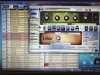
387D7D31-CD39-4330-83C8-EE0D2B12B328.jpeg Put two patches in, they work but can’t work out how to save? When I come out of the app they disappear :(

I tried to use save top left but ?

Edit

Ok I save it on the X3 itself ugh !! Lol. Sorted now to seek more patches :)
 
Last edited:
View attachment 25288 Put two patches in, they work but can’t work out how to save? When I come out of the app they disappear :(

I tried to use save top left but ?

Edit

Ok I save it on the X3 itself ugh !! Lol. Sorted now to seek more patches :)

Yup. You got it.

Using the "File ---> Save as" function in the smaller Gearbox window will save the patch to your computer, but won't load it into the device.

To actually store it into the X3 Live, you use the "Put Selected" function at the top of the larger Hardware Memory Window. You first select the patches and "Put" them into the hardware (the X3 Live).
 
Last edited:
Trying to work out how change clean crunch lead ? For song types

There are a couple of ways to approach this.

For review, you obviously have seen the "Stomp", "Mod", and "Delay" switches on the X3. The Stomp switch is for overdrive and distortion type pedals. The Mod switch is for modulation effects (Chorus, Flanger, etc.), and the Delay switch is for...well...delay effects!

One drawback of the X3, is that you can only have one modulation effect for any given patch. Of course, in the real world you rarely would run two modulation effects at the same time, but with this processor you have to think about how you build and organize your patches to provide the effects you want to use.

Anyway....here are some ideas to address your question....

One thing you could do is build your patch and assign some type of overdrive or distortion pedal to the Stomp function. Then, it's just a matter of using the Stomp switch to turn it on or off during a performance, just as if you are using a physical OD/distortion pedal. The base patch could be a clean tone. Then, you hit the Stomp switch to pull in your crunch. Again...just like if you had an OD pedal in your chain.

Another approach would be to build your clean and crunch tones and assign them to Tone 1 and Tone 2. As you've likely seen, each main selection allows two tones. This can be used in a variety of ways. But, in this case you could build the basic clean tone and assign it to Tone 1. Then, you could start with the same patch, but maybe crank the amp a little bit and add a little bit of overdrive and boost. You would assign this patch to Tone 2 (of course, give it a new name for the second tone). In this way, a single press on the Tone 2 switch on the X3 will toggle to that crunchier version of Tone 1. This approach is good in that toggling between Tone 1 and Tone 2 has practically no latency. Switching between selections in a Bank is extremely fast and pretty much undetectable, but it does take longer than toggling between Tone 1 and Tone 2.

Building patches and making them useful for you comes down a LOT to how you organize things.

This thread has me thinking...I'm contemplating making some YouTube videos to go over some of these things....
 
Last edited:
Hence why the saved patches that the previous owner left in for me have one song per saved number with Clean Dirty Stomp Lead saved in the 4 banks

I haven’t saved mine like that I just mixed 4 songs into a bank lol
 
Hence why the saved patches that the previous owner left in for me have one song per saved number with Clean Dirty Stomp Lead saved in the 4 banks

I haven’t saved mine like that I just mixed 4 songs into a bank lol

That's one approach. There are numerous ways to build and organize patches. It all comes down to what makes sense for you.

I do build some song-specific patches. Most of the time, I build them according to sounds I want to use.
 
I see how the Variax setting works now

When it’s plugged in using the line 6 cable, you can change guitar just with the stomp box

So let’s say you playing Floyd wish u here on 1 with acoustic Gibson 59, then switch to patch 2 let’s say Run like Hell, it’s also switches the guitar to Fender Strat Spank !

Ohhhhhh :). Nice
 
That's one approach. There are numerous ways to build and organize patches. It all comes down to what makes sense for you.

I do build some song-specific patches. Most of the time, I build them according to sounds I want to use.

I think I should put my more accurate settings at the back of the settings for playing at home

I am thinking of using 1-4 for clean dirty etc as Ninja King Who jams with us can’t make the exact tone with one guitar. That way we have similar sound. Just have to work out how !!
 
That's one approach. There are numerous ways to build and organize patches. It all comes down to what makes sense for you.

I do build some song-specific patches. Most of the time, I build them according to sounds I want to use.

I can’t find info on Clean dirty chunk and lead. How do these get changed and why is it set up like this ? TIA
 
I can’t find info on Clean dirty chunk and lead. How do these get changed and why is it set up like this ? TIA

You mean from the screen shot you posted earlier?

Those look to me like just the names the previous owner gave to those patches. The X3 Live doesn't come loaded with any patches named that. I'm guessing he may have had them organized in his computer like that.
 
You mean from the screen shot you posted earlier?

Those look to me like just the names the previous owner gave to those patches. The X3 Live doesn't come loaded with any patches named that. I'm guessing he may have had them organized in his computer like that.

Ah I see now lol

Stupid me looking thru all the info and can’t find how to change these :

So tone 1 and tone 2 is like he has mixed two amps
 
C9A8321C-E6A8-4A7D-9CFE-ED4BBB33340F.jpeg I worked out how to open the Dropbox attachment thanks

I was messing with the settings from custom tone and adding but you show how to set up and change names which I have not seen on YT yet. You should up load this I am sure people would be interested like I am

Edit
So now I can save an edit I can also copy the tone one, then move same to tone 2, paste it and have two amps with slight adjustments that sound fuller :)

Brain hurts now !!
 
Last edited:
Thanks!

I'm glad the video helped. If I do upload a video, I'd actually want to redo a few things to smooth out the presentation.

I'm glad it's coming along for you!
 
Thanks!

I'm glad the video helped. If I do upload a video, I'd actually want to redo a few things to smooth out the presentation.

I'm glad it's coming along for you!


Can I change output on the box and not use the Laptop?

I have output for front of stack, but may need to try into a PA wens eve could that be done at the rehearsal studio ?
 
To run to the PA, the best way is to take a Direct Out (the XLR connectors) to the mixing board.

There are two Direct Outs in case you want to run in stereo. Usually, people don’t use the stereo function. In this case, just take the left XLR to the mix.

The monitor outs are normally set to mirror the Direct Outs and can be run to a local amp or powered speaker for monitoring. Unless, that has been changed in a profile, you should be all set. I’ve never had to change those.
 
Last edited:
Back
Top