Doing an End-Run Around Helix, Fractal, and Kemper

TBF smitty I only got the cheapo STANDARD option -- the middle of the road and high end options are .... well more than I knew I would EVER have need of ... but it looks cool ;)
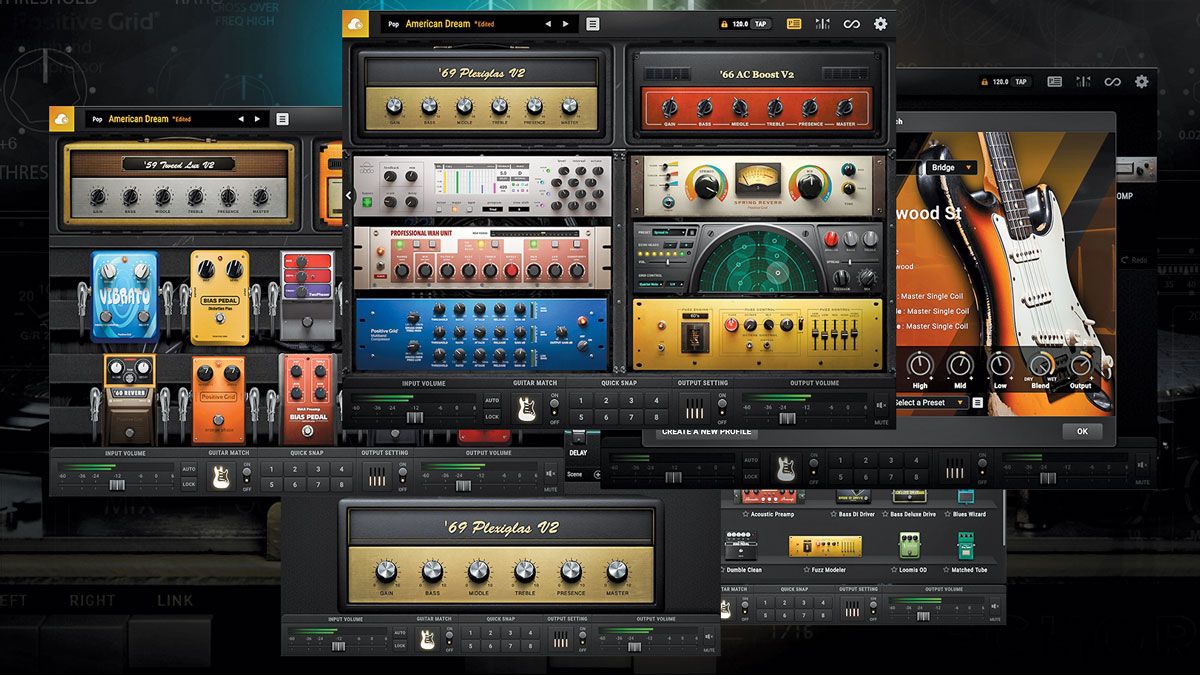


Yeah, the basic standard option is how I'll probably go. I think the current pricing of $49.00 is a limited time offer, so I'll jump on that. I'm in no rush to use it, but I think it would be fun to get a midi foot controller and see what I can do with it. Eventually (as in...way down the road because I have other stuff that sort of takes priority) I think I'd like to give it a go in a live setting. If you go into your laptop settings, you can set your display options so nothing happens when you close the laptop. You could plug the controller into the USB, launch the program, shut the lid, and tuck the laptop away somewhere safe and just rock on! A laptop with a solid-state drive would be pretty robust, too.
 
yeppers-- 49.00 for a WHOLE CRAP ton of tones ..... its almost stupid NOT to get it -- HELL 49.00 wont even buy 2 people dinner at a half ass restaurant

cant even get a USED tire mounted for 49.00
(I could go on but why)

OH OH OH -- NO SOLDERING!
 
yeppers-- 49.00 for a WHOLE CRAP ton of tones ..... its almost stupid NOT to get it -- HELL 49.00 wont even buy 2 people dinner at a half ass restaurant

cant even get a USED tire mounted for 49.00
(I could go on but why)

OH OH OH -- NO SOLDERING!

Well, the "End-Run" just got more interesting...

Bias FX2: Purchased, downloaded, and installed!
 
Thanks, Kerry! Those really are helpful insights.

Are you using Bias FX in a live setting?

As for latency, I can say that in my own testing at home, I can't detect any using Guitar Rig 6 and the Presonus interface shown in the pic in my OP. I mean, I'm sure there has to be some latency, but it is essentially undetectable.
I don’t use it live. I like to keep my gear as simple as possible live. Too much to go wrong with a computer involved. I mostly play bass live so I use a DI into an amp for a stage monitor and into the PA for the house. I do use it for practicing with headphones. I load the plugin in Reaper and arm the track in Reaper. Then I open YouTube or a music player in another window and play along. It is great for playing to backing tracks or playing along with a song to learn it.
 
Well, I've been playing around some more with both Guitar Rig 6 by Native Instruments and Bias FX2 by Positive Grid. I installed the standalone version of both programs; I'm not using them with a DAW.

I have made a few observations.

These are slick programs!

The programs run best using ASIO drivers. Guitar Rig 6 more or less just defaulted to that, but I had to select that in Bias FX2. Initially, Bias FX2 wanted to use Windows drivers. If you have had multiple devices connected to your computer which have installed ASIO drivers, you need to be sure you pick the right one! Over time, I have ended up with ASIO drivers from my Allen&Heath Zed i10 mixer, my Presonus interface, and my Line6 POD X3 Live. I'm running the software with my interface connected to one of the USB 3.0 ports on my laptop.

Once up and running, they both run pretty much glitch free. There are already quite a few options in the standard version of Bias FX2, but buying the next level up unlocks even more. There is not too much in the free version of Guitar Rig 6, but it has all I was interested in having for the moment. I was really just looking for some effects to use with acoustic guitar. Before spending more on either software, I think I want to get a MIDI controller and get that working. I'm really curious about that and I'd like to give that sort of thing a shot.

As for using this live, I feel pretty comfortable using it as-is with Guitar Rig with acoustic guitar. I won't be changing patches or switching effects. Before attempting with Bias FX2 with my electric guitar and MIDI control, I think I want to get a more robust computer.
 
For live use I just run the Acoustic Simulator in my Zoom G3, add a bit o chorus and some verb. Works quite well, is close enough for sure.
Or, just use one of the Godin with the piezo in the bridge! Go from acoustic to full bore.

I've thought of trying an electric with a piezo. That would be pretty cool!

But, to be honest, I kinda want to try the idea of using a software plug-in (though I'm using it as a stand-alone application) to provide effects in a live setting. So, the connectivity would be my guitar to a computer interface (my Presonus AudioBox USB), and the interface to a laptop computer. The output would come from the output terminals of the Presonus since it sends two channels into the computer via the USB and gets two channels back from the computer, also via USB.

I realize this is unconventional and sort of a brave (some might say "fool-hardy"!) approach. But, I really want to see if I can make it work. I figure using an acoustic guitar with a setup that requires minimal processing is a "safe-ish" sort of way to try it.
 
So, this Bias FX 2 thing is kind of neat...I'm liking this!

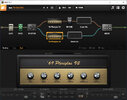
Here is a screen shot of one of the factory presets. It's called "British Dirt' and it does sound cool.

I've been playing around a little bit with customizing setups. It hasn't been too tough to figure out. The customizable, virtual signal flow concept is pretty similar to other processor GUIs. It's more just figuring out where to point and click for stuff....kinda like any other software.

At some point I'll probably upgrade to Bias FX 2 Pro. I'm not so much looking for additional models of anything, but the Pro version has a direct IR Loader that allows you to load custom IRs and it also has a tool to make MIDI integration a little easier.


BiasFX2_Screenshot.jpg
 
At some point I'll probably upgrade to Bias FX 2 Pro. I'm not so much looking for additional models of anything, but the Pro version has a direct IR Loader that allows you to load custom IRs and it also has a tool to make MIDI integration a little easier.
Well, after doing a little more digging, if I want to incorporate MIDI control (which I do!), I do have to upgrade to the Pro version. MIDI is not supported in Bias FX2 Standard. You can see the option in the Bias FX2 software, but the option is locked. But, that is only a $50.00 upcharge for the Pro version, which would unlock MIDI and give me more options.
 
I saw the former owner of my Hiwatt DR103 last weekend at the Orange Goblin show. He owns Mad Oak Studios in Boston, as well as being the singer for Roadsaw and drummer for Sasquatch. We were discussing the Hiwatt and how many recordings it has been used. He was telling me that when Fractal started out, they went to him to model all the amps at Mad Oak. There is a Mad Oak folder in one of the Fractal model versions, and a patch to use my DR103. So, if you want to sound like me, go check it out.
 
Last edited:
I saw the former owner of my Hiwatt DR103 last weekend at the Orange Goblin show. He owns Mad Oak Studios in Boston, as well as being the singer for Roadsaw and drummer for Sasquatch. We were discussing the Hiwatt and how many recording it has been used. He was telling me that when Fractal started out, they went to him to model all the amps at Mad Oak. There is a Mad Oak folder in one of the Fractal model versions, and a patch to use my DR103. So, if you want to sound like me, go check it out.

That's pretty wild!
 
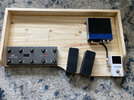
So, here's the start of the new pedal board. Essentially, this is just a board for the MIDI control components and the audio interface for the computer.

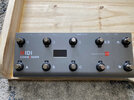
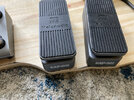
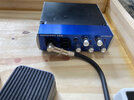
Nothing on this board is an actual effects pedal. On the far left is the ten-button MIDI Commander. Next to it are two expression pedals. The MIDI Commander and pedals work together with the Bias FX2 program in the computer. I will be able to select patches and turn effects on and off with the MIDI Commander. For most patches, I'll program the two expression pedals to act as a volume and a wah. To the far right is just a TC Electronics PolyTune tuner, which connects to the audio interface. The Presonus audio to USB interface is the blue and black box toward the corner.

The MIDI Commander and the interface will both connect to the computer via USB.

All the open, unused area is for future use. One thing I may eventually do is to install the mobile version of
Bias FX2 on my iPad and use that for processing, instead of my laptop. If I do that, the iPad could sit comfortably in the unused area of the pedal board.

This is just the beginning. I still need to build cables to length and to paint the board, but you can see the general layout.

Here's just a basic full shot:

MIDI_Board_Full.jpg

Here's a closeup of the MIDI Commander:

MIDI_Board_Controller.jpg

A closeup of the two expression pedals:

MIDI_Board_Pedals.jpg

And, finally the Presonus Audio Interface. The cool thing is that I bought this from our own @Sp8ctre a couple of years ago!

Thanks, Sp8ctre!

MIDI_Board_Interface.jpg

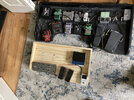
Just for a little comparison, here's a shot of the new board alongside my other pedal board:

I'm definitely down-sizing!

MIDI_Board_Top.jpg
 
How long will/can your USB cable run be? I ask because I ran into difficulties with a webcam cable run being too long. I’ve had fairly long, non streaming, data cable runs in the past…but those were for updating/loading effects pedals.
 
How long will/can your USB cable run be? I ask because I ran into difficulties with a webcam cable run being too long. I’ve had fairly long, non streaming, data cable runs in the past…but those were for updating/loading effects pedals.

The MIDI Commander came with a 6 foot USB cable. You are correct. USB definitely has distance limitations.

My plan is for the computer to be within 10 feet of the board. If I eventually do use an iPad or even a smaller form-factor computer, I'll just sit it in the board in the open area.
 
Back
Top