Doing an End-Run Around Helix, Fractal, and Kemper

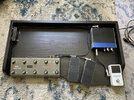
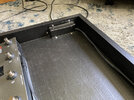
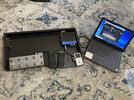
So, here's the start of the new pedal board. Essentially, this is just a board for the MIDI control components and the audio interface for the computer.

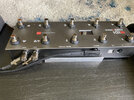
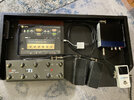
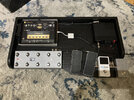
Nothing on this board is an actual effects pedal. On the far left is the ten-button MIDI Commander. Next to it are two expression pedals. The MIDI Commander and pedals work together with the Bias FX2 program in the computer. I will be able to select patches and turn effects on and off with the MIDI Commander. For most patches, I'll program the two expression pedals to act as a volume and a wah. To the far right is just a TC Electronics PolyTune tuner, which connects to the audio interface. The Presonus audio to USB interface is the blue and black box toward the corner.

The MIDI Commander and the interface will both connect to the computer via USB.

All the open, unused area is for future use. One thing I may eventually do is to install the mobile version of
Bias FX2 on my iPad and use that for processing, instead of my laptop. If I do that, the iPad could sit comfortably in the unused area of the pedal board.

This is just the beginning. I still need to build cables to length and to paint the board, but you can see the general layout.

Here's just a basic full shot:

View attachment 84045

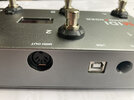
Here's a closeup of the MIDI Commander:

View attachment 84046

A closeup of the two expression pedals:

View attachment 84047

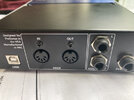
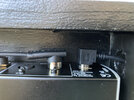
And, finally the Presonus Audio Interface. The cool thing is that I bought this from our own @Sp8ctre a couple of years ago!

Thanks, Sp8ctre!

View attachment 84048

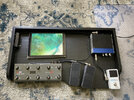
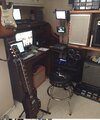
Just for a little comparison, here's a shot of the new board alongside my other pedal board:

I'm definitely down-sizing!

View attachment 84049
Smitty you might want to try the iPad setup first. I bought an iPad mini in 2016 to use as a dedicated part of my iRig setup. In the bedroom it was fine but at band volumes it was unbearably noisey.


21DB204D-9338-44EF-8A57-539B8B81E3B3.jpeg
 
Last edited:
The MIDI Commander came with a 6 foot USB cable. You are correct. USB definitely has distance limitations.

My plan is for the computer to be within 10 feet of the board. If I eventually do use an iPad or even a smaller form-factor computer, I'll just sit it in the board in the open area.
Can the distance limitations something that can be cured by converting or getting an adapter for Ethernet cables? Or, is USB needed for powering the devices?
 
Smitty you might want to try the iPad setup first. I bought an iPad mini in 2016 to use as a dedicated part of my iRig setup. In the bedroom it was fine but at band volumes it was unbearably noisey.


View attachment 84058

What was your connectivity? Were you feeding the sound system directly from the iPad?
 
Can the distance limitations something that can be cured by converting or getting an adapter for Ethernet cables? Or, is USB needed for powering the devices?

The MIDI commander can be powered by a pair of AAA batteries or by using USB power. You can load it with rechargeable batteries and actually charge them using a USB cable plugged into an external charger. But, it can also run off the USB power, though it doesn't have to. The audio interface does require USB power, though.

As for the distance, itself, I'm pretty certain a USB extender would work, but having the computer close doesn't bother me. I keep my display settings so that the laptop keeps working if the lid is closed. So, I can start Bias FX2, close the laptop lid, and tuck it out of the way.
 
Well, howdy!

So, this actually works!

I'm still playing around with this, but I've been able to do what I planned to do. That is, I can change patches, turn effects on and off, and ramp volume. I haven't messed around with wah, yet.

I still need to develop a systematic operational concept for building patches and assigning MIDI channels for control, but this MIDI thing is actually working!

After I've played around with this some more and have the process more refined and understood, I may make a YouTube video detailing the process.
 
What was your connectivity? Were you feeding the sound system directly from the iPad?
It was guitar into the iRig pedal, lighting cable to the iPad mini and back to the iRig pedal and analog into the amp.
 
It was guitar into the iRig pedal, lighting cable to the iPad mini and back to the iRig pedal and analog into the amp.

I see. You went into a guitar amp? Did you try running straight to a PA system?
 
Well, now...things got a little interesting today.

I got to looking at the backplane of the MIDI Commander.

Here's part of it:

MIDI_Board_ControllerBackPlane.jpg

Aaaand, I got to looking at the backplane of my PreSonus AudioBox USB audio interface.

Here's what that looks like:

MIDI_Board_PresonusBackPlane.jpg

Up until now, I have been running the USB out of the MIDI Commander into one USB port on my computer, and I was running the USB out of the PreSonus audio interface into another USB port on my computer.

But...lookie here! The MIDI Commander has a MIDI out and the PreSonus has a MIDI in.

Hmm.... Are you thinking what I'm thinking?

Well, sure enough...I plugged the MIDI out of the MIDI Commander into the MIDI in of the PreSonus, then I plugged the USB from the PreSonus into my computer, and launched Bias FX 2.

After selecting the PreSonus as the MIDI device instead of the MIDI Commander in Bias FX2, the MIDI controls I had previously set up still worked like a champ! The MIDI controls from the MIDI Commander are embedded into the USB from the PreSonus and they are received and recognized just fine by the program. All the audio interfacing functionality still works, as well, and isn't affected at all.

This is pretty cool because it means I only have to run a single USB to my computer, simplifying connectivity.

I also played around a bit more. For all intents and purposes, the MIDI switching is instantaneous. If you just watch the computer screen, you can get the impression that there is a lag between stepping on a switch and the change taking place, but this is only due to the visual transitions they've programmed into the GUI. Audibly, the MIDI changes take place right away.

I need to order some parts (cable and connectors) to finish up the board. But, so far, this is working out pretty well.
 
“I love it when a plan comes together”!
Yeah. So far, so good.

I still need to get the parts to finish building my pedalboard for the MIDI and audio components. Then, it's just a matter of building patches in Bias FX2.

The cool thing about going this route is that if I should ever decide in the future to use another software, such as Amplitube, I can do so without changing any of the hardware I've accumulated. It's just matter of buying and installing software.

That is VASTLY less expensive than switching hardware platforms, such as going from a Helix to a Kemper, for example.
 
Some more progress.

Actually, with the exception of putting some protective feet on the bottom, I'm pretty much done with my MIDI board,.

Here's a finished, top-down view. Things are in the same place as I described in an earlier post.

MIDIBoard_Top (1)_sm.jpg

So, I'll just go on to a few details about the board...

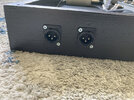
I'm using both outputs from the Presonus AudioBox, just in case I should ever want to run in stereo. Conveniently, the Presonus provides balanced outputs, so I installed a couple of XLR jacks for the outputs:

MIDIBoard_XLR_sm.jpg

This is just a view of the protective metal cover I fabricated for the XLR jacks on the other side. The cable is Gepco XB401 "X-Band" cable. It is a very low capacitance cable. It has only 17.5 picofarads of capacitance between conductors. It is made for studio or rack interconnect wiring.

MIDIBoard_XLRCover_sm.jpg

Here's a shot of the MIDI Commander backplane. I was able to find a really low profile MIDI cable with 90^ ends. The cable is made by Rockboard and was less than $9.00 for a 60 cm (approximately 24") cable. I made the cables for the expression pedals.

MIDIBoard_CommanderRear_sm.jpg

To get a clearer view of the benefit of the flat MIDI connector, here's a view of the back of the Presonus AudioBox in its final location. It allows me to position the AudioBox very close to the rear of the board.

This also shows a flat, 90^ USB cable (on the far right) that I found for it.

MIDIBoard_AudioBoxRear_sm.jpg
 
In another post, I had mentioned that I may, at some point, decide to use my iPad instead of my computer to run Bias FX2 (or another potential VST, for that matter).

This pic shows how nicely the iPad would sit in the open space on the board, if I were to go that route.


MIDIBoard_Top_iPad_sm.jpg
 
And, so...here's the final rig.

This is literally the whole thing. The idea is that a direct run to the house mix is taken off the board via the XLR jacks, shown in my earlier post.

MIDIBoard_w_Computer_sm.jpg
 
So....umm...do y'all remember me saying something about trying this with my iPad someday?

Well, wouldn't ya know...doggone it...someday arrived today!

This actually works very nicely. The Bias FX2 app is only $14.99 for the Pro version and $24.99 for the Elite version. It works with MIDI very well.

MIDIBoard_w_iPad_sm.jpg
 
So....umm...do y'all remember me saying something about trying this with my iPad someday?

Well, wouldn't ya know...doggone it...someday arrived today!

This actually works very nicely. The Bias FX2 app is only $14.99 for the Pro version and $24.99 for the Elite version. It works with MIDI very well.

View attachment 84368
Any chance of a quick and dirty demo for us? I’ve been watching with joy for you! Seems to be coming together!

F2F44195-DC69-434B-A8E5-E67AAF1E1220.gif
 
Just a few minor changes...

I added a switch box so I can switch between two guitars. This makes it easier to alternate guitars.

Also, I replaced the audio interface with a brand-new 96 KHz model.

As for more minor tweaks, I changed the USB cable from the audio interface to a much shorter cable so I have less clutter on the board, and I made a bracket to hold the iPad in position. This bracket keeps it in a perfect position at a slight angle toward me.

MIDIBoard_96_sm.jpg
 
Back
Top