Discussion: Recording, DAWs, and Mixing

Everything is in tracks like i am mixing a live band PA. I do the absolute best i can before touching it with any plugins at all.

The only way my brain handles this all is like this. Cause it does get overwhelming with way too many ways to alter the base tone i worked so hard to get .Plus its absolutely able to be played live again not relying on effects after much, other than leveling. I dont like the "fix it in the box "thinking much
 
Have computer that is only for music. No internet except when i have to load plug ins.

Have 150 songs in it already. Thinking of transferring into external drive from now on. Good reminder TV V ^^^
 
@Thatbastarddon ... I am recording to the main drive. Would recording to an external drive give me enough stability for 10 tracks? I should try it. I do have a drive here to see if it might work.
Open reaper preferences, and select the external drive as the destination drive. Start saving your projects to that drive too…to make things easier. I’ve been suspicious of this whenever you complained….
 
Well I need to get a more powerful computer to prevent freeze ups that said I went with stand alone recorders I like the Zoom R-20
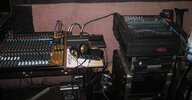
16 track then mix down to a Tascam model 24 22 tracks and a Lexicon PCM 90 for effects.
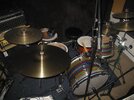
I use 8 microphones for the drum set to a Allen and heath QU16 digital mixing board two channels to the Zoom R-20
I can't stand the sound of digital drums getting good results with the Blue condenser microphone Trainwreck Express with
the new Marshall 2 x 12 cabinet also the 50 watt ODS amp with a AkG dual condenser microphone
still learning but getting recordings that sound what I'm hearing.

game room 001.JPGgame room 002.JPG
 
My mix is all mono then Rendered to stereo i think.

I was kinda wondering what happens when you drag a track on another. Use 2 mic's on my guitar cabs. Didn't know if i should be making them into 1 track vs 2 separate in the mix that gets rendered.
No, don't drag a track to another one. Just keep your mono tracks sending to the master. Like I said, you don't want to smash one mono track over another in a typical case. Think in terms of sending tracks to effects tracks instead of to other audio file tracks. Hope that helps.
 
So essentially, you could have multiple busses (Receiving Channels) to do different things, ie. Reverb, compression, etc... and each track you create can send to multiple busses (receiving channel) just by dragging the send to the bus (receiving channel.
Is that right?
I do this all the time. It’s very like working with a traditional mixer, so it makes sense to me. Often times, one of the first tracks I set up is a reverb bus…usually start with drums, drag the drum send to the reverb send/return. The sends have independent levels and pans and such, so you can mix the amount of signal, and pan it in the space. In this scenario, one would set the reverb to full wet mix, no dry signal. As I add tracks, I route them to the reverb bus, and mix to taste.

Now, if you want to group process tracks, like a full set of drum tracks, I often use the folder feature. Create an empty track ahead of the first drum track, assign as the first folder, take the last drum track, and assign as the last track in the folder. Now the first(empty) track in the folder behaves as a mini master track. one can put a compressor, limiter, eq, or whatever you want to shape the tone with, into the effects section of the parent folder track panel.(again…very mixer like- a subgroup)

Aside:
How are you making out @TVvoodoo ?
 
@Thatbastarddon ... have not planned to visit my DAW grotto for a day or two. I wish it was different for me...But I seem to work better with blinders on during one 4-5 hr. Session, rather than five 1 hour sessions.

I will try the thing with the thing though, I promise! If I can save some dough and get 10 or 12 tracks with light FX, it'll be a happy day!
 
@Thatbastarddon ... have not planned to visit my DAW grotto for a day or two. I wish it was different for me...But I seem to work better with blinders on during one 4-5 hr. Session, rather than five 1 hour sessions.

I will try the thing with the thing though, I promise! If I can save some dough and get 10 or 12 tracks with light FX, it'll be a happy day!
I hear you…same here, pretty much…I have to be alone here too, which complicates things.

About the thing: if your computer was made after 2010, and your external hard drive is in good shape, you should be fine. I have a 2010 Mac Mini, with 8 gigabytes of ram, that will run fake drums, and work with 30 tracks, without fahting(I was forced to spell that in my colloquial phonetic…the site censors that word? Wow.)out the cooling fan….it‘s not ”all about“ processor speed…or ram(unless you’re asking a bunch of virtual instruments to play a midi track in real time)…it is about the data bottlenecks. There’s only so much seeking a single hard drive can do…an audio track here, an instrument there, a reverb algorithm from somewhere else…pop…click…stall. If you tell the OS that the audio tracks are all “over there”, then that drive can take some of the work off the hands of the OS drive. The same principle holds true for sample based virtual instruments…they should be on their own drive too, and are often sold that way now.
 
I've got 32 gigs and choking comes on pretty quickly. Maybe you should look at it by the numbers and get a close calculation. Memory is cheap - I buy a computer with little memory as possible then buy two 16GB chips to pair in for 32. Not expensive at all. If you buy the memory stock with the computer every company will shaft you.

I should have mentioned I'm using Studio One 6. Reaper I can go for miles with 32GB. Studio One is a pig and I I'm trying to see if I can trim things down. In S1, one IK Multimedia tape saturation plug can keep sucking on 19% of the CPU. I mean, it's unreasonable so I need to look into it.

I just tested Reaper again and I've got like 4 instances of Amplitube, 4 instances of that tape plug and the CPU bounces from 0 to 1.5 to 2%. Wowsers that's good. I could stack forever in Reaper.

Anyway, wanted to clarify that - I was going by what I use and not your environment per se.

You can get a full 32GB for $36 for the record. Lol.

:)
 
Ok, after looking into this more it turns out that plug is just a pig. It even brought Reaper to it's knees when ran a track and tried to open to import a file.

Without that pig plug I can run almost a whole small band session using even less resources. Lol. The following runs at about 15% CPU:

rGx4uQC.png


Bigger plugs there are the Manley VOXbox, Superior Drummer 3, TC Electronic reverb, Abbey Road studio environment, and 2x AmpRooms. (Some not seen.)

All in all Reaper had a lighter footprint but S1 is much better than I thought it would be. Doable for sure. I will hit processor max long before I even get near memory capacity. I am on a laptop as well and we all know how that goes.
 
My question: Do you guys typically run reverb on all instruments to put things in the same space. This includes vocals, bass, and kick. ??
 
My question: Do you guys typically run reverb on all instruments to put things in the same space. This includes vocals, bass, and kick. ??
If “Nope”.
Sometimes - That’s what room mic’s are for.
Other times - there may be something going on already that makes additional reverb sound…not right.
If “Yep”.
Occasionally something gets recorded directly, and needs space.
 
My old cheap windows desktop with reaper is choking after about six or seven tracks with FX. It's only got 4G ram and is not upgradeable for more unfortunately. So I'm looking at best buy for a cheaper reconditioned box ... I know to look for SSD, and the more ram the better, but could I possibly get away with 8GB ram unit or do I need the 16gb? For like 12-15 tracks with fx? I can hardly imagine ever needing more than that
Windows , remember in 2025 is ending support for 10. 11 has some requirements. I would go 16 just for the sake of it. 64 bit , I forget the requirements but my Lenovo is not up to par for 11.
 
Windows , remember in 2025 is ending support for 10. 11 has some requirements. I would go 16 just for the sake of it. 64 bit , I forget the requirements but my Lenovo is not up to par for 11.
Roger that on 2025. My laptop can’t be upgraded to Win11. By 2025 it’ll be approaching 10 years old…. So…. Probably time for a new one anyway.

For now. I mostly did this laptop right. It does have 16Gb RAM and a 1TB hard drive. Has all the other “have to’s” to upgrade, just not the processor.
 
Yeah, I'm a bit behind in versions. I'm considering going zorin. I'm sick of the update/version/subscriber hamster wheel
Once I upgrade to newer, bigger, better, faster laptop….. probably in 2025…. I may use my old laptop as a Linux test mule.
 
Once I upgrade to newer, bigger, better, faster laptop….. probably in 2025…. I may use my old laptop as a Linux test mule.
The thing that sucks is making some programs work. They all could be made to work but some company's refuse to allow it. Linux is a great platform. The powers that be hate it because it's free.
 
The thing that sucks is making some programs work. They all could be made to work but some company's refuse to allow it. Linux is a great platform. The powers that be hate it because it's free.
I’d have a Win platform for all the heavy lifting. Just think it’d be entertaining to do some Linux work. And Realer does have a download for Linux. Don’t know how the add on programs would work. But could be interesting to find out.
 
Back
Top