Deleted User Account
Guest

Is there a way to record at home without a powerful computer and huge hard drive? Or what is the entry level way? Help.


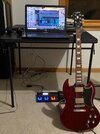


What kind of phone do you have?Is there a way to record at home without a powerful computer and huge hard drive? Or what is the entry level way? Help.
What kind of phone?Thanks y'all ya I have a laptop and a phone, but was hoping to not overload the drive with too much stuff. Last time I recorded anything it was when I had a tower computer Ableton Lite and used a M-audio blackbox kinda like a POD. I was hoping I could get something that could record 4 tracks and then send it to sound cloud or something.
Perfect! I can help with that platform!Old iphone 8 need to upgrade soon.
I will check that out later today Thank you sir!Perfect! I can help with that platform!
You will need a USB interface…the one I mentioned above works really well with iPhone, but there are plenty of others.
You will need the USB adapter for iPhone:

Charging Essentials - iPad Accessories
Find cables, charging docks and external batteries for iPad. Charge and sync up your iPad. Buy online with fast, free shipping.www.apple.com
You can get a cheaper one, but I’ve not used another.
As to an app for multitrack recording…
I’ve used this for years…actually over a decade now…once you get the hang of it, it is really nice to work with. You can “upgrade” to get more tracks to work with. I have 24 tracks, and it’s always been plenty.
I can upload to SoundCloud, and Dropbox, with ease. I can even share whole projects to computers on my wifi network via browser download. This is great if you’ve recorded a bunch of tracks, and want to work on them further in a computer DAW.

Ok my tiny mind is trying to sus this out. If I get the ART 2 channel USB, that goes into my laptop, then what/why is the iphone and harmonica dog doing/needed exactly? Sorry to be so obtuse here.I will check that out later today Thank you sir!
The portable Zoom revorders do multitrack. You can get a wifi adapter of some sort to send to cloud. I never do that so... external drives are really cheap. Especially for audio it takes up so little space compared to video.Thanks y'all ya I have a laptop and a phone, but was hoping to not overload the drive with too much stuff. Last time I recorded anything it was when I had a tower computer Ableton Lite and used a M-audio blackbox kinda like a POD. I was hoping I could get something that could record 4 tracks and then send it to sound cloud or something.
For multi track though. Need somethjng else.@Mr. Potato Head
Just use your phone,, that’s how I do it,, then to be able to share it , start a YouTube channel to upload and share..
Mind you this is not a great means of recording, but it does work
If you want to just use your old phone, you would need the stuff in my previous post. The Harmonicdog app is for iOS (your phone), the usb to lightning adapter goes into the phone on one end, and the other end goes to a usb cable to the ART interface. You plug a mic/guitar/line input into the ART.Ok my tiny mind is trying to sus this out. If I get the ART 2 channel USB, that goes into my laptop, then what/why is the iphone and harmonica dog doing/needed exactly? Sorry to be so obtuse here.
That is not true. I record 24 track sessions with an iPhone or an iPad….and have for over a decade. It is super portable, AND super easy….once you wrap your head around it.For multi track though. Need somethjng else.
Didn’t sound rude to me…. Since I can’t seem to get around to recording a single track on my phone….. or anything for that matter.That is not true. I record 24 track sessions with an iPhone or an iPad….and have for over a decade. It is super portable, AND super easy….once you wrap your head around it.
Edit: I did not mean that to sound rude in any way. Just stating the fact that I have experience with iOS multitrack recording.

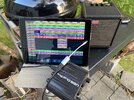
Is the grill a necessary option? Asking for a friend.This, and the appropriate mic’s will get the job done. You can replace the iPad with an iPhone. I started with an iPhone 4S and that interface.
View attachment 93728