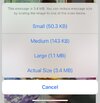
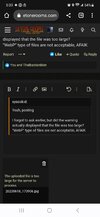
TTR says photos 88.2kb too large:

Inspector #20

Ambassador of Tone
Fallen Star
Country flag
I have to take a screenshot then crop and save to post photos now.

Even resized to 88kb the system still says the file is too large to post.

Strange...
 
I have to take a screenshot then crop and save to post photos now.

Even resized to 88kb the system still says the file is too large to post.

Strange...
Must be a fluke. I don’t generally need to shrink photos down that small to post. There have been a few times where I have had an issue regardless size I’ve tried to post. I’ve walked away and tried again later and it worked.
 
Besides using the phones image settings to control the size of the image, there are free apps for our smartphones that will resize the images into another copy of the original. For my iPhone, I use an app called “Image Size”.
 
Last edited:
Besides using the phones image settings to control the size of the image, there are free apps for our smartphones that will resize the images into another copy of the original. For my iPhone, I use an app called “Image Size”.

That’s the same app I use if I want to resize an image from my phone or iPad. Usually, though, I post images from my computer and use paint.net to resize images.
 
That’s the same app I use if I want to resize an image from my phone or iPad. Usually, though, I post images from my computer and use paint.net to resize images.
Same here. Posting from computer is easy. I use MS Paint to change size. I know there are apps out there to resize the photo. Done the email thing so often now, I can email it and then from there post it to TTR pretty quickly.
 
Back
Top