
You are using an out of date browser. It may not display this or other websites correctly.
You should upgrade or use an alternative browser.
You should upgrade or use an alternative browser.
Thumbnail vs full size pics
- Thread starter BlueX
- Start date


Well…I’ll make an attempt at this one…Is there a way to post thumbnails instead of fullsize pics (that take up all the screen)? I haven't found such function.
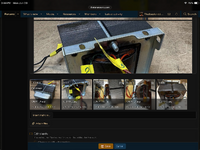
Note the row of thumbnail images across the bottom. In the image furthest to the left I have clicked the area that had previously said “insert…”(as appears in the rest of the row). Now one is able to choose between posting the thumbnail or the full image.
These thumbnails appear at the bottom of the post as images are added, and the choice can be made, during the process of making the post…or when editing, after the fact.
I hope this helps.
Thanks, but I only see "Full image" as on option.Well…I’ll make an attempt at this one…
View attachment 111267
Note the row of thumbnail images across the bottom. In the image furthest to the left I have clicked the area that had previously said “insert…”(as appears in the rest of the row). Now one is able to choose between posting the thumbnail or the full image.
These thumbnails appear at the bottom of the post as images are added, and the choice can be made, during the process of making the post…or when editing, after the fact.
I hope this helps.
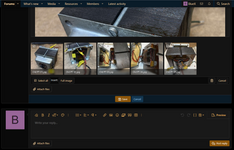
Perhaps because I’m using Safari on a tablet, most of the time, it shows differently for me. Sorry for the dead end.
Hopefully someone else, better versed, will chime in… @WavMixer


DirtySteve
Ambassador of Hold My Beer
I was just explaining on the other pics thread that if you use Imgur you can edit the size right in your post, then one has to click on it to blow it up to full size if they want to.
Plus with Imgur you don't need to resized your photos. If it posts really big and you want it smaller you just edit your post, click on the image and you can drag a corner to resize it right there. Then if anyone what's to see it full size all they have to do is click on it.
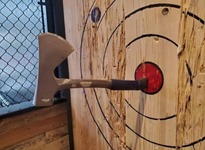
example: click image to make it bigger, click again for full size.


Is it your allocated storage or is it image size. I don't recall setting limitations on storage space, however this is a limit to file/image size.So I was uploading some gear pics and whatnot and it seems I've exhausted my allocated storage space...
Maybe a mod or @WavMixer could kindly show me the way to contribute financially and perhaps spare me few more megs...

PelliX
Well-Known Member

Is it your allocated storage or is it image size. I don't recall setting limitations on storage space, however this is a limit to file/image size.
Looks like 50MB is the max. As an admin I absolutely understand that; number of users times storage space per user including projected growth = worst case scenario. On the other hand, most members do not seem to utilize the feature much so one could make a shrewd guesstimate. Not trying to argue or impose anything here, just thinking out loud.

Last edited:
