Need Advice In Setting Up 15 year old's PC Based Practice Rig:

Inspector #20

Ambassador of Tone
Fallen Star
Country flag
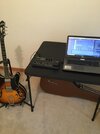
My youngest has been living with his Mom since 2018. His guitar playing is getting on his Mom's nerves, so I wanted to try and hook him up with something like I use for headphone practice.

My practice setup is a Focusrite 2i2 USB interface with Guitar Rig 6. This allows me to play along to YouTube videos, etc. I want to do something similar for my Son, but it needs to be really simple so he can install it easily, although my oldest son can give remote support if needed through Team Viewer. I also want to keep this really cheap because I am not sure if he is going to stay with it.

I gave him my old Mac Pro not long ago, so he has a decent platform.

What would I need to accomplish this???

I considered this USB Interface:


Is there a guitar amp simulator that doesn't shut down after 30 minutes like the demo version of Guitar Rig 6???

Thanks...
 
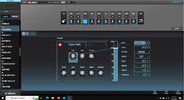
This is what I do Rob. The Boss GT1 plugs into laptop via USB. Plug in my headphones and away I go. Won't disturb a field mouse. Boss (as well as most USB boxes like this) has downloadable software that lets you control the patches by pointing and clicking. The GT1 is a poor mans Boss GT6, GT10, GT100, GT1000 or whatever number they're up to now. But it works for me. Several amp sims. Speaker configurations. Loaded with effect boxes. Betting you already have something sitting there that does the same stuff.

boss.JPG
 
Kinda want to get him the ability to "build" a 100 watt Marshall stack, something that would not be possible any other way but virtually.
Theoretically these are the amp sims in the GT1. Personally, I’ve built a few patches using the Fender Twin Reverb. There are other multi effect boxes that doesn’t break the bank that specifically list Marshall amps as some of their sims. Some don’t always say Marshall…. Like my Korg AX-5G listed them as 70s, 80s, modern, etc. I do know you can do a little internet search and find groups/forums/chat rooms where people have put together patches to imitate just about any amp you want.

NATRL CLN (NATURAL CLEAN)
An unembellished, clean sound that minimizes the amp’s idiosyncrasies, such as its trebly character and boomy low end.
FUL RANGE (FULL RANGE)
An amp with a broad frequency range and an extremely flat response. Good for acoustic guitar.
CB CRUNCH (COMBO CRUNCH)
Crunch sound that allows the nuances of your picking to be expressed even more faithfully than on conventional combo amps.
ST CRUNCH (STACK CRUNCH)
Great-feeling crunch sound that responds well to picking dynamics while retaining all the defining characteristics of a 4 x 12” speaker cabinet.
HiGAIN STK (HiGAIN STACK)
High-gain sound of a vintage Marshall specially revamped in a way that is possible only with COSM modeling technology.
POWER DRV (POWER DRIVE)
A straight drive sound that works well in a broad range of situations, from backing to lead. A sound like this cannot be obtained from any existing combo amp or stack amp.
XTREM LD (EXTREM LEAD)
A new type of sound that smoothes out the uneven frequency response that is typical of existing large stack amps.
CORE MTL (CORE METAL)
A large stack sound that has been tweaked extensively in the pursuit of the ultimate metal sound.
JC-120
This models the sound of the Roland JC-120.
CLEAN TWIN
This models a Fender Twin Reverb.
PR CRUNCH (PRO CRUNCH)
This models a Fender Pro Reverb.
TWEED
This models a Fender Bassman 4 x 10” Combo.
DxCRUNCH (DELUXE CRUNCH)
This models a Fender Deluxe Reverb.
VO DRIVE
This models the drive sound of a VOX AC-30TB. This is a sound that it suited to sixties-style British rock.
VO LEAD
This models the lead sound of the VOX AC-30TB.
MATCH DRV (MATCH DRIVE)
This models the sound input to left input on a Matchless D/C-30. A simulation of the latest tube amp widely used in styles from blues and rock.
BG LEAD
This models the lead sound of the MESA/ Boogie combo amp. The sound of a tube amp typical of the late ‘70s to ‘80s.
BG DRIVE
This models a MESA/Boogie with TREBLE SHIFT SW on.
MS1959 I
This models the sound input to Input I on a Marshall 1959. This is a trebly sound suited to hard rock.
MS1959 I+II
The sound of connecting inputs I and II of the guitar amp in parallel, creating a sound with a stronger low end than I.
R-FIER VTG (R-FIER VINTAGE)
Models the sound of the Channel 2 VINTAGE Mode on the MESA/Boogie DUAL Rectifier.
R-FIER MDN (R-FIER MODERN)
Models the sound of the Channel 2 MODERN Mode on the MESA/Boogie DUAL Rectifier.
T-AMP LD (T-AMP LEAD)
This models a Hughes & Kettner Triamp AMP3.
SLDN
This models a Soldano SLO-100. This is the typical sound of the eighties.
5150 DRV (5150 DRIVE)
This models the lead channel of a Peavey EVH 5150.
BGNR UB
This is a heavy distortion sound that models the high- gain channel of a Bogner Uberschall.
ORNG ROCK
This models the dirty channel of an ORANGE ROCKERVERB.
 
I’ve said before. If I started playing at church again and went electric rather than acoustic…. I wouldn’t hesitate to leave the amp at home and just plug my GT1 straight to the board/house. Is it as good as a Kemper Modeling Amp? Nope. Not close. But it didn’t cost well into 4 figures either.

And not trying to push the GT1. Just the box I have and am familiar with. There’s at least 5 or 6 other companies that have the same effect boxes available in the same price range. Betting any one of them would do what you want.
 
Garage Band works but it's been a while . I didn't like it on the phone because of navigation but on a box it should work.
The Mac version is better than the iOS version(IMO)…much more flexible…but it doesn’t play with the iOS version, it seems. I tried when I tried to help out Mitch recently…it seemed the easiest path when I was setting up a project for him to work with, but when I tried to load it on to either iPhone, or iPad, it was a no go.:( I wonder if they’ll cripple the new iOS port of “Logic Pro” in the same manner. That said…
Reaper works well on Mac. It will host any of the Mac compatible VST amp suites. Mac is pretty friendly with USB interfaces…there are no PITA drivers to deal with. One can actually use multiple interfaces by building an ”aggregate device” in the Mac OS audio manager…pretty neat. I’ve never had to, but I may be tempted soon…thanks to the latest Kemper news about updating the Kemper firmware so that it will function as a USB interface.:cool:

Anyway…to the original poster…there’s plenty of stuff to choose from for Mac in the interface department…especially if it’s only for an instrument input. I have the original Apogee Jam..it worked great on the iPhone until they ditched the headphone jack. The newer Jam Plus, and Jam X, have their own headphone jack. They also come with software apps for Mac and iOS…Positive Grid Bias FX stuff.

IK also has a similar device that’s also packaged with apps.
 
The Mac version is better than the iOS version(IMO)…much more flexible…but it doesn’t play with the iOS version, it seems. I tried when I tried to help out Mitch recently…it seemed the easiest path when I was setting up a project for him to work with, but when I tried to load it on to either iPhone, or iPad, it was a no go.:( I wonder if they’ll cripple the new iOS port of “Logic Pro” in the same manner. That said…
Reaper works well on Mac. It will host any of the Mac compatible VST amp suites. Mac is pretty friendly with USB interfaces…there are no PITA drivers to deal with. One can actually use multiple interfaces by building an ”aggregate device” in the Mac OS audio manager…pretty neat. I’ve never had to, but I may be tempted soon…thanks to the latest Kemper news about updating the Kemper firmware so that it will function as a USB interface.:cool:

Anyway…to the original poster…there’s plenty of stuff to choose from for Mac in the interface department…especially if it’s only for an instrument input. I have the original Apogee Jam..it worked great on the iPhone until they ditched the headphone jack. The newer Jam Plus, and Jam X, have their own headphone jack. They also come with software apps for Mac and iOS…Positive Grid Bias FX stuff.

IK also has a similar device that’s also packaged with apps.
I hated that they did that to iphones and made all the hardware to that point obsolete. I never updated hardware.
That may be why I am using windows platform now.
 
Last edited:
I hated that that did that to iphones and made all the hardware to that point obsolete. I never updated hardware.
That may be why I am using windows platform now.
I migrated from Windoze to Mac so I could stop fiddling around under the hood, trying to make everything work nicely together.
To be fair, this was back in the Windoze 7 days(32 and 64 bit).
The hardware thing, in regards to the old Apogee Jam…it still works with iPad, and Mac…just requires the right cable(that’s Apogee’s cable too, it uses a proprietary connector, into the Jam, of its own…locks in nicely)
 
Back
Top