Let talk LUF's, RMS & gain situating for mastering

BFT Gibson

Ambassador of Originality
Country flag
Lots of talent on here with studio experience. Being the home hack with so many songs ready to mix & master & load up for prosperity sake to spotify as a place to gather it all.

Spotify says it has -14 luf threshold. Help me understand that all. My captures are decent on tracking but still confused from there to final product.

What numbers should i be looking at before rendering. Keeping YouTube & Spotify in mind mainly

Searching for an overall fullness without losing the room capture i worked hard to create as part of the song

Hit me with your tips !! Thanks
 
Do you have a Loudness Meter that measures LUFS?

LUFS is a measure of the integrated loudness of the track. It’s kind if like RMS watts vs. peak watts in an amp. LUFS Is RMS, kind of, but it also takes into account how people hear and how they perceive loudness.

They are lots of free loudness meters that measure LUFS.
 
I’d say you want to gets a close to -14 LUFS as you can.
Ok i now have at that range consistently.

Since Spotify will "normalize" to 14

Tend to like my stuff at -12 to 9 which works great on soundcloud cause they just let it rip..

How do i get the -12 to 9 fullness at -14?

Without compressing the heck out of it-

What would be best technique
1) bringing the mix up naturally louder? before master
2) figuring out how to have a 'clear" boost in what i have already mixed happening at the master

Very level at capture from learning set up years ago of bands so never do much post capture messing around. usually have my sound going in where i want it.
 
Ok i now have at that range consistently.

Since Spotify will "normalize" to 14

Tend to like my stuff at -12 to 9 which works great on soundcloud cause they just let it rip..

How do i get the -12 to 9 fullness at -14?

Without compressing the heck out of it-

What would be best technique
1) bringing the mix up naturally louder? before master
2) figuring out how to have a 'clear" boost in what i have already mixed happening at the master

Very level at capture from learning set up years ago of bands so never do much post capture messing around. usually have my sound going in where i want it.

I'd say priority number one is a mix you're happy with. Adding extra compression won't make it sound better to you, so I wouldn't do it, that's just my personal opinion. Getting your track to a level specific to streaming services like Spotify is a PITA, because it's hard to meet all their LUFS specs versus your natural inclination to max out the level you can print before distortion. In reality, if you don't exactly meet all their parameters, they'll do it for you.

Before I understood the new rules, I mastered an album for a friend at the levels I'd use for a CD. He submitted it also to Spotify, and it turned out fine. Next album, I followed the Spotify spec for the streaming version, and that was fine too.

Why do streaming services make these rules? I think it's because a lot of people who use streaming services are using relatively low-grade playback systems. Also, the services themselves need to conserve bandwith, so they'll minimise your drain on their output. Backing the level off to the lowest common denominator seems to be the strategy for avoiding 'system overload'.
:confused:
What I find massively disappointing is we'd reached a stage in the early 1980s where music fans could hear on CD close to exactly what the music sounded like in the studio control room when the artist and producer said: "Yep. That's it." MP3 files, streaming services etc take us back to the days when the vinyl disc, and the radio staion output were just approximations .
 
I'd say priority number one is a mix you're happy with. Adding extra compression won't make it sound better to you, so I wouldn't do it, that's just my personal opinion. Getting your track to a level specific to streaming services like Spotify is a PITA, because it's hard to meet all their LUFS specs versus your natural inclination to max out the level you can print before distortion. In reality, if you don't exactly meet all their parameters, they'll do it for you.

Before I understood the new rules, I mastered an album for a friend at the levels I'd use for a CD. He submitted it also to Spotify, and it turned out fine. Next album, I followed the Spotify spec for the streaming version, and that was fine too.

Why do streaming services make these rules? I think it's because a lot of people who use streaming services are using relatively low-grade playback systems. Also, the services themselves need to conserve bandwith, so they'll minimise your drain on their output. Backing the level off to the lowest common denominator seems to be the strategy for avoiding 'system overload'.
:confused:
What I find massively disappointing is we'd reached a stage in the early 1980s where music fans could hear on CD close to exactly what the music sounded like in the studio control room when the artist and producer said: "Yep. That's it." MP3 files, streaming services etc take us back to the days when the vinyl disc, and the radio staion output were just approximations .
Very good point ! My mix sounds great on my monitors & recording headphone but not so much regular stuff.

Thanks for the tip, going out & getting some crappy ear buds & headphones to see where that EQ issue is . Thanks
 
For the benefit of anyone's who's wondering what the heck we're taking about, the rules of the game are here: Loudness normalization - Spotify

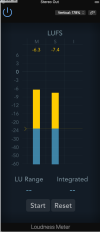
In order to check whether your mix meets the specs, you'll need a specialised meter, like this plug-in that comes with Logic Pro. The process isn't especially difficult, it's just fiddly, because you're trying to meet Spotify's conditions without throwing a dB more level away than you have too.

Screenshot 2024-06-28 at 15.03.58.png
 
For the benefit of anyone's who's wondering what the heck we're taking about, the rules of the game are here: Loudness normalization - Spotify

In order to check whether your mix meets the specs, you'll need a specialised meter, like this plug-in that comes with Logic Pro. The process isn't especially difficult, it's just fiddly, because you're trying to meet Spotify's conditions without throwing a dB more level away than you have too.

View attachment 101276
So i am really looking at keepin LUF's as consitent to -14 as possible ?
While at same time making it as full & loud as possible at -14 & even EQ wise without distoring the mix?
 
Lots of talent on here with studio experience. Being the home hack with so many songs ready to mix & master & load up for prosperity sake to spotify as a place to gather it all.

Spotify says it has -14 luf threshold. Help me understand that all. My captures are decent on tracking but still confused from there to final product.

What numbers should i be looking at before rendering. Keeping YouTube & Spotify in mind mainly

Searching for an overall fullness without losing the room capture i worked hard to create as part of the song

Hit me with your tips !! Thanks
It's multi-band compression.
The music is divided up into 4 or more frequency bands, each band is processed / adjusted separately.
Then the individual bands are mixed back into a stereo track.

When the music starts, the VU meter goes up to a certain pre set level and stays there; regardless if the musical passage is soft or loud.
It makes the level constant, and the meter never drops down as long as the music is playing.
This creates consistent loudness.

Used by all FM, TV, broadcast and recording industries; it's an industry standard.
But it is also missing from home recording...

One device which accomplishes this is "Opti-Mod." There are several different systems.

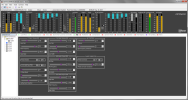
1719587973855.png
 
So i am really looking at keepin LUF's as consitent to -14 as possible ?
While at same time making it as full & loud as possible at -14 & even EQ wise without distoring the mix?
Yes, but I'm not sure EQ really comes into it. It's really about level.
It's multi-band compression.
The music is divided up into 4 or more frequency bands, each band is processed / adjusted separately.
Then the individual bands are mixed back into a stereo track.

When the music starts, the VU meter goes up to a certain pre set level and stays there; regardless if the musical passage is soft or loud.
It makes the level constant, and the meter never drops down as long as the music is playing.
This creates consistent loudness.

Used by all FM, TV, broadcast and recording industries; it's an industry standard.
But it is also missing from home recording...

One device which accomplishes this is "Opti-Mod." There are several different systems.
That certainly can deliver a lot of control, but the pay-off is it's quite a complicated system to get to grips with. I can't help wondering if some users might find it a little intimidating.

There are a number of 'brick wall' limiter plug-ins that allow you to set the maximum output level and it will never been exceeded. It can be very effective, although over-use will make the music dull and lacking in dynamic range, as well as full-on at all times!

Currently on at $29.99, the Waves L2 Ultramaximizer is a good example: L2 Ultramaximizer Peak Limiter Plugin - Waves Audio and very simple to use. I believe the Orban Optimod is a lot higher than that, but I'm struggling to find a definite price.
 
Not really recording at the moment cause of new band set up & loading 250 songs up to Spot that don't have ability to be mixed right.

but, i just might write a song right now & get the instruction as i go to be better at this. Absolutely got a handle on capture but from then on.. need help
 
Not really recording at the moment cause of new band set up & loading 250 songs up to Spot that don't have ability to be mixed right.

but, i just might write a song right now & get the instruction as i go to be better at this. Absolutely got a handle on capture but from then on.. need help
If your mix file is a loss-free type, such as .WAV, you can always import the stereo file back into your DAW and apply the level changes. With 250 songs, that's still going to be a lot of work, so you may be better off letting Spotify sort it automatically!
 
If your mix file is a loss-free type, such as .WAV, you can always import the stereo file back into your DAW and apply the level changes. With 250 songs, that's still going to be a lot of work, so you may be better off letting Spotify sort it automatically!
I am ok with it. Its a painful journey into the past but a resolve is happening. Captured life after the accident & how it affected a whole family's life. Sorta tucked it all away & now am enjoying the music that was made & how perseverance in life can pull ya back up.

Actually reflecting, the music making gave an outlet during the duress
 
Ah ha moment with mastering for spotify. Back in Sept 2020, Got a call at 2 pm my Great Granny passed in FL, whole family headed south. We were leaving at 4 am next morning for strait through drive to Sebring.

I got hit with a flood of emotion & recorded "Take me away" :in like 2-3 hours". Strait into Mesa 50 Cal+. just barked the words in place & laid some leads down, Today found the Reaper back up file & my gosh no effects on main guitar & phaser on 1 side leads & some leads stepped on flanger & chorus. Fam had me read it as a poem at the funeral.

Went back today to address the spotify loading up. I figured something out. Get the RMS steady like at -13-12 range, The luf at -14 as a guide is a loudness guide but not a good way to meter overall oomph of a song. heavier stuff is seemingly a lil rougher to process vs nice open rock songs. I kinda equated it to my SVT having the oomph for low freq push through no matter what(class D wut? ! lol)..like a serious RMS badgering of power being sustained
 
It's multi-band compression.
The music is divided up into 4 or more frequency bands, each band is processed / adjusted separately.
Then the individual bands are mixed back into a stereo track.

When the music starts, the VU meter goes up to a certain pre set level and stays there; regardless if the musical passage is soft or loud.
It makes the level constant, and the meter never drops down as long as the music is playing.
This creates consistent loudness.

Used by all FM, TV, broadcast and recording industries; it's an industry standard.
But it is also missing from home recording...

One device which accomplishes this is "Opti-Mod." There are several different systems.

View attachment 101278

These multiband compressors are pretty common with plugins. I've got about 6 different types (because I like to brag and I'm special - Lol) that I've picked up over the last year. Here are some of them that are also out there....

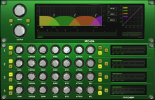
McDSP - a rather meaty 4 band with adjustable crossover points.
q.png
Lindell - nice, but vertically a little too long makes it a bit annoying to use.
r.png
Fabfilter - very versatile non analog interface.
s.png
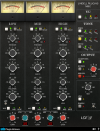
Lindell - 3 band that's got it all, including mid/side mode.
u.png
 
Last edited:
These multiband compressors are pretty common with plugins. I've got about 6 different types (because I like to brag and I'm special - Lol) that I've picked up over the last year. Here are some of them that are also out there....

McDSP - a rather meaty 4 band with adjustable crossover points.
View attachment 101333
Lindell - nice, but vertically a little too long makes it a bit annoying to use.
View attachment 101334
Fabfilter - very versatile non analog interface.
View attachment 101335
Lindell - 3 band that's got it all, including mid/side mode.
View attachment 101336
That's what you need.
And you want to tweak it into a constant level, so that the VU meters are no longer bouncing but fairly steady at the target audio level.

If you listen to a good sounding FM radio station, this is what you are hearing.
The audio level is constant.
It works with a PA system also. It will make a night and day difference when done correctly.
 
These multiband compressors are pretty common with plugins. I've got about 6 different types (because I like to brag and I'm special - Lol) that I've picked up over the last year. Here are some of them that are also out there....

McDSP - a rather meaty 4 band with adjustable crossover points.
View attachment 101333
Lindell - nice, but vertically a little too long makes it a bit annoying to use.
View attachment 101334
Fabfilter - very versatile non analog interface.
View attachment 101335
Lindell - 3 band that's got it all, including mid/side mode.
View attachment 101336
I remember using the old Fab Filter plugins way back! I really liked them a lot.
There’s one in Reaper. I like it a lot. It defaults to 4-band iirc, but you can add more. If you go through the presets, there are a few that are quite useful “starting points” for certain applications.
 
Back
Top