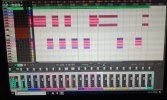
What’s Your DAW of Choice?

So are you guys just creating a one or two measure file and pasting that in front of the track(s) you’re recording?
Yes. In Reaper, you can grab an end of one of those little count-ins, and drag it out to whatever number of measures you would like. If I’m going to be away from the desk to play whatever, I may have a 16 count(or whatever I need to be ready). But it usually starts with a 4 count, done at the project tempo.
 
Yes. In Reaper, you can grab an end of one of those little count-ins, and drag it out to whatever number of measures you would like. If I’m going to be away from the desk to play whatever, I may have a 16 count(or whatever I need to be ready). But it usually starts with a 4 count, done at the project tempo.
I made do on the 80s hit challenge. Partly because somehow when I pasted in the backing track, I managed to clip off the first couple beats…. So I just came in on measure two. It worked.
 
Katana or FocusRite 2i2 > Reaper. I haven't done a full song yet so I haven't done a mix down I have done some tracks with Harrison Mix Bus and I like that as well. I chose Reaper initially because of it programming capabilities. Another project of mine is to use a MIDI foot controller with Reaper to create a super looper.
 
I'm using Reaper. It's the first one I've tried but I've yet to see a reason to try something else yet. I'm getting the basics down, but I really need to figure out and practice how to punch in. I don't mind doing multiple takes of things, but for now I'm stuck just playing the track all the way though and going with the best take of the bunch. Selecting areas in general are still confusing to me, but there are tons of youtube videos out there that have been very helpful so far.
I'm thankful for the "undo" function for sure though lol
 
I'm using Reaper. It's the first one I've tried but I've yet to see a reason to try something else yet. I'm getting the basics down, but I really need to figure out and practice how to punch in. I don't mind doing multiple takes of things, but for now I'm stuck just playing the track all the way though and going with the best take of the bunch. Selecting areas in general are still confusing to me, but there are tons of youtube videos out there that have been very helpful so far.
I'm thankful for the "undo" function for sure though lol
"punch-in" recording in Reaper could not be simpler... Right click on the the main (not track) record button and set it to "Time selection auto punch".

Simply select by "select/drag" operation where you want to start and end.

Que up where you want to start listening then hit "Record" - recording will start and stop automatically for that particular region. Done.

Note: You have to define a start and end record point, which the selection does automatically so you need a "feel" for how long you want to record your clip. You can't just define a start point and have it just go on recording until you click "Stop". Would be nice though.

Oh ...remember to change mode back when you are done or at least remember where you were at regarding recording mode.
 
"punch-in" recording in Reaper could not be simpler... Right click on the the main (not track) record button and set it to "Time selection auto punch". Simply select by "select/drag" operation where you want to start and end. Que up where you want to start listening then hit "Record" - recording will start and stop automatically for that particular region. Done. Note: You have to define a start and end record point, which the selection does automatically so you need a "feel" for how long you want to record your clip. You can't just define a start point and have it just go on recording until you click "Stop". Would be nice though. Oh ...remember to change mode back when you are done or at least remember where you were at regarding recording mode.

Right on, thanks man. Once I get a hang of that, I’m going to figure out how to silence all the parts between vocals and then I’ll be unstoppable!! I “sing” incredibly quiet so I get a good amount of hiss from having the mic preamp cranking
 
Right on, thanks man. Once I get a hang of that, I’m going to figure out how to silence all the parts between vocals and then I’ll be unstoppable!! I “sing” incredibly quiet so I get a good amount of hiss from having the mic preamp cranking
That's easy ...use a Gate plugin, set with as much precision as you can. Also use a Deesser to keep the sibilance at bay. You'd be surprised what those plugs can do to the vocals.

You can probably get free ones on a "Free plugins" search. Or, go to PluginBoutique.com and click on their "FREE" menu option. There is sure to be a gate and desser in there.

Actually, grab is preset option for say "Male Vocal" on both of them. Should be more than fine.
 
That's easy ...use a Gate plugin, set with as much precision as you can. Also use a Deesser to keep the sibilance at bay. You'd be surprised what those plugs can do to the vocals.

You can probably get free ones on a "Free plugins" search. Or, go to PluginBoutique.com and click on their "FREE" menu option. There is sure to be a gate and desser in there.

Actually, grab is preset option for say "Male Vocal" on both of them. Should be more than fine.
Nice. I think I have that plugin boutique website bookmarked on my laptop actually. I went down the free plugin rabbit hole looking for a reverb I liked.
Another thing I may try now that I’m using a Kemper as a vocal interface as well is to use one of the gates in there. I’m more familiar with them but I guess I lose the ability to back it off later once it’s done and recorded
 
Nice. I think I have that plugin boutique website bookmarked on my laptop actually. I went down the free plugin rabbit hole looking for a reverb I liked.
Another thing I may try now that I’m using a Kemper as a vocal interface as well is to use one of the gates in there. I’m more familiar with them but I guess I lose the ability to back it off later once it’s done and recorded
Like every plugin, the effect doesn't get written into the audio file until of course you render all the tracks to one. You can even apply one to vocals you've already done. Not sure 100% if I'm gettin' you on this, but effects run in real-time with the audio and are free from commitment - you can turn the effect on an off, add and delete them whenever you want.
 
I’m going to figure out how to silence all the parts between vocals and then I’ll be unstoppable!! I “sing” incredibly quiet so I get a good amount of hiss from having the mic preamp cranking
Well…there is a GREAT gate in Reaper, but you could learn to use the split function, and edit the silences between lines manually. I do that all the time…with my mouth always running, you’re all better off. Feel free to PM if you have any questions.
 
Like every plugin, the effect doesn't get written into the audio file until of course you render all the tracks to one. You can even apply one to vocals you've already done. Not sure 100% if I'm gettin' you on this, but effects run in real-time with the audio and are free from commitment - you can turn the effect on an off, add and delete them whenever you want.

I guess I could have been clearer. I’m leaning towards a gate plugin as you suggested, for the reasons you suggested.
Im currently using the gate on my Kemper, because that is the interface I’m running my mic through, and it does the trick but I cannot adjust it afterwards like I could a plugin
 
Well…there is a GREAT gate in Reaper, but you could learn to use the split function, and edit the silences between lines manually. I do that all the time…with my mouth always running, you’re all better off. Feel free to PM if you have any questions.

Thanks man. I think the split is what I have to figure out. I must be a little click crazy because sometimes I can get it to work and sometimes not. I’m a bit like a toddler when I get on a computer lol
 
I guess I could have been clearer. I’m leaning towards a gate plugin as your suggested, for the reasons you suggested.
Im currently using the gate on my Kemper, because that is the interface I’m running my mic through, and it does the trick but I cannot adjust it afterwards like I could a plugin
Gotchya! Here are two free gates:


And a desser:


They should be fine. (y)
 
Well…there is a GREAT gate in Reaper, but you could learn to use the split function, and edit the silences between lines manually. I do that all the time…with my mouth always running, you’re all better off. Feel free to PM if you have any questions.
Ahh ...I forgot ...yes Reaper has the built-in stuff. (y)
 
Thanks man. I think the split is what I have to figure out. I must be a little click crazy because sometimes I can get it to work and sometimes not. I’m a bit like a toddler when I get on a computer lol
Right click the item to be split, where you want to split it, select split item, and drag each end to where you want them(where the vocal stops, and starts). You may need to click once to get the cursor to the split point, but I hope you get the idea.
 
I'm mainly a Logic Pro user for all the fancy stuff (track laying, arranging and editing) but I have Harrison MixBus 32C for the final mix, because it really does give the 'big studio console' sound of the 1980s, which is what I prefer to aim for. I'm also a paid-up Reaper user, because I'm working on a project with two old friends who aren't experienced DAW users. Delivering complete Reaper projects for them to work with is more helpful than a bunch of WAVs with no clues.

That's the shorter answer…

The longer answer is a have a range of DAWs, including Reason, Ardour ("our DAW' geddit?) and Luna. Why? Well, partly because I used to get sent them to review for magazines, but more recently, just so I can help if someone else gets stuck. I can usually figure out an answer, even if I don't know the DAW that well.

I don't have a physical mixing desk as such, but I've written Controller Assignments for a wide range of plug-ins and fader functions in Logic, so I can use an Akai APC40 MIDI contoller to give me a better hardware interface than a QWERTY keyboard and a mouse. When editing, I like to keep an Apple track pad under my left hand and a mouse under my right, which really speeds things up. I'm old, so I need all the help I can get!
 
Last edited:
Back
Top