5010 Sizzle Noise - Help Please?

fitz

Ambassador of DIY
Country flag
I recently picked up a Marshall 5010 (single input version) that was in need of some TLC.
I'm not a circuit guru, but the amp needed new pots and had a fried DI out resistor.

I've swapped out all the pots and replaced the incinerated DI resistor.
Everything seems to be working properly, although I've not tested the DI out and have no plans to use it.

New issue - when I crank the Preamp & Master Volume, I hear (from the speakers) what sounds kinda like bacon frying.
Not loud, and I'm loving the overdrive tone of this amp, but wondering what the possible sources for this noise might be.
The amp sounds fine when playing, and at lower volume with pedals, or out through the Bad Cat which I can use to make it L.A.F.
Just get a sizzle noise that gets more pronounced with the amp volume, and I'm curious if I could DIY repair.

After changing out the pots, I'm feeling fairly confident of attempting further repairs.
Should I be looking at replacement capacitors, or output transistors?
Amp is from 1988 and looks all original, so I'm not surprised if some maintenance is in order.

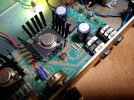
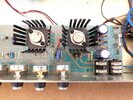
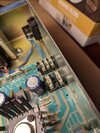
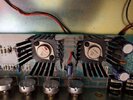
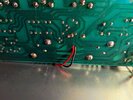
Some gut shots:
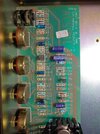
5010-01.jpg5010-02.jpg5010-03.jpg

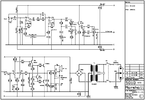
Schem:
5010-JMP27rA.png
 
I have no idea brother
Thanks Mitch.
The noise is not much, and only when the amp is cranked, and nothing is being played.
Barely audible till the gain gets past about 8 with the volume on 10, but that's also about where that amp starts to sing...
Mostly just curious if it's indicative of a problem that may get worse and could easily be fixed.
 
Fitz, sounds like a tube is going on you. Classic signs. Open the back then get the amp where it starts to do this. Take a non-conductive instrument, like chop stick or something and lights tap each tube. You should hear the radiophonic sound of the bad one. Do power and preamp tubes.

There are more glamorous ways to do this under cork sniff rule but it's fine. Just don't clobber them.
 
Fitz, sounds like a tube is going on you. Classic signs. Open the back then get the amp where it starts to do this. Take a non-conductive instrument, like chop stick or something and lights tap each tube. You should hear the radiophonic sound of the bad one. Do power and preamp tubes.

There are more glamorous ways to do this under cork sniff rule but it's fine. Just don't clobber them.
No tubes in a 5010 Sap...
I did suspect the op-amp chip, but AFAIK they are more of a workin' / ain't workin' kinda thing.
Got a suggestion to replace caps from a tech on another forum.
Just speculation at this point.
Was hoping someone would say it's obviously something like "replace the Heisenberg compensator and re-align the field coils to balance the matter / anti-matter streams to the dilithium chamber".
I'll probably just leave it for now and see if it gets any better/worse.
 
I recently picked up a Marshall 5010 (single input version) that was in need of some TLC.
I'm not a circuit guru, but the amp needed new pots and had a fried DI out resistor.

I've swapped out all the pots and replaced the incinerated DI resistor.
Everything seems to be working properly, although I've not tested the DI out and have no plans to use it.

New issue - when I crank the Preamp & Master Volume, I hear (from the speakers) what sounds kinda like bacon frying.
Not loud, and I'm loving the overdrive tone of this amp, but wondering what the possible sources for this noise might be.
The amp sounds fine when playing, and at lower volume with pedals, or out through the Bad Cat which I can use to make it L.A.F.
Just get a sizzle noise that gets more pronounced with the amp volume, and I'm curious if I could DIY repair.

After changing out the pots, I'm feeling fairly confident of attempting further repairs.
Should I be looking at replacement capacitors, or output transistors?
Amp is from 1988 and looks all original, so I'm not surprised if some maintenance is in order.

Some gut shots:
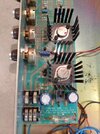
View attachment 87540View attachment 87541View attachment 87542

Schem:
View attachment 87543
R19 would fry when there is DC on the speaker output caused by what probably could be a bad transistor.

Disconnect the speaker...
Connect DC voltmeter to the 2 speaker wires (don't let the 2 speaker wires touch together, use black tape to insulate the wires...)
now turn the amp on...

Are you seeing DC voltage from the speaker wires?
What is the reading?

If you are seeing DC on the speaker output wires, you need to start looking for a bad solid state part.
Starting with testing the output transistors, then working the way back.

If you do not see DC on the output it's another problem...
 
No tubes in a 5010 Sap...
I did suspect the op-amp chip, but AFAIK they are more of a workin' / ain't workin' kinda thing.
Got a suggestion to replace caps from a tech on another forum.
Just speculation at this point.
Was hoping someone would say it's obviously something like "replace the Heisenberg compensator and re-align the field coils to balance the matter / anti-matter streams to the dilithium chamber".
I'll probably just leave it for now and see if it gets any better/worse.
Don't start replacing caps or other parts until we do more testing.
Narrow it down more.

Random parts replacement is not a good strategy....
Jumping to replace caps is a bad way until you know which part is actually bad.

The best tool you can have is an analog volt ohmmeter.
This can be used to test transistors and caps, diodes and all sorts of stuff.
For solid state amps:
an analog meter is quite useful to test parts.

An analog meter will show leakage, that digital meters ignore.
You can test MOSFETS, transistors, caps, diodes for reverse leakage and shorts...amazingly handy.

I have fixed soooo many amps with a $29 Radio Shack Analog volt-ohm meter. :pound-hand:
 
Last edited:
R19 would fry when there is DC on the speaker output caused by what probably could be a bad transistor.

Disconnect the speaker...
Connect DC voltmeter to the 2 speaker wires (don't let the 2 speaker wires touch together, use black tape to insulate the wires...)
now turn the amp on...

Are you seeing DC voltage from the speaker wires?
What is the reading?

If you are seeing DC on the speaker output wires, you need to start looking for a bad solid state part.
Starting with testing the output transistors, then working the way back.

If you do not see DC on the output it's another problem...
Thanks for the reply.
Speculation on MF was that someone sent a powered signal into the DI jack and fried the 100-ohm resistor.
I've replaced the R-19 resistor and all the pots.

I have the combo chassis in a head shell with speaker jacks installed.
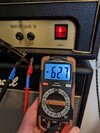
DC voltage on a speaker cable from the amp out settles in at about 63mV.
5010-06.jpg5010-07.jpg5010-08.jpg
How do I test the output transistors?
 
Thanks for the reply.
Speculation on MF was that someone sent a powered signal into the DI jack and fried the 100-ohm resistor.
I've replaced the R-19 resistor and all the pots.

I have the combo chassis in a head shell with speaker jacks installed.
DC voltage on a speaker cable from the amp out settles in at about 63mV.
View attachment 87553View attachment 87554View attachment 87555
How do I test the output transistors?

From what I can see:
You might have a leaky output transistor....theoretically the voltage on the output should be 0 volts DC. Although not always perfect.

You might have a corroded headphone jack.
Looks rusted or cooked.
The headphone jack has a switch which turns off the speaker, when the headphones are plugged in.
This switch (part of the headphone jack) can be corroded or burned...in which case the speaker does not connect properly when the headphones are UN-plugged.
The noise could be caused by a bad headphone jack.....

CLIFF JACK:
make sure the Jack is stamped: "CLIFF UK."
If the jack is not stamped "UK," it is a fake knockoff from China.
WARNING: do not use FAKE cliff jacks! they are garbage.

Testing transistors:
Standby, for next post.
Check the headphone jack for damaged contacts.
 
You might have a corroded headphone jack.
Looks rusted or cooked.
The headphone jack has a switch which turns off the speaker, when the headphones are plugged in.
This switch (part of the headphone jack) can be corroded or burned...in which case the speaker does not connect properly when the headphones are UN-plugged.
The noise could be caused by a bad headphone jack.....
HP jack contacts do look a little dirty.
5010-09.jpg
I brushed on a little Deoxit gold, inserted a cable to lift the switching contacts and scraped the contact surfaces a bit with a tiny file.
Sizzle now seems more like a hum...
Noise goes completely quiet when a cable is in the HP jack, or cable removed from input.
 
No tubes in a 5010 Sap...
I did suspect the op-amp chip, but AFAIK they are more of a workin' / ain't workin' kinda thing.
Got a suggestion to replace caps from a tech on another forum.
Just speculation at this point.
Was hoping someone would say it's obviously something like "replace the Heisenberg compensator and re-align the field coils to balance the matter / anti-matter streams to the dilithium chamber".
I'll probably just leave it for now and see if it gets any better/worse.
Ok.

dunce_hat.jpg
 
HP jack contacts do look a little dirty.
View attachment 87556
I brushed on a little Deoxit gold, inserted a cable to lift the switching contacts and scraped the contact surfaces a bit with a tiny file.
Sizzle now seems more like a hum...
Noise goes completely quiet when a cable is in the HP jack, or cable removed from input.
The jack looks rusted....
cleaning or scraping with a file is not the best way, the jack can be replaced...
(once scraped, the plating is removed, and the contact base metal will corrode faster than ever before)
or you can solder jumper wires across the solder pads on the solder side of the board.
(bypass the switch contacts with short wires soldered to the pads)
other than that make sure (measure) the 2 switch contacts are zero ohms resistance when no plug is inserted into the jack.
The rust causes high resistance between the contacts...
The switch contacts must close and make good contact zero ohms or the speaker does not make a good connection.

Noise goes completely quiet when a cable is in the HP jack, or cable removed from input.
Cable into the HP jack shuts off the speaker. Quiet would be normal; w/ no speaker connected....

OK
no noise when cable is removed from input jack.
The input is grounded muted (by the jack switch) when the cable is removed from the input jack.
This also depends on the jack switch contacts. (same deal as HP jack switch contacts)

2.
Turn off and disconnect the power.

Label the transistor positions (don't get them mixed up.)
Take out the screws and pull the 2 power transistors out of the sockets.
However,
sometimes there will not be a socket.
The base and emitter are soldered to the board.
The collector is screwed to the board.

There is also an insulator under each transistor....be careful not to
damage the insulator.

With the ohm meter: It helps to have clip leads...
The transistor should read resistance from base to collector.
But NO resistance when the test leads are reversed, base to collector.
Look for a tiny reverse leakage which indicates the transistor is bad....

Now
The transistor should read resistance from base to emitter.
But NO resistance when the test leads are reversed.
Look for a tiny reverse leakage which indicates the transistor is bad....

Check for resistance between collector and emitter, in both directions.
There shouldn't be any.


4. Case is the collector.
The two small terminals are base and emitter.

5. Knowing this info you can test almost any transistor with an ohm meter.
The most common failures:
reverse leakage as above
Shorts (zero ohms) between any 2 terminals as above, there will be no resistance, just a dead short zero ohms, in both directions, between any 2 terminals.
OR
base to collector, base to emitter will be open, no resistance reading at all in any direction.

A little practice, and you can find a bad transistor...not difficult....and very basic testing.
Test for shorts
test for open
test for leakage

However analog ohmmeter will help spot tiny reverse leakage that a digital meter might not recognize.
Over the years I have grown to prefer the analog meter for testing transistors and capacitors.
 
Last edited:
Go to You Tube and watch this test video.

1st - Thanks for the response and the video. :yesway:

Amp has a MJ2501 (PNP) and MJ3001 (NPN)
PNP/NPN info is from a spec sheet I found on digikey.com
They are soldered and bolted to the board.

I'm getting readings, but not with the red on base for PNP / black on base for NPN as video says.
Open (no reading) when doing as the video describes.
Seems to get readings with black/red reversed, and I'm getting readings from emitter to collector.
No shorts anywhere.

Is the soldered to the circuit throwing everything off?
Amp seems to work fine except for the sizzle noise when cranked.

I can get a new set of transistors for about $25 and I'd replace the jack for $5 if I'm going to be heating up an iron.
(I'm getting no resistance across the jack switch contacts, btw)

5010-10.jpg5010-11.jpg
 
1st - Thanks for the response and the video. :yesway:

Amp has a MJ2501 (PNP) and MJ3001 (NPN)
PNP/NPN info is from a spec sheet I found on digikey.com
They are soldered and bolted to the board.

I'm getting readings, but not with the red on base for PNP / black on base for NPN as video says.
Open (no reading) when doing as the video describes.
Seems to get readings with black/red reversed, and I'm getting readings from emitter to collector.
No shorts anywhere.

Is the soldered to the circuit throwing everything off?
Amp seems to work fine except for the sizzle noise when cranked.

I can get a new set of transistors for about $25 and I'd replace the jack for $5 if I'm going to be heating up an iron.
(I'm getting no resistance across the jack switch contacts, btw)

View attachment 87578View attachment 87579
That's the problem with in circuit testing, you have to remove (or disconnect) the transistor from the other circuit parts.

The other circuit parts will throw the tests off...
there's really no reliable way to test a transistor (or other part) without removing it from the circuit first.
Or disconnect the related parts before testing the transistor.

BUT
considering the burned parts on the circuit board....
Considering the unusual noise or hum...
I would expect to find at least one blown solid state part...like a blown power transistor.

You start at the output first; the output transistors are the most likely (based on experience), but other
parts such as diodes, ICs, or small signal transistors can be blown.
Check the power supply....etc.
 
Fitz, any chance you have access to an oscilloscope? That would make finding the source of the oscillation a lot easier. You can look at each gain stage and see where it starts in the signal chain.
 
Back
Top