New Stuff

In the lower righthand corner. you will see a speaker symbol. Right click on it and choose "Open sound settings".
With your interface pugged in, see if it lists the device in the "input" dialog box. You may have to open the drop down to see it. Then you can test it from there. You should have a "test your microphone" button.

Are you hooking it up via USB or audio out cables?
 
U
In the lower righthand corner. you will see a speaker symbol. Right click on it and choose "Open sound settings".
With your interface pugged in, see if it lists the device in the "input" dialog box. You may have to open the drop down to see it. Then you can test it from there. You should have a "test your microphone" button.

Are you hooking it up via USB or audio out cables?
Usb.
 
This is comedy but I got it working in conjunction with the crappy stock web cam.
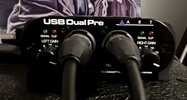
I didn't know for sure if it was using the USB Dual Pre but it did because it is currently mono.
The pour little Park amp sounds good but has lots of obvious noise
Volume is really low
Not sure why ??
 
This is comedy but I got it working in conjunction with the crappy stock web cam.
I didn't know for sure if it was using the USB Dual Pre but it did because it is currently mono.
The pour little Park amp sounds good but has lots of obvious noise
It didn’t sound mono on my phone. It sounded like it hit both channels.

To make sure it is using the interface, tap or rub the end of you mic with your finger and see if it records that rubbing static like noise.

Also, some things to look at would be the knobs. Make sure they are set right.
The level knob in the front has a green and red clipping LEDs. Test it out before you play.

I pin the knob until I am clipping and work my way back until the red clipping light stays off.

This will take a little experimentation until you get you levels right.

Otherwise, it sounded good!!
 
Last edited:
Here are where mine are set right now. But it depends how loud I play.
There are time I have my amp blasting and these levels are set much lower.
The levels you see here are for bedroom level play. Not quite pinned, but close.
B0CB8145-A626-42B6-9916-DB11E346CBAC.jpeg
 
Ok. I listened to it on my monitors.

Yes. You have only the right channel going and the level on that channel sounds good.
@Mitch Pearrow SJMP you hear it low because you catching the right channel only.

Until you get the splitter like I suggested.
I don’t know if this will help, but it worked when I use my iPhone.
Try turning on your video recording software first. Then plug into your PC.
It’s quirky that way. Sometimes the order in which you turn things on will help.

That’s all the help I have so far.

Maybe @Thatbastarddon has more insight since he is the Black Belt Master Sensei that taught this humble student the way of Interface-Fu.
 
Ok. I listened to it on my monitors.

Yes. You have only the right channel going and the level on that channel sounds good.
@Mitch Pearrow SJMP you hear it low because you catching the right channel only.

Until you get the splitter like I suggested.
I don’t know if this will help, but it worked when I use my iPhone.
Try turning on your video recording software first. Then plug into your PC.
It’s quirky that way. Sometimes the order in which you turn things on will help.

That’s all the help I have so far.

Maybe @Thatbastarddon has more insight since he is the Black Belt Master Sensei that taught this humble student the way of Interface-Fu.
Right , I have a return number. I need to go drop it off. I knew it was one channel . Lol
That's one plug = mono.
I recorded to the DAW and doubled a track for stereo but the live stereo version will have to wait.
 
In the lower righthand corner. you will see a speaker symbol. Right click on it and choose "Open sound settings".
With your interface pugged in, see if it lists the device in the "input" dialog box. You may have to open the drop down to see it. Then you can test it from there. You should have a "test your microphone" button.

Are you hooking it up via USB or audio out cables?
I had the input but forgot the output. That's what made It work.
 
Back
Top