
You are using an out of date browser. It may not display this or other websites correctly.
You should upgrade or use an alternative browser.
You should upgrade or use an alternative browser.
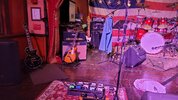
Modern Rig Rundown
- Thread starter Ghostman
- Start date

Kerry Brown
Ambassador of the Great Northern Bar Jams

I switched to a PC, way better mids.


Blasphemous!!!!!


heltershelton
Well-Known Member
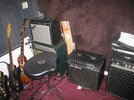
i think my favorite setup for now is my helix lt set to stompbox mode with snapshots going into my 65 drri.

Ramo
AmTHRASHador of Chugz


which mac do you use, thinking to switch from pc to mac..."Hello....
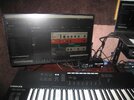
Sooooo, here's my Mac.
.
.
.
....thanks for coming."


OP

Ghostman
Ambassador of the SuperNatural
I currently run an older Macbook Pro. early 2015 edition. I also have an older Mac Mini from 2011 that I can run as well.which mac do you use, thinking to switch from pc to mac...
I strongly suggest Mac to run your studio unless you like Cakewalk.
Kerry Brown
Ambassador of the Great Northern Bar Jams
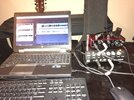
On a more serious note this setup gets more time than my amps. I hope this will change in the near future as things open up.
Kerry Brown
Ambassador of the Great Northern Bar Jams
For electric guitar I use Bias FX2, Amplion 2 Rock Essentials, and the free plug in from Blue Cat Audio into a Focusrite interface. They have a good selection of amps, pedals, cabs, etc. Between them I can usually find the tone I'm looking for. The Blue Cat has the best really clean sound. Don't like the rest of it so much. For bass I use a DI into the Focusrite interface, rarely with any amp or pedal sim. Vocals is a Sennheiser e835 into a cheap Behringer mixer then the Focusrite.. I find the preamp in the Focusrite doesn't have enough gain for my vocals. I have everything set flat in the mixer and use plugins that came with the Focusrite to shape the vocals. Acoustic guitar I go through an acoustic pedal board with a LR Baggs Venue DI, Boss Chorus, and a HOF reverb into the Focusrite. Keyboard I use an Akai MPK Mini Mark III controller with some free keyboard plugins. I'm not a keyboard player, just triads and sometimes a bass line. I like the midi because I almost always have to edit my timing and erase my bad notes from fumble fingers.Reaper! love that DAW. I just have to find more plug-ins for instruments. I had a bunch of them on Ableton but that's gone now.

Like Kerry. Don’t plug into amps much anymore. Just plug into the Boss GT1 and run thru headphones. Lately been slowly learning the ropes on recording from said GT1 thru the USB connection. Got both the free version of Abelton and Audacity. Try them both. Use the one that’s easiest. Set up on a card table in the spare bedroom 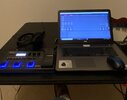
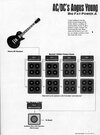

Clockworkmike
Ambassador of STACKS in WV SHACKS
Only thing he has between the guitar and amp, live, is a Schaffer-Vega Diversity Wireless. He used it in the studio too to capture the slight difference he wasnt hearing. Now its a SoloDallas Schaffer Replica GT ( Model # 001) modeled heavily after the SVDS. Can't rightly call that an effect but if someone wants to be technical: it is a bit of an overdrive signal towards the front end of the amp, which pushes them a lil harder

I’ll play  ...
...
This is my mess....
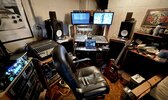
Guitar, in to Kemper, in to mixer/USB interface(Soundcraft MTK 12 channel...on the desk), in to MacBook Pro (or the just out of sight 2010 Mac mini), and/or to Yamaha monitors...or out to main PA system from the Kemper, via the other Soundcraft GB12-2 board.
And.....Yes.... I do occasionally play guitar while watching Sasquatch documentaries....and surfing this forum.

...This is my mess....
Guitar, in to Kemper, in to mixer/USB interface(Soundcraft MTK 12 channel...on the desk), in to MacBook Pro (or the just out of sight 2010 Mac mini), and/or to Yamaha monitors...or out to main PA system from the Kemper, via the other Soundcraft GB12-2 board.
And.....Yes.... I do occasionally play guitar while watching Sasquatch documentaries....and surfing this forum.
Not meant as an adversarial reply, but an honest question....The years of Mac superiority in AV production have been over for quite some time.
Will a PC do the aggregate audio input/output thing now? I have been out of play in that arena for a while now...but in my pic above, my old, gutted, XP tower has been abandoned in favor of Mac for a while now.
That was a big thing to me back when I switched over. I was PC driven for a good while, but the ability to build an aggregate device for audio was pretty cool to me for a while...
No....I mean aggregation of multiple devices to handle audio streaming in and out of the box. Can PC be set up now(Windoze10 etc) to take in and put out audio streams to multiple interfaces? Say I have a USB 16 in X 2 out device, AND a 14 in X 12 out device....can I get a Windoze box to see both devices simultaneously, and assign appropriate functions to both?I'm not sure what you mean by aggregate audio. Do you mean in and out simultaneously, ie bidirectional or full duplex? If so then yeah. Ever since the days of firewire. I've been doing that since at least 2005. Firewire was just more common on Macs than PCs back then, but if you had a firewire port on your PC then it was always the same as Mac.
Firewire could handle that because it was 400 Mbps and USB1 was only 11Mbps, which ultimately was the real limitation. USB2 bumped that up to 480Mpbs when FW went to 800. Now USB3 really has more in common with the original firewire bus than USB and its up to 5Gbps + today.
I actually still use two 16 channel firewire digital mixers chained together for a total of 32 simultaneous in and out at once on my PC in Studio One. Almost no PCs have firewire anymore but my studio PC has Thunderbolt and I use, ironically, an Apple Thunderbolt to firewire adapter to connect them. I never have any dropouts or any problems of any sort with that setup.
I didn’t mean to convey any limitations to USB audio. The interface could utilize any available connectivity. Mac allows the construction of a virtual aggregate device, made up of available hardware devices. Can PC/Windoze do that now?I really think that depends on the device. I know Presonus Firewire interfaces can. I havent used USB for audio in over 15 years.
My guess is if you're using thunderbolt/USB3 or newer devices it would likely work. The windows audio subsystem got a major overhaul with Windows 10. And from what I'm reading its about to get another big upgrade with the next Windows update.
Yes. That’s where I left off with my Windoze system. I was using ASIO4all.See the edit I added above.
Granted, there isn’t a lot of call for the ability, but I’ve had occasion to use this ability over the years. It’s kludgy, but it works....fairly easily.
Nonononono.....I mean that I can assign any audio device connected to my computer to inputs and/or outputs, at my discretion, when necessary. No manufacturer matching.... just direct the streams.So yeah I guess it's long been possible as long as you are using compatible devices from the same manufacturer that ran the same driver. But you would need something like ASIO4ALL if you had multiple devices that run under different drivers.
What you're referring to I guess is audiobus on mac. The audio bus didn't need drivers as every audio device is handled the same way with vanilla USB audio standards. In that sense the Mac didn't care what device and what manufacturers so they would all just show up in the DAW.
Last edited: