NOD build

RVA

Ambassador
We do build threads here quite often, so I figured I would throw this out - New Office Day - a build thread.

I have been sharing space with an acounting firm. Unfortunately, they are closing their doors and I am opening a door of my own. It is my own space in the same building, except it is all mine, with some space carved out for mu freind Rocco, who is also losing his space in this situation.

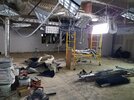
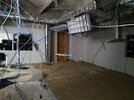
Today was day 1. They did some demo

20190103_183525.jpg

20190103_183539.jpg
 
We do build threads here quite often, so I figured I would throw this out - New Office Day - a build thread.

I have been sharing space with an acounting firm. Unfortunately, they are closing their doors and I am opening a door of my own. It is my own space in the same building, except it is all mine, with some space carved out for mu freind Rocco, who is also losing his space in this situation.

Today was day 1. They did some demo

View attachment 20764

View attachment 20765
There is a few blemishes but not bad....:blink:
 
Are you doing this through a general contractor and architect?

The company I work for gets involved in these type of office renovation projects. We do audio-visual (AV) design and integration. For smallish jobs like this we may bid directly to the customer, but fall under the GC for coordination. If you plan on having much AV, get your AV contractor involved as early as you can.

If you’ve never done an office remodel before...take a deep breath! There are almost always changes, unforeseen issues, and delays for a host of reasons. I’ve never seen a single project come off without, at least, a few change orders. The last office renovation we worked with had eight change orders for low voltage and AV (which isn’t that many), not to mention the change orders affecting other trades.
 
Are you doing this through a general contractor and architect?

The company I work for gets involved in these type of office renovation projects. We do audio-visual (AV) design and integration. For smallish jobs like this we may bid directly to the customer, but fall under the GC for coordination. If you plan on having much AV, get your AV contractor involved as early as you can.

If you’ve never done an office remodel before...take a deep breath! There are almost always changes, unforeseen issues, and delays for a host of reasons. I’ve never seen a single project come off without, at least, a few change orders. The last office renovation we worked with had eight change orders for low voltage and AV (which isn’t that many), not to mention the change orders affecting other trades.
Wow, that is cool. I have had to consult with the architect and building, who hired a GC. The plans have permit approval. I already picked the tiles, rug, paint, etc, but the AV and IT stuff has not been done yet. I think I will take your advice and call my IT guys now. If you have any AV ideas, I would appreciate that. I have attached the architectural plans.
 

Attachments

Wow, that is cool. I have had to consult with the architect and building, who hired a GC. The plans have permit approval. I already picked the tiles, rug, paint, etc, but the AV and IT stuff has not been done yet. I think I will take your advice and call my IT guys now. If you have any AV ideas, I would appreciate that. I have attached the architectural plans.

That conference room is where most customers will focus their AV requirements, though it’s not unusual to see certain offices, a reception area, or a break room get some AV assets.

What I have seen most often is that the plans will be pretty much developed by the time the AV and IT are brought into the game. Then, when the AV contractor sits down with the customer to identify requirements and develop a solution, the solution may require some changes to what the architect has laid out. Usually, this impacts connectivity.

For example, an architect may have envisioned a laptop connection at the conference room table to go directly to a display. Often, that’s fine if requirements are simple enough. However, if the AV capabilities are more involved and incorporate multiple sources and web-conferencing, it may work better to run all connectivity to a central location, such as an equipment credenza, where all the switching and control are handled, and run video and control to the main display from there.

Mind you, none of this is a show stopper, if dealt with early enough.
 
  • Like
Reactions: RVA
As for actual AV ideas, I never try to force a customer into a mold. Though I do have a sense of what to suggest based on prior experience, my initial goal is to listen to the customer and ask questions to try to develop a solution from that. This is called a “Needs Analysis” in our industry.

However, I can tell you what is very commonly seen in many corporate conference rooms:

1. One or more displays. This is usually a large-screen display used for viewing various AV sources. The actual size of the display depends on the type of content you anticipate viewing. If you’re going to only be viewing PowerPoint, you may not need as large a display as you would if you’re viewing Excel. There are some guidelines for this.

2. Laptop Capture at the Table. There may be one or more connections at the table for a laptop. This used to be VGA. Mostly now, it will be an HDMI connection. This is used to make presentations from the laptop to the display in the room.

3. Wireless Presentations Gateway. This is a small equipment item that allows other devices, such as tablets, smartphones, and computers, to present visual content wirelessly without having to plug in an HDMI cable. These gateways usually connect to your network. Some allow two network connections - one for your corporate LAN and one for your guest network.

4. Web Conferencing. This is Skype, WebEx, Go-to-Meeting, etc. Many conference rooms are now taking advantage of Web Conferencing in their design and allows them to conduct web-based conferences similar to doing a web conference at your desk. However, the equipment here gets quite a bit more elaborate, as you now need to incorporate more professional microphones and a camera into the system than you’d have with a simple webcam clipped onto your computer monitor.

5. Cable TV. Some customers like to have cable TV in their conference rooms. This is where things can go sideways. Usually, the architect will anticipate a drop behind the display in the room. However, depending on the rest of the system, it may be more seamless and user-friendly to have a set-top box installed in an equipment credenza and integrated with some AV switching equipment. In this case, the drop would go to the credenza.

6. Sound system. Sometimes the speakers on the display are sufficient. Other times it’s good to have a dedicated sound system. Sometimes the decision to go one way or the other is a matter of how complex the rest of the system is.

7. Control. This may be as simple as the TV remote, in the case of a simple system, or it may be a control system with a touch panel at the conference room table.

Of course, this is just scratching the surface. Keep in mind, the more you add the more likely it will be that you need to incorporate some AV switching and control equipment, which will add to the price.

That’s why I say it’s good to think about what you envision doing. On the one hand, you don’t want to go too sparse and then be hampered down the road by lack of capability you wish you had. On the other hand, you don’t want to spend money on features you never use.
 
Last edited:
As for actual AV ideas, I never try to force a customer into a mold. Though I do have a sense of what to suggest based on prior experience, my initial goal is to listen to the customer and ask questions to try to develop a solution from that. This is called a “Needs Analysis” in our industry.

However, I can tell you what is very commonly seen in many corporate conference rooms:

1. One or more displays. This is usually a large-screen display used for viewing various AV sources. The actual size of the display depends on the type of content you anticipate viewing. If you’re going to only be viewing PowerPoint, you may not need as large a display as you would if you’re viewing Excel. There are some guidelines for this.

2. Laptop Capture at the Table. There may be one or more connections at the table for a laptop. This used to be VGA. Mostly now, it will be an HDMI connection. This is used to make presentations from the laptop to the display in the room.

3. Wireless Presentations Gateway. This is a small equipment item that allows other devices, such as tablets, smartphones, and computers, to present visual content wirelessly without having to plug in an HDMI cable. These gateways usually connect to your network. Some allow two network connections - one for your corporate LAN and one for your guest network.

4. Web Conferencing. This is Skype, WebEx, Go-to-Meeting, etc. Many conference rooms are now taking advantage of Web Conferencing in their design and allows them to conduct web-based conferences similar to doing a web conference at your desk. However, the equipment here gets quite a bit more elaborate, as you now need to incorporate more professional microphones and a camera into the system than you’d have with a simple webcam clipped onto your computer monitor.

5. Sound system. Sometimes the speakers on the display are sufficient. Other times it’s good to have a dedicated sound system. Sometimes the decision to go one way or the other is a matter of how complex the rest of the system is.

Of course, this is just scratching the surface. Keep in mind, the more you add the more likely it will be that you need to incorporate some AV switching and control equipment, which will add to the price.

That’s why I say it’s good to think about what you envision doing. On the one hand, you don’t want to go too sparse and then be hampered down the road by lack of capability you wish you had. On the other hand, you don’t want to spend money on features you never use.
All nice ideas. What I would really like is a large conference room monitor/TV with surfing capabilities so that I can use Google Street view to "take" my clients on a journey to the incident location, or flash the photographs/jpegs associated with the case on screen. This far, any attempts have this have been too slow, so I have opted to take them to my desktop computer in my office.
 
All nice ideas. What I would really like is a large conference room monitor/TV with surfing capabilities so that I can use Google Street view to "take" my clients on a journey to the incident location, or flash the photographs/jpegs associated with the case on screen. This far, any attempts have this have been too slow, so I have opted to take them to my desktop computer in my office.

Honestly, in cases like that, I would probably opt for laptop capture at the table that you could plug into your computer. In this case, your big screen functions as the computer monitor. The reason I prefer this route is that you’re never quite sure just how easily you can use the surfing capability of the TV. Some just aren’t that user-friendly. Spec sheets aren’t printed with disclaimers like, “Full internet capability, but it’s a pain in the butt to use.” Whereas, the laptop is a known entity.

Alternatively, you could install a mini-computer to the wall behind the display, plugged into the display. The mini-computer could be controlled with a wireless keyboard and mouse. This would be like the laptop capture, without having to actually plug in the laptop. You’d just log onto the computer when you go into the conference room. One customer I’m working with right now is doing that.

The biggest issue I run into with displays is that they are constantly being discontinued and new models released. So, what I spec out today may not be available when it’s time to order. What makes this worse is that manufacturers often keep displays on their websites even after being discontinued. I have to check with distributors to find out if I can still get it. This is another reason I avoid relying too much on display capabilities beyond the basics - HDMI inputs and a control port. Even if I find the best TV with really user-friendly internet, if it gets discontinued and I can’t find the same capabilities in a new TV of the same size, I’ll have to figure out an alternate solution and maybe submit a change order for more money.
 
Last edited:
Maybe I can mount a big monitor or a TV that has true monitoring and plug it in as an extension monitor.
 
In your office? That can work, too.

I don’t mean to overwhelm you.

I’ve quoted conference room systems, equipment and labor, for $6000.00 and I’ve done conference room systems for $90,000.00. It all comes down to what you need.

The point is to start thinking ahead as to what you’ll really want to do. This will help you get your needs across to the AV contractor so he neither over-engineers a system nor under-engineers a system.
 
In your office? That can work, too.

I don’t mean to overwhelm you.

I’ve quoted conference room systems, equipment and labor, for $6000.00 and I’ve done conference room systems for $90,000.00. It all comes down to what you need.

The point is to start thinking ahead as to what you’ll really want to do. This will help you get your needs across to the AV contractor so he neither over-engineers a system nor under-engineers a system.
Thank you for getting my wheels spinning Smitty. I am flushing out some options now
 
Back
Top