
You are using an out of date browser. It may not display this or other websites correctly.
You should upgrade or use an alternative browser.
You should upgrade or use an alternative browser.
What phone apps are you using?
- Thread starter Sérgio
- Start date


Occasionally, I use PlusAdd tuner for tuning. It works very well with acoustic guitar. In a quiet room, it’s even sensitive enough to work with an unplugged electric.
I use Tempo a lot for my metronome app. That is a really cool app. It’s cool in that you can really customize the tempos and click subdivisions and save/name them. You can even organize saved tempos into a set list.
I also use Music Speed Changer for practicing to songs. It allows you to change the speed or pitch of a song. You can also crop to a small section of a song and have it repeat that section over and over for you. This is useful if you’re trying to learn a particular part.
I have Riff Station, but I don’t use it much.
For all the music apps I have, I’ve purchased the paid versions to avoid ads.
I use Tempo a lot for my metronome app. That is a really cool app. It’s cool in that you can really customize the tempos and click subdivisions and save/name them. You can even organize saved tempos into a set list.
I also use Music Speed Changer for practicing to songs. It allows you to change the speed or pitch of a song. You can also crop to a small section of a song and have it repeat that section over and over for you. This is useful if you’re trying to learn a particular part.
I have Riff Station, but I don’t use it much.
For all the music apps I have, I’ve purchased the paid versions to avoid ads.
Last edited:


jtcnj
Ambassador of the Crossroad
I tried a couple of the tuner apps meh.
I have garageband on iphone but never got a good input device or one to work right and never got the hang of the app.
I'm not really into the whole phone thing.
i mainly get Honey-do lists texts from The Warden, as well as exchange how you doin's, I love yous, and dont freak the fl u k out at work.
We use a lot of smiley kissy pissy happy sad mad sick hearts rose emojies.
I text her and the grown children admonishments for leaving on lights, TVs, fans, dishes in the sink, empty toilet paper dispensers, hair in the shower drain, empty dog water bowls, and recyclables in the trash can.
I tried to actually record a video -just to use the audio - clip of me playing (badly) something but I gets the Deer-in-Headlights.
I dont have anyone to text "Get Off My Lawn!!" to but if the situation arises, I'm ready.
I have garageband on iphone but never got a good input device or one to work right and never got the hang of the app.
I'm not really into the whole phone thing.
i mainly get Honey-do lists texts from The Warden, as well as exchange how you doin's, I love yous, and dont freak the fl u k out at work.
We use a lot of smiley kissy pissy happy sad mad sick hearts rose emojies.
I text her and the grown children admonishments for leaving on lights, TVs, fans, dishes in the sink, empty toilet paper dispensers, hair in the shower drain, empty dog water bowls, and recyclables in the trash can.
I tried to actually record a video -just to use the audio - clip of me playing (badly) something but I gets the Deer-in-Headlights.
I dont have anyone to text "Get Off My Lawn!!" to but if the situation arises, I'm ready.


syscokid
Ambassador of War & Peace
My main app is Phone. I use it for phoning. My next main app is Chrome. I use that for writing stupid stuff.

Seriously.... this sounds very interesting. This might be my first educationally based music app...I also use Music Speed Changer for practicing to songs. It allows you to change the speed or pitch of a song. You can also crop to a small section of a song and have it repeat that section over and over for you. This is useful if you’re trying to learn a particular part.
Seriously.... this sounds very interesting. This might be my first educationally based music app...
Yeah. Music Speed Changer is a pretty cool little app that is great for practice.
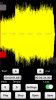
Here's a screen shot of what it looks like after you load a song (the song has to first be on your phone).
This is "Here I Go Again," by Whitesnake.
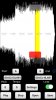
This screenshot is the same song, but I've drug the gray sliders to select just the solo. With the "Loop:" switch turned on in the lower right portion of the screen, the portion of the song highlighted in yellow will loop continuously.
The red slider bar indicates the actual point in the song being played. You can drag the red slider at any time to a point in the song, as long as that portion is highlighted.
As I said in my other post, I can also change the tempo or the pitch of the song.
Last edited:

I have an Android with less than 105 MB free for Music Speed Changer. Argh!
Ouch.
That’s too bad!
I will say, there are a couple of limitations to it. First, if you’ve purchased a song that has Digital Rights Management (DRM) embedded, it won’t allow you to load the song. I’ve had this issue with a few songs, but not many. The only real glitch I’ve seen is that some times if I change the pitch or tempo of a song, sometimes it will apply that to the next song I load. But, I just adjust the settings and force it back to normal and all is fine. Actually, though, I haven’t noticed that issue on my iPad or new iPhone. So, maybe it was just an issue with my old 5S iPhone?
The app keeps a list of all the songs you’ve loaded, so you don’t have to keep going back each time to load it again.
Last edited: