
You are using an out of date browser. It may not display this or other websites correctly.
You should upgrade or use an alternative browser.
You should upgrade or use an alternative browser.
Clipping
- Thread starter RVA
- Start date



Any effects in play?(on the track, or the master?)I am getting clipping on playback. I am not clipping while recording - see below. The guitar is being played extra clean. Clipping occurs more on bass notes. Playback source is headphones. Clipping can be hear on PFL or after a render. What gives?
Thanks for any guidance
View attachment 70041
check that track fader is set at or below 0dB.
master track fader at(or below…but I prefer at) 0dB.
OP

RVA
Ambassador
No effects. Master below zero, and you see the wave form. I just do not get it. Did I blow a pre-amp? Should I try another channel?Any effects in play?(on the track, or the master?)
check that track fader is set at or below 0dB.
master track fader at(or below…but I prefer at) 0dB.
I doubt you’ve blown a preamp. The track looks kind of compressed, but not clipping inducing.…more clipped somewhere before input, like a limiter or tube compression.No effects. Master below zero, and you see the wave form. I just do not get it. Did I blow a pre-amp? Should I try another channel?
Another place to check is your master send level- at 0dB…but that would be unusual.
You could load up a new project at default settings, and drag that audio file into it from the media browser.
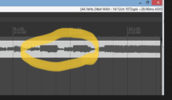
The upper portion of these Wav forms look limited.
OP
RVA
Ambassador
I bet my compressor pedal is too jacked up. I did not know compression could cause this issue. I will give it another go tomorrow. Thank you!View attachment 70042
The upper portion of these Wav forms look limited.
That makes sense, as the amplitude shown(if at default scale) looks well below the digital ceiling. If all gain stages in Reaper are set to 0dB, and there are no other tracks being mixed, there shouldn’t be any clipping in the final render.I bet my compressor pedal is too jacked up. I did not know compression could cause this issue. I will give it another go tomorrow. Thank you!
OP
RVA
Ambassador
Yep. That wave form is as recorded, with master below 0db and track around -18. I will report back tomorrow. Thanks againThat makes sense, as the amplitude shown(if at default scale) looks well below the digital ceiling. If all gain stages in Reaper are set to 0dB, and there are no other tracks being mixed, there shouldn’t be any clipping in the final render.
OP
RVA
Ambassador
So, with all pedals off, and all Kemper effects off, and after switching to a VERY clean Fender profile, and setting the channel gain at 0, I still get clipping, but only where the wave form shows flattening that looks like limiting. I am way below clipping levels judged by Reaper and the soundboard meter. Essentially, it sounds like natural breakup now, but only on the recording, not when I listen to the live playing via the same monitors. I have checked the limiters on the soundboard and they are off. I can only assume the Kemper is causing the compression. It may be time for a mic test on the same channel
Yes please!It may be time for a mic test on the same channel
Sounds like it would be something in the Kemper, or perhaps some external gain stage(hitting a preamp too hard…analog is forgiving with this, but digital representation of it can be harsh).

Amp Mad Scientist
Ambassador of Heresy
You nee to lower the record level until the clipping is freed up. Reduce the level until there is no more clipping.So, with all pedals off, and all Kemper effects off, and after switching to a VERY clean Fender profile, and setting the channel gain at 0, I still get clipping, but only where the wave form shows flattening that looks like limiting. I am way below clipping levels judged by Reaper and the soundboard meter. Essentially, it sounds like natural breakup now, but only on the recording, not when I listen to the live playing via the same monitors. I have checked the limiters on the soundboard and they are off. I can only assume the Kemper is causing the compression. It may be time for a mic test on the same channel
OP
RVA
Ambassador
Of course, correct in all instances, but here I was within tolerances. Channel gain was on 0 - I was far below the red line even when bashing the stringsYou nee to lower the record level until the clipping is freed up. Reduce the level until there is no more clipping.
Amp Mad Scientist
Ambassador of Heresy
maybe the red line is out of calibration, so try reducing it to -3 or -6 etc...Of course, correct in all instances, but here I was within tolerances. Channel gain was on 0 - I was far below the red line even when bashing the strings
Yeah, but his recording is only peaking around -18dB….he’s clipping an analog stage, pre conversion to digital. This shows as a “hard limited“ track that doesn’t actually clip digitally.You nee to lower the record level until the clipping is freed up. Reduce the level until there is no more clipping.
OP
RVA
Ambassador
So here is a recording on the same channel (same song, and although different guitar from last night, issue was reproduced today). I used an Audix A5. I needed to get to 55% of channel gain to be at the same level as I was at 5-10% with the Kemper as a source. The wave form shows NO compression. There is no clipping/OD on the recording. This is good news actually. Now to find out how to adjust the Kemper
I recall from a prior discussion with TD that the Kemper runs HOT
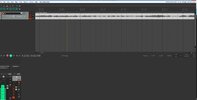
I recall from a prior discussion with TD that the Kemper runs HOT
OP
RVA
Ambassador
I brought the input levels WAY down in the DAW and out the channel gain at 0 - whisper quiet volume - it still compressed and only clipped in the compressed areas. Need to find out why the Kemper compresses the signalmaybe the red line is out of calibration, so try reducing it to -3 or -6 etc...
There you go sir. What is the signal path from the Kemper to the Soundcraft….including the Soundcraft input channels used?So here is a recording on the same channel (same song, and although different guitar from last night, issue was reproduced today). I used an Audix A5. I needed to get to 55% of channel gain to be at the same level as I was at 5-10% with the Kemper as a source. The wave form shows NO compression. There is no clipping/OD on the recording. This is good news actually. Now to find out how to adjust the Kemper
I recall from a prior discussion with TD that the Kemper runs HOT
View attachment 70090
OP
RVA
Ambassador
The Kemper goes straight to Channel 9/10 on the Soundcraft and then out via USB. Maybe the Kemper signal is overloading the computer interface / sound cardIt looks like @RVA is clipping somewhere prior to the actual digital capture.. either in the Kemper, or to an external preamp(if there is one in use), or in his mixer interface.